The DualShock controller has been reported by PS4 users to be flashing white while in use without a fix in sight. This isn’t something that is characteristic of a properly functioning controller. In order to fix this sudden white flashing of the ps4 controller, we’ve put together this guide that will aim to solve all your issues.
How to Fix a PS4 DualShock Controller that is Flashing White?
To fix your white flashing PS4 controller, you’ll need to give it an examination as well as go through the console once. Furthermore, we’ve listed a detailed set of steps you can take to fix your ps4 controller that’s flashing white.
Consider changing your USB cable
USB cables are subject to a lot of rough use and can’t usually handle strenuous amounts of rough usage. It’d probably be best to go ahead and get a replacement for your PS4 controller’s USB cable. Once you connect and plug in a new USB cable, the white flashing should stop and an orange or blue color should light up instead. This would indicate an error with the USB cable.
Reset and Restart your PlayStation Console
If you’ve been with the PlayStation line of consoles since the PS2 days, you’ll know this is pretty much the universal one-step fix to a majority of problems. This could also fix and provide a solution to the White Flashing problem. Here’s how to do a quick reset
- Hold down the power button until the console turns off.
- Just to be sure, remove the power cord as well.
- Be patient and let your system rest for at least 5 minutes.
- Clean the insertion point of the cable gently and re-insert it back into the console.
- Turn on your PS4.
- Insert your PS4 USB charging cable into the console as well as the controller.
- Now hold down the PlayStation icon button on the controller until it turns on.
- The White flashing will have stopped.
Hard Reset or Factory Default Reset your Controller
This basically means you wipe out all updates and make the controller role back to the software it had when it was packaged. Here’s how to fix the white flashing issue by doing a factory reset on your PS4 controller:
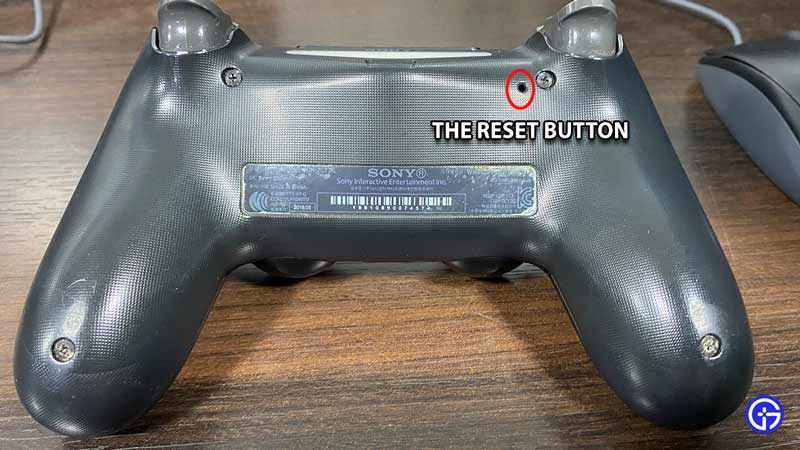
- Turn your controller to the back and locate the screw on the right just below the led light panel.
- Beside this screw, you’ll notice a tiny hole which is actually the reset button.
- To trigger the reset, use something like your sim card tray opener. You can even use a pin that can fit and push down the button.
- You’ll need to hold down the button for about 5 seconds.
- Once reset, you can plug your USB charging cable into the console as well as into your controller.
- The white flashing issue should now be fixed, and this will indicate that the white flashing issue was a software-related one.
Start your Console in Safe Mode
Additionally, you can choose to start your PlayStation in safe mode, but be aware that you need to carefully follow the aforementioned steps first since this step would act only as the last resort to fix the white flashing error. Here’s how you can start your PS4 in safe mode.
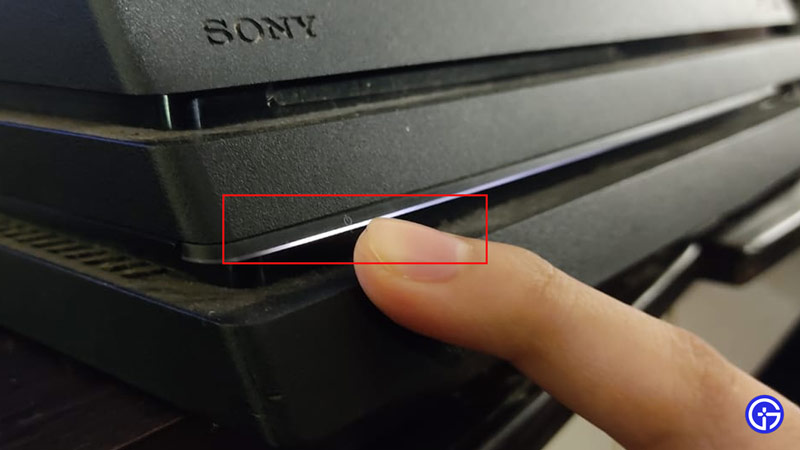
- After you’ve turned off your PS4, you have to press down the power button.
- Hold the power button until you hear 2 beep sounds. The first one will sound when you pressed the button, and after a gap of 7 seconds, you’ll hear the second beep.
- Now connect your controller to the console using your USB charging cable.
- Click the center Playstation icon button on the controller.
- Your controller should work fine now.
Fix the White Flashing Issue by Replacing your Controller
Sometimes, no amount of fixes will work to solve your issue and that simply means the error lies with your hardware device. We advise simply replacing your PS4 DualShock controller if none of the above steps solved the white flashing issue.
We hope you liked this guide and that it helped you solve the white flashing error on your PS4. If your controller causes more issues, maybe it has something to do with the charging. Here’s a guide you can use to troubleshoot and fix a PS4 controller having charging issues.