One of the new features in Minecraft 1.20 Trails & Tales is Pottery. The Archaeological update has given players the freedom to explore and experiment with several items. With around 20 different Pottery Shards, you have the ability to make Decorated Pots with or without symbols. This guide will show you how you can get and use Pottery Shards and also how to decorate Pots in the latest update. Without any further ado, let’s dive into our complete Minecraft 1.20 Pottery guide.
How to Get Pottery Shards in Minecraft 1.20
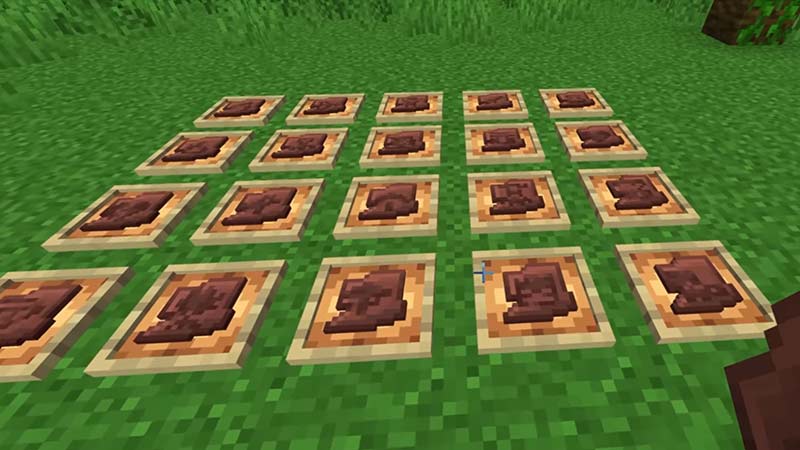
Pottery Shards can be found inside Suspicious Sand and Suspicious Gravel Blocks in Minecraft 1.20. And unlike other items, you can’t mine or break these blocks or you will end up losing the loot inside them. If you want to get Pottery Shards, then you will have to use a Brush to dust off the Suspicious Sand or Gravel Blocks and get the hidden loot. Here are all the locations where you can get Pottery Shards:
- Desert Well
- Desert Temple
- Trail Ruins
- Warm Ocean Ruins
- Cold Ocean Ruins
How to Use Pottery Shards in Minecraft 1.20
You can use Pottery Shards to create Decorated Pots in Minecraft’s latest 1.20 update. Players can make unique decorative pots with or without symbols with the help of Pottery Shards. All you need to do is combine four Poterry Shards to craft a Decorated Pot. We will show you the recipe required to decorate Pots in Minecraft 1.20.
How to Decorate Pots in Minecraft 1.20 (Crafting Recipe)
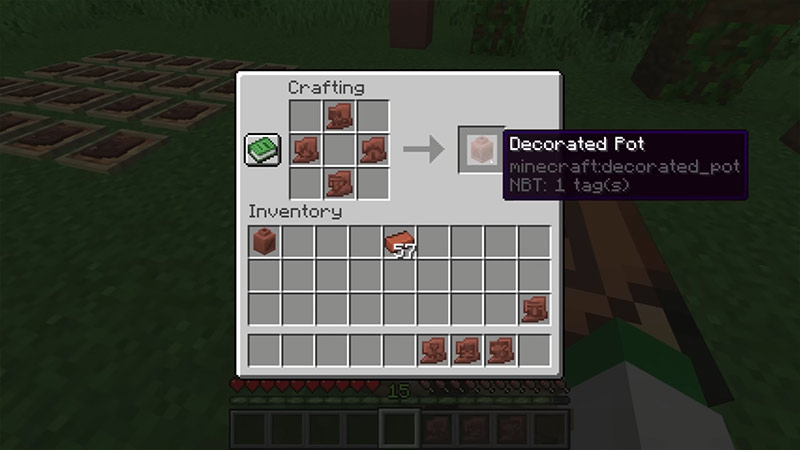
Here is how you can decorate Pots in the Minecraft 1.20 update:
- Open your Crafting Table and equip a Pottery Shard.
- Now, place one Pottery Shard each in the middle grid of the top and bottom rows.
- After placing the two shards, put the next two Pottery Shards on the left and right side of the middle row.
That’s it, you have now used Pottery Shards to decorate your Pots in Minecraft 1.20. Remember that you can also follow the same recipe using Bricks to decorate a Pot without any symbols.
That’s all you need to know in our Minecraft Pottery guide. We hope that you have learned how to get and use Pottery Shards to decorate Pots in Minecraft 1.20 Trails & Tales. For more tips, head to our Minecraft section.