
Rocket League has several customization features. Among these is Player Anthem, which you can customize the way you want. With this feature, you can hear the song you want while playing the game. Hence, for the players who are new to the game and don’t know how to get Player Anthem in Rocket League, this guide is all you need.
How to Get Player Anthem in Rocket League?
- You can unlock the new Player Anthem by completing challenge rewards or through Rocket Pass.
- Challenge rewards are the small challenges assigned to players. They are divided into daily, weekly, and Seasonal categories. Seasonal challenges are the toughest and daily challenges are the easiest to complete.
- On the other hand, if you have purchased Rocket Pass you are rewarded with rare Anthems while you play the game.
- Also, you can purchase Player Anthems from the item shop.
- Although, you get Rocket League Ost Vol.1 Player Album that has 5 songs at the beginning of the game from which you can select and change the song you want to hear every time you play the game.
- These 5 songs are :
- Angel Wings – by Mike Ault (ft. Avianna Acid)
- Flying Forever – by Mike Ault (ft. Morgan Perry)
- I Can Be – by Mike Ault (ft. Crysta)
- Love Thru the Night – by Mike Ault
- We Speak Chinese – by Mike Ault and Abandoned Carnival
How to Customize the Player Anthem?
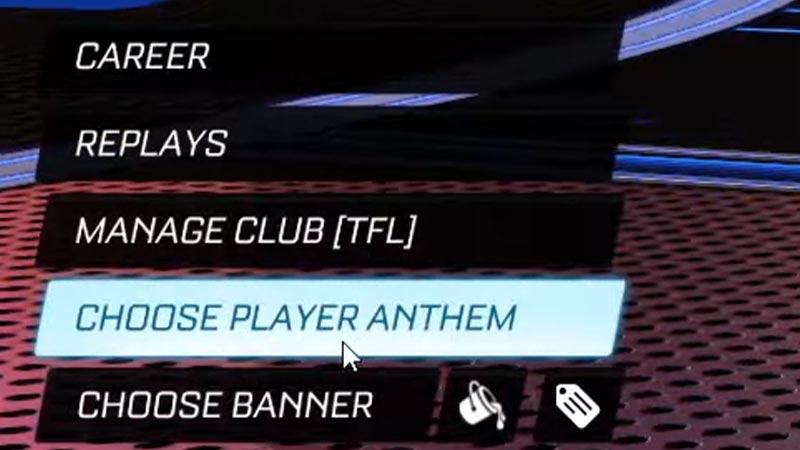
- You can change these Anthems by going into the main menu and selecting Profile.
- For Console users, Navigate through the options with D-pad and Select the ‘Choose Player Anthem’ option by pressing ‘X’.
- For PC players use the arrow keys to navigate and press Enter on ‘Choose Player Anthem’ to select it.
- A list of all the available Anthem will appear, select your favorite song by pressing X(Console) or Enter(PC).
- Once you selected the song, it will play every time you play the game.
- You can customize this feature anytime.
That’s everything covered on how to get Player Anthem in Rocket League. Also, check out our guide on how to get Fennec on Rocket League.











