Gran Turismo 7 is the latest installment in the Franchise released by Polyphony Digital & Sony Interactive Entertainment. After a whole 5 years of waiting, we have been blessed with the new game. In this game, a lot of new features were added alongside the stunning visuals. Before we get to the newer stuff, let’s get to basics. Everyone likes to customize your Cars like changing Paint but it’s been so long and to do the customization is a bit convoluted. In this guide, I will show you how to Paint your Car in Gran Turismo 7.
How to Paint your Car in Gran Turismo 7
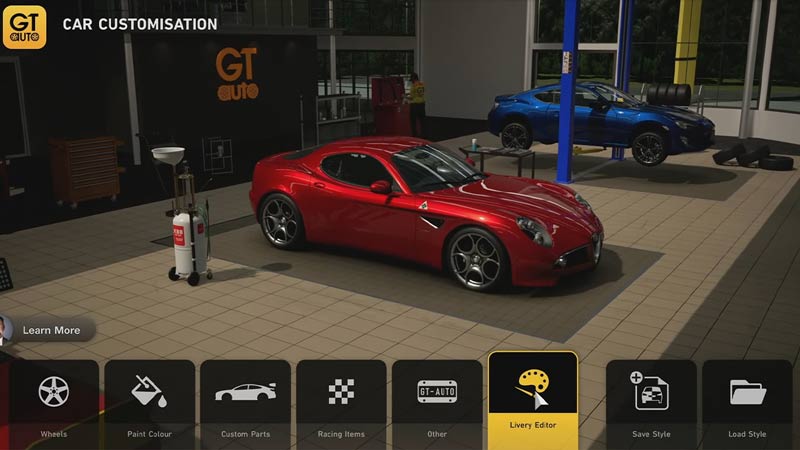
At the start of the game, most of the features are locked. These features will unlock as you complete missions and challenges in Gran Turismo 7. Similarly, you will unlock locations line the Tuning Shop & GT Auto by completing requests from the Cafe. Now when you do have the GT Auto unlocked, select it and get into it. You will be shown a menu with three options of which Customise Cars will be one of them, select & click on it. This will open up a Garage look with your Car and a lot of customizable options. There will be a Paint Color option but this is a Shop where you can buy Color Paints for your Cars in Gran Turismo 7.
Instead, select & click on the Livery Editor on the far right side of the options and it will ask you to either Create Design or Open Design. Click on Create Design and click on Paint. Now you will be able to Paint your Cars in Gran Turismo 7. Keep in mind that some Cars have Original Designs and overriding it will lose that Design forever. Based on this make your Decision. You will be able to apply Paints from the Color Picker or the custom Paints from the ones you have bought from Color Paints. Once you are happy with the design, you can select the Save Button to save your Design. After that, you will be able to Apply the Paint job to your Car in Gran Turismo 7.
This was all about painting your car in Gran Turismo 7. Hopefully, this guide has helped you. You can also check out our guides like How To Buy Tires In Gran Turismo 7.