Home > Gaming Guides > How To Use The Nitro System In Gran Turismo 7

Gran Turismo 7 – How To Use The Nitro System?

Published Date :

Gran Turismo 7 is the latest installment in the Franchise released after its predecessor almost 5 years ago. With it brings the adrenaline-filled action of driving supercars and racing with others. Sometimes in a race, you may end up lacking behind and have to catch up to the guys at the front. For that, you will have to activate the Nitros in your race. In this guide, I will show you how to use Nitro System in Gran Turismo 7.

How to Use the Nitro System in Gran Turismo 7
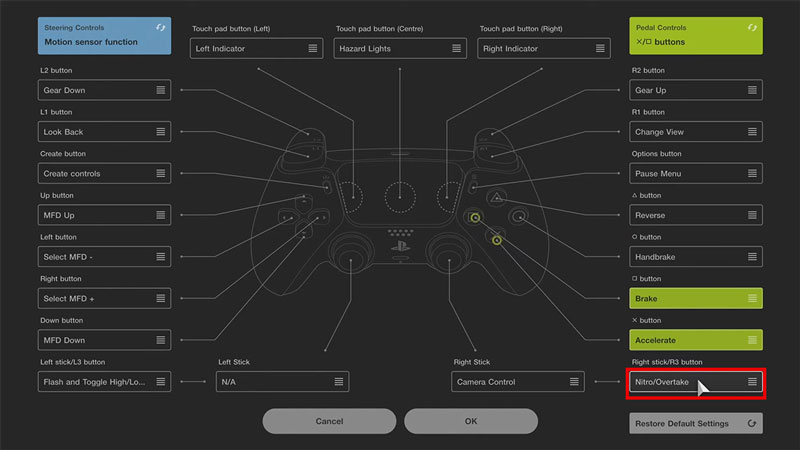
use nitro system gran turismo 7

If the Nitro system is installed into your car then you will be able to activate it by pressing the R3 button in Gran Turismo 7. To be more specific, you will have to press down the Right-Stick on the PS Controller. If you want, you can rebind the controller buttons to match your preference if the R3 button is not comfortable. But if you do press the Key when there is enough Nitros Fuel in the tank, you will go zooming in Gran Turismo 7. The Nitro Tank will be indicated on the right-downside of the HUD.

The Nitro system is a Car Part that you can get after you reach Collector Level 7. Once you have reached that level, you will be able to purchase it in the Tuning Shop under the Extreme Category. This category will also unlock at this Collector Level which contains amazing parts like the Nitro System. To apply the Nitro system to your Car in Gran Turismo all you have to do is to get it out of the garage. Make sure that this is the Car you want as a Nitro System costs about 100K Credits. That’s pretty expensive. But once you do get one, all your Campaign Missions & other such Missions will be a breeze to complete.

This was all about using the Nitro System in Gran Turismo 7. Hopefully, this guide has helped you. You can also check out our guides like How To Paint Your Car Easily in Gran Turismo 7.


  • Will GTA 6 Have First-Person Mode? Latest Footage Leaves Fans Wondering

    Will GTA 6 Have First-Person Mode? Latest Footage Leaves Fans Wondering

    Published Date :

    GTA 6’s latest extended look has given players a closer look at the game’s action, story, driving, exploration, and open world. However, the gameplay steers away from one familiar feature: first-person mode. The new footage shared by Rockstar has brought back questions about whether GTA 6 will let players switch between third-person and first-person perspectives… Read More

  • Who is Jason’s Voice Actor in GTA 6? His Voice Is Already Dividing Fans

    Who is Jason’s Voice Actor in GTA 6? His Voice Is Already Dividing Fans

    Published Date :

    Jason Duval is one of GTA 6’s two main protagonists, but Rockstar Games has yet to reveal the actor behind his voice. That hasn’t stopped fans from trying to figure it out, especially after the latest GTA 6 footage gave players more of Jason’s dialogue to analyze. The discussion has also moved beyond his identity,… Read More

  • Fly Your Wings Codes (August 2026)

    Fly Your Wings Codes (August 2026)

    Published Date :

    Fly Your Wings lets you glide across the map and earn Coins as you improve your equipment. You can upgrade your wings and fireworks to travel farther and free Coins from codes can help you get those upgrades without waiting as long. Here are all the codes you can redeem right now. Last checked for… Read More

  • Power a City Codes (August 2026)

    Power a City Codes (August 2026)

    Published Date :

    Power a City is all about keeping a growing city supplied with electricity. You can build generators, connect your power network, upgrade your equipment, and expand your operation as the city’s energy needs increase. Managing everything well can take time, so free Cash and other rewards can give your progress quite a boost. So, here… Read More