Home > Stardew Valley > How To Move A Building In Stardew Valley

How To Move Buildings In Stardew Valley

Updated Date :

Moving buildings in Stardew Valley can be a really easy process. You might need to move buildings to make way for some other structures or because you need to grow crops. In this article, we will show you exactly how to do so.

How to Shift A Building in Stardew Valley?

Follow the steps below to find how you can move buildings in Stardew Valley:

  • To move a building in Stardew valley, you first need to go to the Carpenter Shop.
  • This shop is easy to find because it is also the home of Demetrius and Robin.
  • You can find it in the middle of the Mountain map. It is located to the north of Pelican Town.
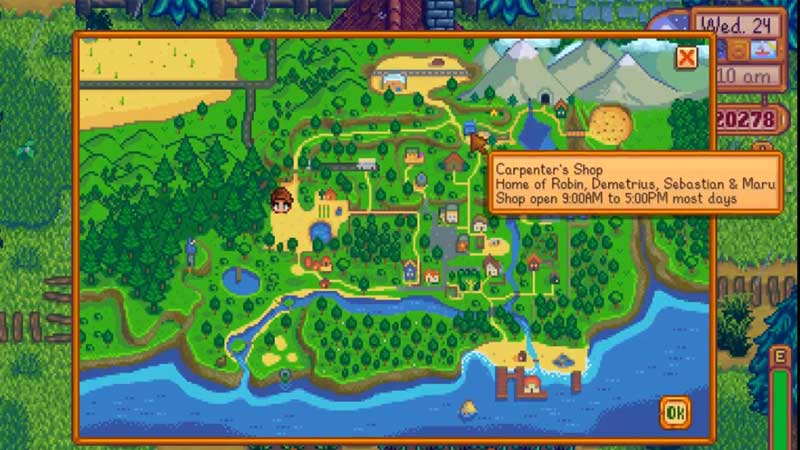
paradise shop stardew valley

  • Once you reach the Carpenter Shop, all you need to do is tell Robin that you want to move a building.
  • To do this, you need to select the Construct Farm Buildings and Move Buildings option when talking to Robin. This option is located between the Upgrade House Renovations and Leave options.
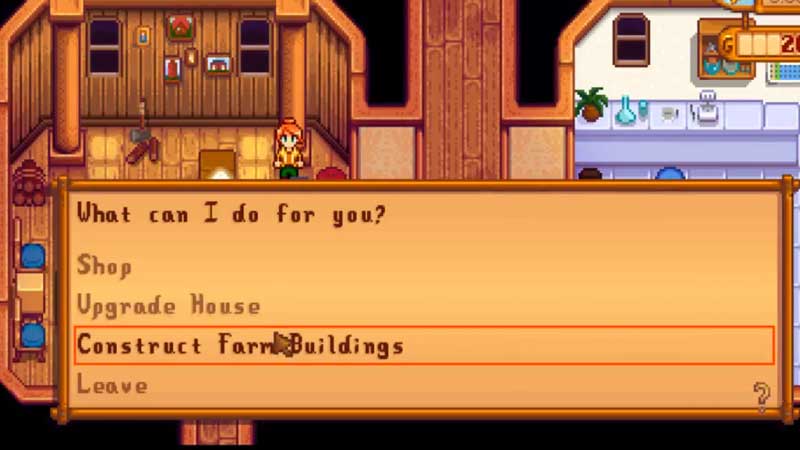
how to move structures stardew valley

  • After completing this step, you can now choose which building you want to move.
  • To do this, hover your mouse over the building of your choice. When the cursor turns green, click it to turn the building into green squares.
  • You can now freely place your building anywhere else on your map as long as the squares are green.
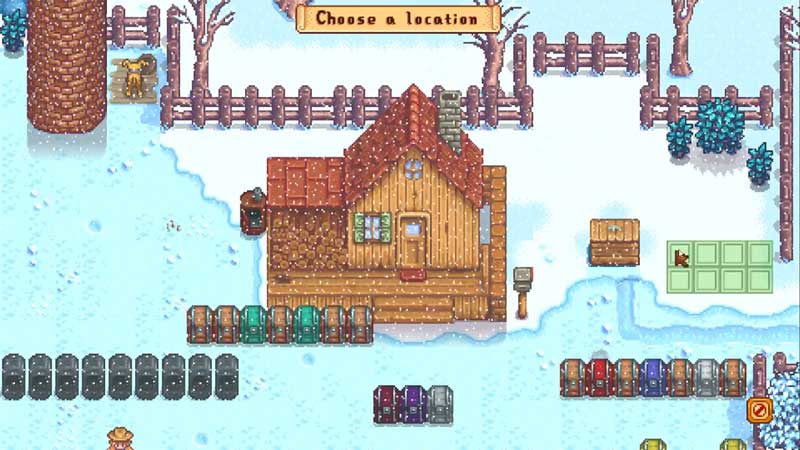
moving buildings in stardew valley

  • A red square indicates the lack of space for a building. This means you will not be able to place your building in such a spot.

And that’s it. With a few simple steps, you too can easily move buildings in Stardew Valley. As long as the squares are green, you will be able to place your buildings wherever you want.

Now that you know how to move buildings in Stardew Valley, check out this guide on how to download mods in Stardew Valley . For more, check out our Stardew Valley guides here.

  • Level Your Weapon Codes (July 2026)

    Level Your Weapon Codes (July 2026)

    Published Date :

    Level your Weapon has quite an addictive gameplay – you start with a weak weapon, but you keep adding XP Crystals to it; the weapon gets stronger, helping you take down increasingly powerful enemies. Leveling up slowly is part of the fun; however, free rewards can make that grind a little smoother. If you’re looking… Read More

  • Mine a Planet Codes (July 2026)

    Mine a Planet Codes (July 2026)

    Published Date :

    Getting rich in Mine a Planet requires you to use laser drones to blast apart a giant voxel planet and evolve/upgrade as you go; however, codes can give you a significant boost while you’re at it! If you don’t want to look for the latest rewards everywhere, don’t worry; here’s the complete list as well… Read More

  • Reminiscence Zombies Codes (July 2026)

    Reminiscence Zombies Codes (July 2026)

    Published Date :

    Whether you’re trying to survive longer or strengthen your loadout, free rewards are always worth claiming. Developers occasionally release Reminiscence Zombies codes that give you Z-Tokens and special cosmetics for free, so we’ve gathered every active one in this guide for quick and easy access. Last checked for new codes on July 16, 2026. All… Read More

  • Zombie Island Codes (July 2026)

    Zombie Island Codes (July 2026)

    Published Date :

    Running short of Diamonds? Don’t worry, the devs regularly release Zombie Island codes that give you thousands of Diamonds for free. If you and your squad want to survive much longer, you don’t want to miss out on these rewards. So, here’s the complete list of codes that you can claim right away! Last checked… Read More