With the launch of Modern Warfare 2, there are many reports by players about the bugs and issues present in this game. Some bugs are minor while others halt your gameplay altogether. One of the bugs many players faced is the DLC Data Pack error. You get a constant error on your screen saying that you need to download a DLC pack. If you have come across this error and want a fix for it then look no further. In this article, we will tell you how to fix the missing DLC Data Pack in Modern Warfare 2.
How to Fix the Missing DLC Data Pack in Modern Warfare 2
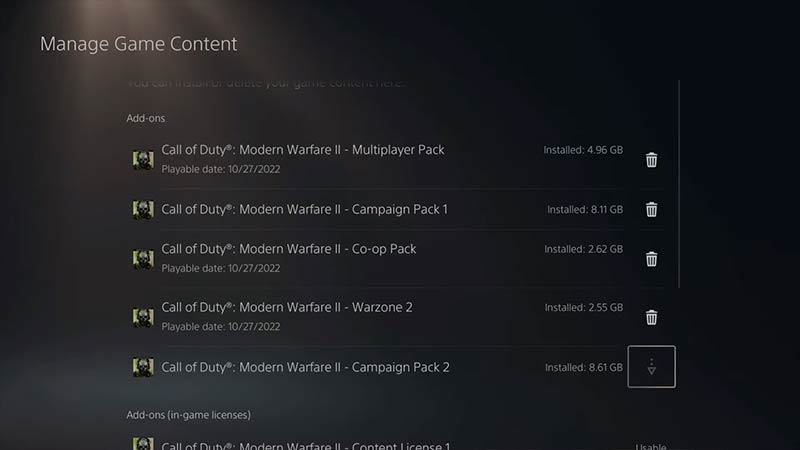
This error might occur if the game does not automatically download all the data packs. Here are some simple ways to fix this issue:
- Check All the Downloaded Packs
- Re-Install Modern Warfare 2
- Change Language on Battle.net
Check All the Downloaded Packs
- Go to the Game Application Icon and press “Options” on it
- Click on Manage Game Content
- Scroll down and check every downloaded pack
- If you see an option to download then go ahead and do that
- After the downloading is complete, launch the game
Re-Install Modern Warfare 2
- Press “Options” on the game application icon
- Click on “Delete”
- Head over to the game library
- Go to “Your Collection”
- Select Call of Duty: Modern Warfare 2 and Download it
- Launch the game once downloading is complete
If you are facing the missing DLC data pack issue on a PC, then here’s how you can fix this issue:
Change Language on Battle.net
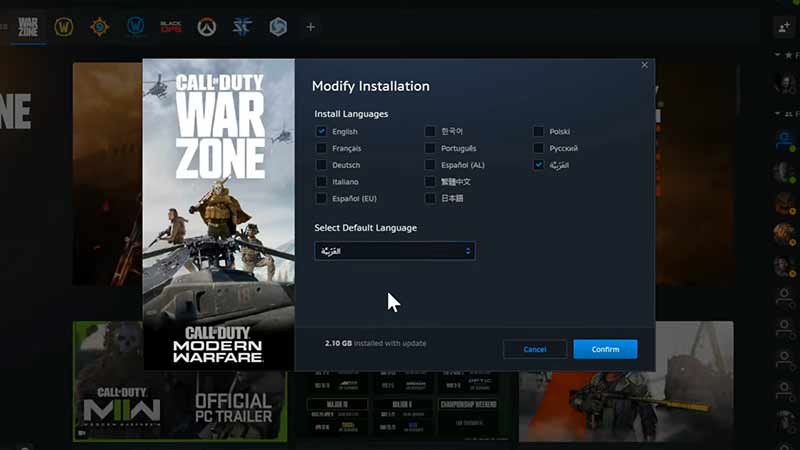
- Open up Battle.net on your PC
- Go to Modern Warfare 2
- Click on “Options” next to the Play button
- Go to “Modify Install”
- Now, under Default Language, click on “Change Languages”
- There, select the last “Arabic” option, and under Default Language Option select Arabic again
- Click on Confirm and Start Update
- Launch the game once Updating is complete
We hope this article helped you to fix the missing DLC data pack in Modern Warfare 2. For helpful guides like How to Fix Friend Request Error and How to Fix the Multiplayer Crashing Issue in our COD MW2 Guides.