Seeing the message “Roblox encountered an unexpected error. Press OK to create a memory dump” can be confusing and frustrating, especially when Roblox crashes instantly or refuses to launch. This issue is commonly referred to as the Roblox memory dump error, and while it looks serious, it is usually fixable with the right steps.
Here’s what the error actually means, why it happens, and how to fix it safely without risking your system.
What is the Roblox Memory Dump Error?
A memory dump is a snapshot of the Roblox client’s memory taken when the program crashes unexpectedly. The platform uses this data to diagnose what caused the crash. The memory dump is not the cause of the error; it is a result of Roblox crashing. So, don’t worry, your PC is not automatically damaged or infected. The real problem is usually a software issue, corrupted files, security settings, or driver-related errors.
Common Causes of the Roblox Memory Dump Error
- Corrupted Roblox Files: Incomplete updates or files from previous installs can break the client.
- Windows Security Conflicts: Windows features like Core Isolation and Memory Integrity sometimes block Roblox from getting access to required system resources.
- Antivirus or Firewall Interference: Third-party antivirus software may incorrectly flag Roblox and force the game to close.
- Outdated or Incompatible Graphics Drivers: GPU drivers that are outdated or unstable can cause Roblox to crash during startup or gameplay.
- Virtualization or BIOS Settings: On some systems, especially AMD-based PCs, virtualization features such as SVM can conflict with Roblox.
How to Fix Roblox Encountered an Unexpected Error Memory Dump
Try the following troubleshooting steps to see if it fixes the problem:
Fix 1: Perform a Clean Roblox Reinstall
- Press Windows + R and type appwiz.cpl.
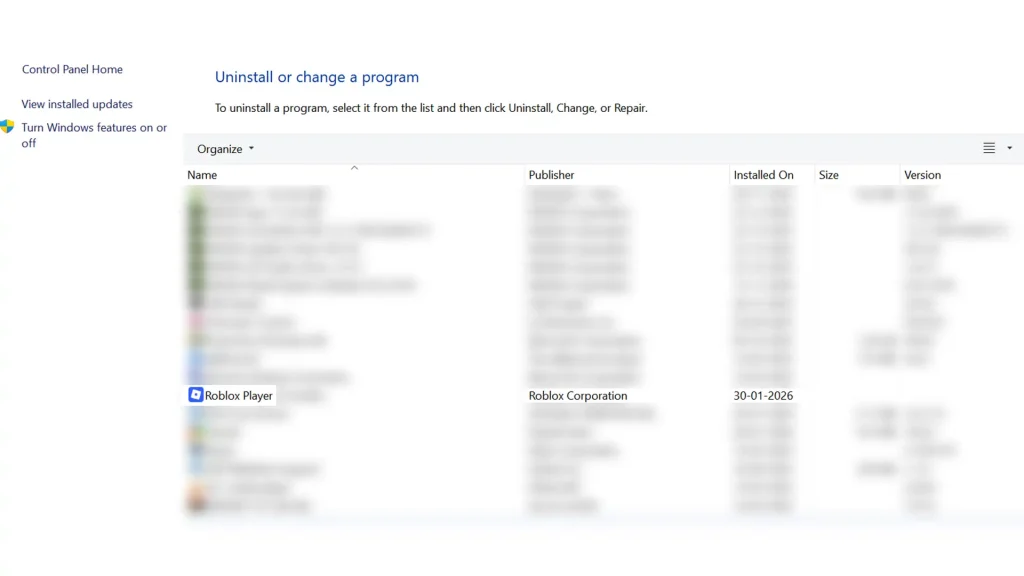
- Uninstall Roblox Player and Roblox Studio.
- Open File Explorer and delete the Roblox folder from: %LOCALAPPDATA%\Roblox.
- Restart your PC.
- Download Roblox again from the official website and reinstall.
This removes corrupted cache files that often cause the Roblox memory dump error.
Fix 2: Disable Windows Memory Integrity (Temporary Test)
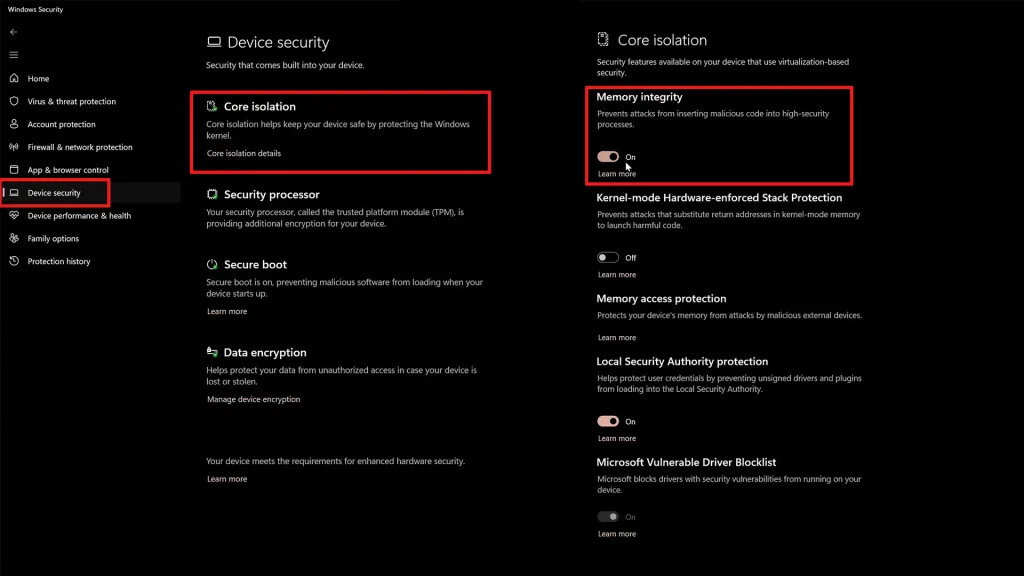
- Open Windows Settings.
- Go to Privacy and Security.
- Open Windows Security.
- Select Device Security.
- Open Core Isolation Details.
- Turn off Memory Integrity.
- Restart your computer.
Important note: Disabling this feature reduces system-level protection. Only use this as a test.
Fix 3: Check Antivirus and Overlays
Some antivirus programs interfere with Roblox. Here’s what you can do to test if this is the problem:
- Temporarily disable third-party antivirus.
- Turn off overlays like Discord or GPU overlays.
- Try launching Roblox again.
If Roblox works after disabling antivirus, add Roblox as an exception instead of keeping protection off permanently.
Fix 4: Update Graphics Drivers and Windows
Outdated drivers are a major cause of crashes.
- Update your GPU drivers from the official manufacturer’s website.
- Run Windows Update and install all pending updates.
- Restart your system.
Fix 5: Disable SVM or Virtualization (Advanced Users)
If you use an AMD processor, this may help.
- Restart your PC and enter BIOS or UEFI.
- Locate SVM or CPU Virtualization settings.
- Disable the option.
- Save changes and restart.
Important Note: Only attempt this if you are comfortable using BIOS settings.
Where to Find Roblox Crash Logs
If the issue continues, Roblox support may ask for crash data. Attach the files in the locations shown below when submitting a support request.
Check these locations:
- %LOCALAPPDATA%\Roblox\logs
- %LOCALAPPDATA%\Roblox\logs\crashes\reports
FAQs
This usually happens due to corrupted Roblox files, Windows security conflicts, antivirus interference, or outdated graphics drivers.
No. A memory dump is only a diagnostic file created after a crash.
It is safe for testing, but not recommended as a permanent solution unless you understand the security trade-off.
No. Your Roblox account data is stored online and will not be affected.
Yes, if none of the fixes work. Make sure to iclude crash logs and system details for faster help.