
While Marvel Rivals had a relatively smooth launch, a few issues like the DirectX 12 not supported error have cropped up. The message “DirectX 12 is not supported on your system. Try running without the -dx12 or -d3d12 command line argument,” will show up which can be confusing. Here’s what you need to do if you’re seeing this message.
Also Read | What does SVP Mean in Marvel Rivals?
How to Fix Marvel Rivals DX12 Not Supported Error?
First and foremost, check whether your system meets the minimum requirements as mentioned on Steam:
Here are the Minimum System Requirements as mentioned on Steam:
- OS: Windows 10 64-bit (1909 or newer)
- Processor: Intel Core i5-6600K or AMD Ryzen 5 1600X
- Memory: 16 GB RAM
- Graphics: NVIDIA GeForce GTX 1060 / AMD RX 580 / Intel Arc A380
- DirectX: Version 12
- Network: Broadband Internet connection
- Storage: 70 GB available space
- Additional Notes: We recommend you install the game on SSD drive for better experience.
If you want to know what is your current DirectX version, type dxdiag on the Start menu and the diagnostic tool that appears will have the necessary information.
What to do if you are using DX12 and meeting the minimum requirements, but still facing the error? You can update your Windows 10 64-bit OS to v1909 or later to potentially fix the issue.
There are a few more troubleshooting tips you can follow to narrow down the problem:
- Restart your PC to flush out any temporary glitches or issues that may have appeared.
- Verify game files on Steam:
- Restart your computer and launch Steam.
- Right-click on the game in your library and select Properties.
- Click on Installed Files.
- Then, click on Verify Integrity of game files and wait for the process to be over.
- Once it’s done, relaunch the game and check if you’re able to play it.
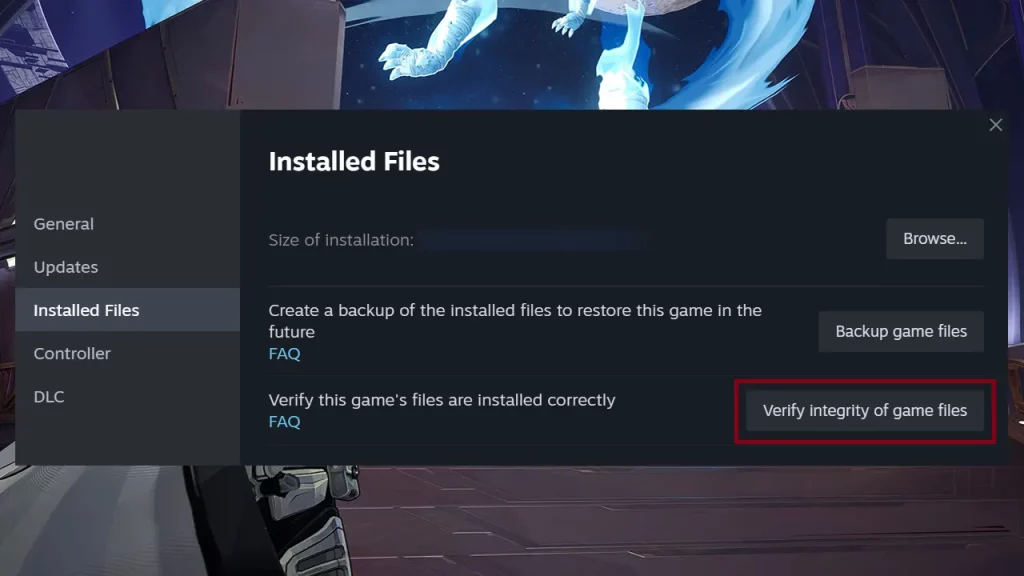
- Verify game files on Epic Games by clicking on the 3 dots near Marvel Rivals in your library, clicking on Manage > Verify.
- Update your Graphics Drivers:
- Visit the official website of your graphics driver’s manufacturer and check whether there are any latest driver updates that need to be installed. After doing so, check if the DX12 not supported message goes away or not.
- Contact Support via the Marvel Rivals Discord for further assistance.
With that done, check out how to solve the loading screen stuck at 99% error, how to earn Units and how to redeem skin codes and assemble codes in the game.











