The story takes place on a remote forested island, filled with dangerous mutants ready to knock you down. So in this case, you should always keep your Standing Fire or the Skull Lamp close in Sons of the Forest. That’s because once it gets dark you never know, who is coming for you. And if you don’t want to become someone else’s meal, then start building all your survival items straight away. To help you with it, in this guide we have mentioned the items required to build Standing Fire & Skull Lamp so you don’t get lost in the dark.
How Can I Build Standing Fire & Skull Lamp in Sons of the Forest?
Here’s how you can craft Standing Fire & Skull Lamp in Sons of the Forest. For your convenience below we have listed all the items you’ll need to build these fire sources. So without any further ado, let’s dive right into it.
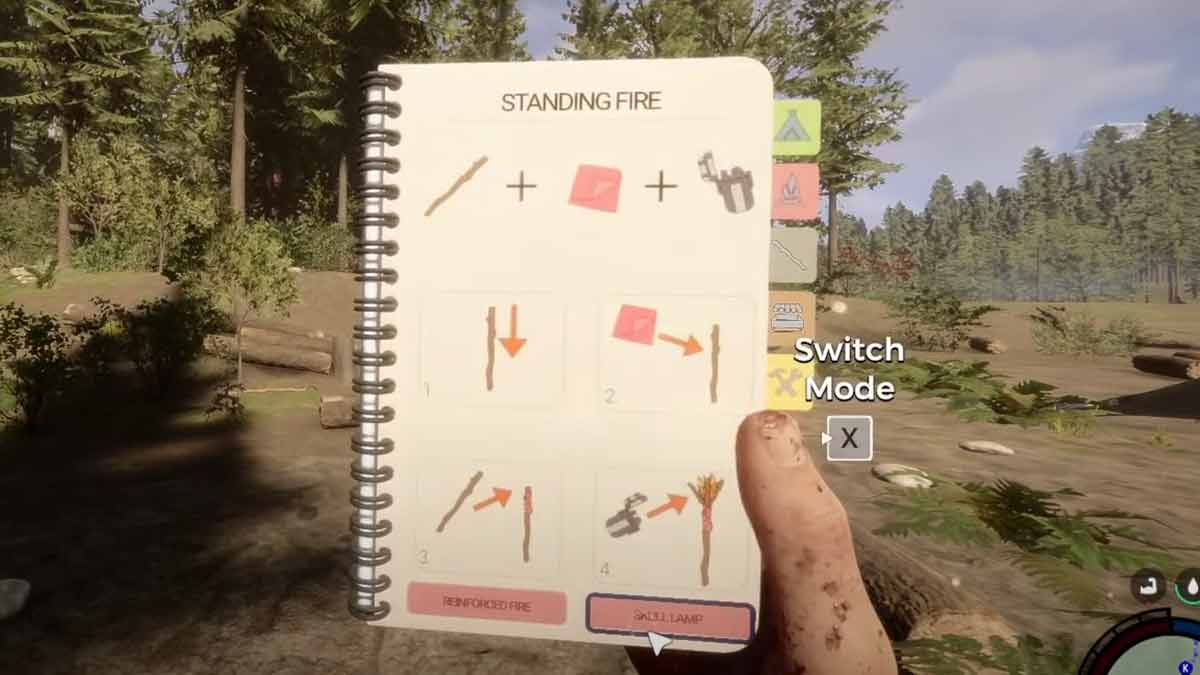
Standing Fire
To make a Standing Fire you’ll need 2x Sticks, 1x Cloth, and the Lighter you got in your Emergency pack. Moreover, to find sticks, look for them on the ground, and to get the Cloth check the containers of your crashed helicopter. Once you have all the items, follow the steps below and you’ll be good to go.
- First, open your inventory by pressing I and then equip a Stick.
- Next, look at the ground to initiate the white dotted outlines. But keep switching it by pressing Right click on your mouse until you get the small circle outline to place the stick vertically.
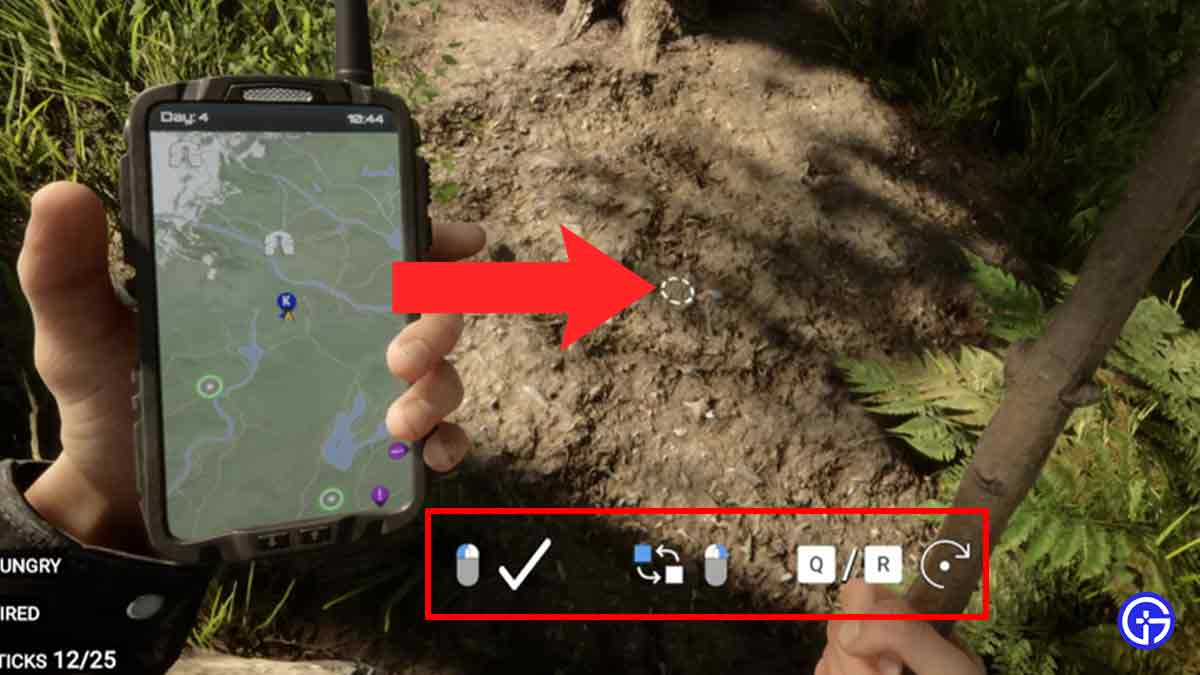
- Once you see the small circle white dotted outline, press Left click on your mouse and that’ll do the trick.
- After that, grab the Cloth from your inventory and wrap it around the stick by pressing E.
- Then, equip another stick and place it on the standing stick by pressing E.
- Now, simply press L to grab your Lighter and ignite the fire source by again pressing E.
And voila, your Standing Fire is ready, if you are looking forward to making a Skull Lamp in Sons of the forest, then scroll down for steps.
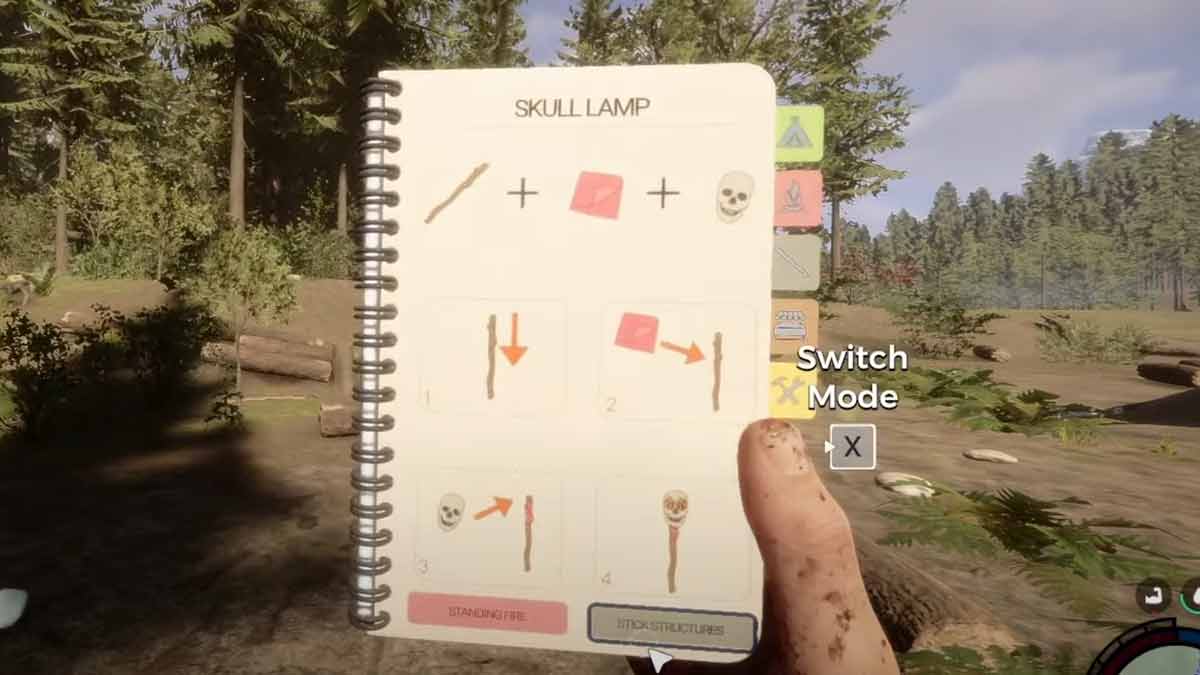
Skull Lamp
The process to make a Skull Lamp is similar to crafting the Standing Fire. But for this, you’ll need 1x Stick, 1x Cloth, 1x Skull, and the Lighter from the Emergency Pack. In order to get the Skull, the player will have to look for dead remains in the Caves. Now let’s take a look at the walk-through and start building.
- First, go to your inventory by pressing I and grab a Stick.
- Next, aim at the ground to initiate the white dotted outline. And keep switching it by pressing Right click until you see a small circle outline.
- Once you see the small circle white dotted outline, press the Left click on your mouse to place the stick in the ground vertically.
- After that, equip the Cloth from your inventory and wrap it around the stick by pressing E.
- Then, grab the Skull and press E to place it on the Stick.
- Now, go ahead and equip your Lighter by pressing L and press E to ignite the skull.
And that’s all you have to do in order to build a Skull Lamp easily. Now you don’t have to worry about getting lost in the dark.
With that said, this is everything you need to know about how you can make Standing Fire & Skull Lamp in Sons of the Forest. If the Mutants are bothering you, then check out how to make Bow & Arrows in the game. Also, take a look at the list of Hidden Achievements that can be obtained easily.