The Lithographic Stone puzzle is one of the most confusing sections in Resident Evil 4 Remake and players need help to solve it. The worst part is many claim that it isn’t working for them at all. But if that is the case then they won’t be able to progress and complete the game. So here is how you can solve the Lithograph Puzzle Door not opening bug for this game.
How to Fix Lithographic Stone Puzzle Not Working in RE4 Remake
There are mainly two reasons why this puzzle could not be working for you. And they are:
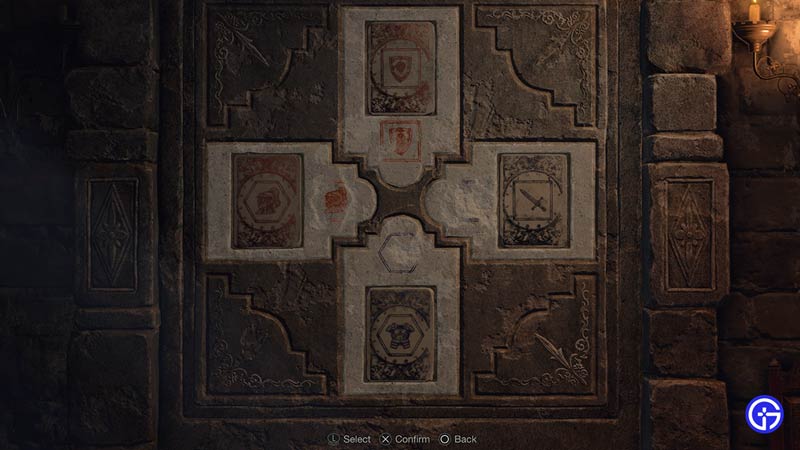
- You might be incorrectly solving the puzzle: Fix this by placing the tablets as shown in the above image.
- Your game files might be corrupt: Try restarting your game or scanning its files.
For most players, it is the first issue. So make sure you double or triple-check to see if you are solving the puzzle correctly. Here are both ways to fix it.
How to Solve Lithograph Puzzle in Resident Evil 4 Remake
To solve the Lithographic Stone puzzle in this game, you need to collect all the tablets and place them in their right positions. You need to match the symbol, color, and shape of each side with its stone tablet. Below is the solution to this puzzle:
- Up: Orange shield inside the square.
- Left: Orange helmet inside the hexagon.
- Down: Dark Purple armor inside the hexagon.
- Right: Dark Purple sword inside the square.
You can find each tablet at the following locations:
- Lithographic Stone Tablet A: Already placed inside the puzzle.
- Lithographic Stone Tablet B: On the bookshelf near the puzzle door.
- Lithographic Stone Tablet C: On the table next to the bookshelf on the south side of the room.
- Lithographic Stone Tablet D: Inside the cabinet in the bottom left corner of the room. Break the glass to get it.
Collect the tablets and place them in the above order and the door will open. Make sure you place them correctly, because until you fit them in their right positions the door won’t open.
Stone Puzzle Not Working Bug Fix
- Restart the game: Try restarting the game to see if it helps. You will lose some progress but solving the puzzle this time should help open the Lithographic stone door.
- Check File Integrity: There is a chance you are having this issue due to some corrupt files. Backup your save and Scan the game’s files from Steam. Once it is over, the corrupt files should be replaced and your puzzle should work now.
- Contact Capcom: If you are sure that the door is bugged and the issue isn’t on your end. Take a screenshot of your door with the same puzzle solution and contact Capcom. They should help you fix it or if this is the problem for other users too then they should release an update to fix it.
That is all you need to do to solve the Lithographic Puzzle door not opening in Resident Evil 4 Remake. If this worked and you have progressed then check out our guide on how to beat Krauser.