Home > Genshin Impact > How to Link Accounts in Genshin Impact

How To Link Accounts In Genshin Impact

Published Date :

Genshin Impact is available across multiple platforms including mobile, PC, and PS4, and will soon be available on Switch as well. Hence, the developers have long added a cross-save feature in the game. You can simply link your Genshin Impact accounts on PC and mobile to seamlessly switch between platforms.

There is no cross-save functionality available for PS4 currently. Hopefully, this might change in the future, but for now, only PC and mobile players can link their accounts to enjoy the game on both platforms.

Genshin Impact: How Can I Link My Accounts

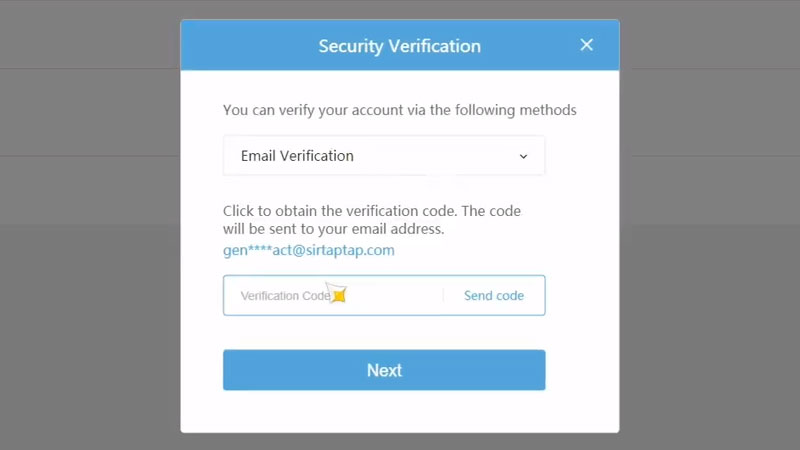
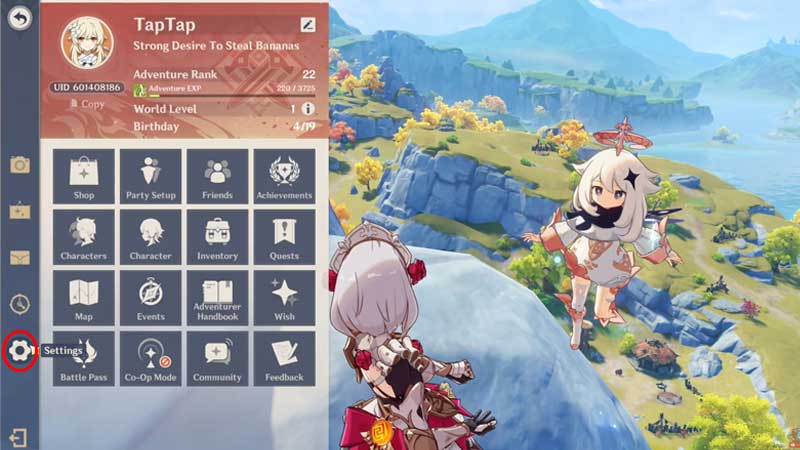
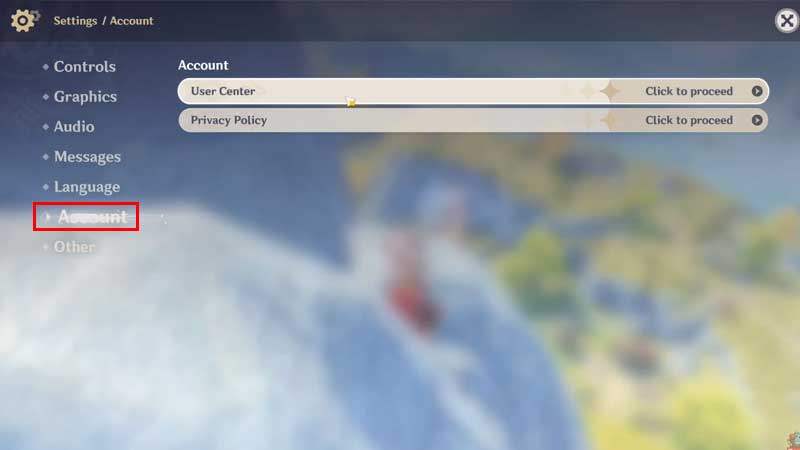
You can link accounts in Genshin Impact by heading to Settings>Account<User Center and then hitting the “Link” option. This will send an email to the address associated with the Genshin Impact account. The sent email address will have a verification code. When you enter the code from the email into the verification section of the game, your account will be linked.
linking accounts in genshin impact

step by step guide to link accounts

genshin impact account linking guide

Linking accounts will let you experience the game on both platforms without the need to explore from the start. You can simply play on the PC, save the game, and then use mobile to continue playing from where you left. You can also link your Genshin Impact accounts with the help of social media platforms including Game Center, Facebook, Twitter, and others.

That’s everything you need to know about how to link accounts in Genshin Impact. If you want to progress quickly in the game, make sure to read our farming guides that will walk you through different locations to get some valuable items and materials. You can start by reading how to get tomatoes and ham, both cooking ingredients. A new update is about to be launched for Genshin Impact soon. The update brings several new characters to the game, among which is Scaramouche. You can read who is Scaramouche and what will be his elemental skills right here.


  • GTA 6 Sprint Control Change: Rockstar Ditches Button Mashing?

    GTA 6 Sprint Control Change: Rockstar Ditches Button Mashing?

    Published Date :

    Rockstar is making a small but important change to how players sprint in GTA 6. The new instalment appears to be moving away from the button-mashing controls used in earlier GTA titles and switching sprinting to the left stick. This means running around Vice City should require fewer repeated button presses when playing as Jason… Read More

  • Dungeon Lootr Codes (September 2026)

    Dungeon Lootr Codes (September 2026)

    Published Date :

    Dungeon Lootr is a Roblox hack-and-slash game built around challenging dungeons, different classes, builds and plenty of loot. You can fight enemies, collect better gear, upgrade your weapons, and use different abilities as you progress and codes can give you useful items such as Luck Potions, Forge Stones, Aspect Gems, and Coins. If you don’t… Read More

  • U7BUY Steal a Brainrot Items Review: Pricing, Delivery Speed, and Service Quality

    U7BUY Steal a Brainrot Items Review: Pricing, Delivery Speed, and Service Quality

    Published Date :

    When playing Roblox Steal a Brainrot, you will be aware of the frustration it causes. You need a unit that actually earns $/sec, but those units have such low probability of appearance that you can only find one of them in 0.1% of cases. Many hours of farming sometimes lead to days, and still, you… Read More

  • MM2 of The Locust Codes (September 2026)

    MM2 of The Locust Codes (September 2026)

    Published Date :

    MM2 of The Locust is a Roblox horror game where you are trapped inside a dangerous nest with a giant creature hunting you. Your goal is to survive, find your way around the map, and escape before the Locust catches you. You can also collect Keys during your runs and use them to get different… Read More