Home > Starfield > How To Land On A Planet In Starfield

How To Land On A Planet In Starfield

Published Date :

Exploring new planets is at the heart of the Starfield experience. However, before setting foot on an alien world, you’ll need to know how to pilot your ship and bring it in for a safe landing. Navigating your vessel and preparing it to touch down may initially seem daunting. We’ll provide a step-by-step overview of how to land on a planet in Starfield.

How to Land on Planets in Starfield
How To Land On A Planet In Starfield

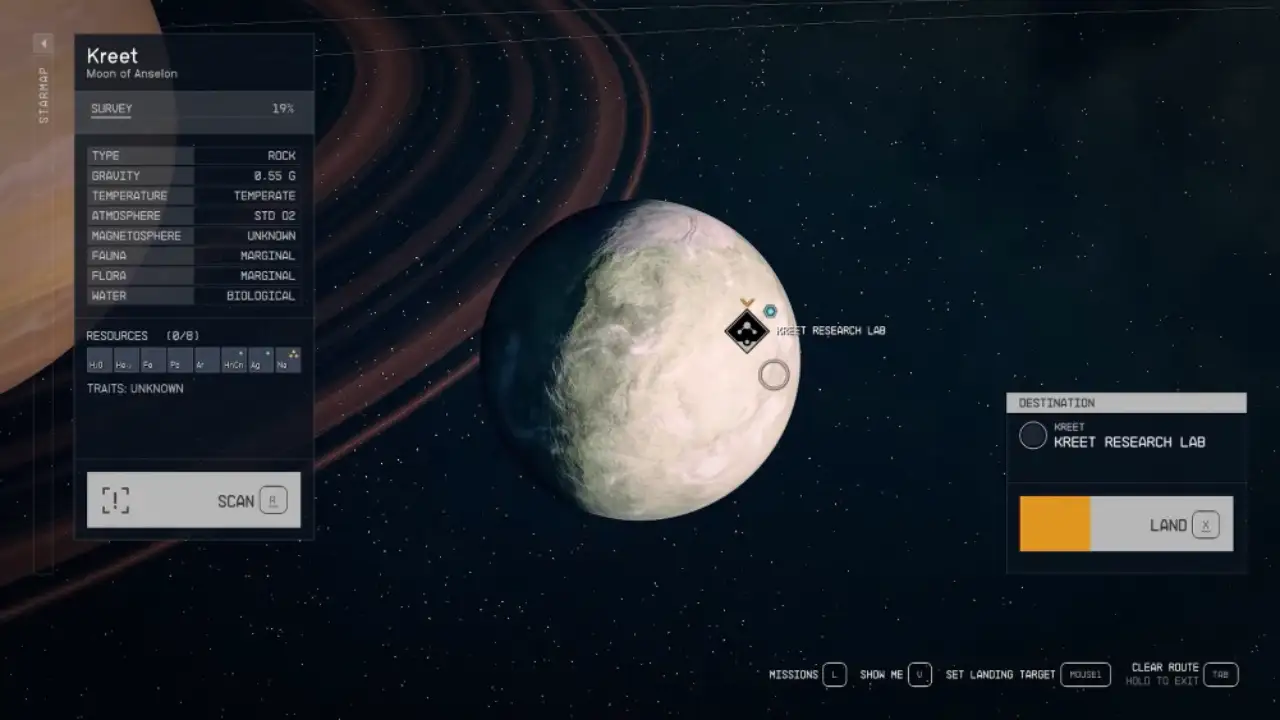
Once you arrive at a new planet or moon, you will need to select it from the starmap to travel there. Make sure to “hold travel” to set a course for the destination. Upon arriving in orbit, you will not be able to land immediately – you must first wait for clearance from any major settlements on the surface.

  1. Open your starmap by accessing the navigation console on your ship. Locate the planet you want to land on in the starmap.
  2. Select the planet by hovering over it and pressing the designated button, usually called “Set Course.” This will set your ship’s course to travel to the moon’s orbit.
  3. Travel to the planet by pressing and holding the designated travel button, usually called “Travel.” Your ship will travel at faster-than-light speeds along your set course line.
  4. Once you arrive at the planet, you will enter its orbit automatically. You can now land on its surface.
  5. Open your starmap again to zoom in on the planet’s surface. Look for safe and flat areas to land on.
  6. Select your landing target by hovering over your chosen spot and pressing “Set Landing Target.”
  7. With your target set, hold down the designated landing button, indicated as “Land,” to begin your descent to surface.
  8. Once you have landed, you can exit your ship and begin exploring.

New players should note that you cannot manually fly your ship down to the surface. You must choose a designated landing zone to touch down.

And that sums up everything about landing on a planet in Starfield. You can go through our dedicated section for Starfield for more such guides.
  • Stream a Mukbang Codes (August 2026)

    Stream a Mukbang Codes (August 2026)

    Published Date :

    Mukbang games are gaining more popularity on Roblox these days, and Stream a Mukbang is where you eat food live, gain views, likes, followers, and earn cash for upgrades. As your live videos become more popular, you’ll need more resources to keep attracting new viewers, and that’s where free rewards can make a difference. Redeeming… Read More

  • Become an Anime Billionaire Codes (August 2026)

    Become an Anime Billionaire Codes (August 2026)

    Published Date :

    In Become an Anime Billionaire, you roll for anime characters, earn money, rebirth, climb the leaderboard and this journey becomes much easier when you have plenty of rewards. Thankfully, the developers release new Become an Anime Billionaire codes pretty regularly, such as free Units, Lucky Blocks, Cash, and more. Here’s the complete list of all… Read More

  • BikeLife Society Codes (August 2026)

    BikeLife Society Codes (August 2026)

    Published Date :

    Pulling off wheelies, upgrading your ride, and traveling across the city is what BikeLife Society is all about. As you unlock better bikes and customize them to match your style, you’ll need plenty of in-game resources to keep progressing. Free rewards can make that journey much easier, so it’s always worth redeeming the latest BikeLife… Read More

  • Coach a Fighter Codes (August 2026)

    Coach a Fighter Codes (August 2026)

    Published Date :

    In this boxing game, you don’t throw the punches yourself – you’re the coach who watches matches and helps train fighters. You’re tasked with upgrading your gym, improving your roster, and climbing through stronger leagues, which is why you’ll need every boost you can get. So, make sure to redeem these Coach a Fighter codes… Read More