Home > Gaming Guides > How To Use Photo Mode And Take Pictures In Kena: Bridge Of Spirits

How To Use Photo Mode In Kena: Bridge Of Spirits And Take Pictures

Published Date :

Kena: Bridge of Spirits is an action-adventure game with an abundance of nature in it. You can find yourself traversing various Forests, come across different creatures, and many other situations. And these scenarios call for taking a picture. Luckily, this game gives you a camera and not just any dull camera, but one which has some good features for you to play with. So in this guide let us take a look at how to use photo mode to take pictures in Kena: Bridge of Spirits and all camera controls.

How To Use Photo Mode To Take Pictures In Kena: Bridge Of Spirits
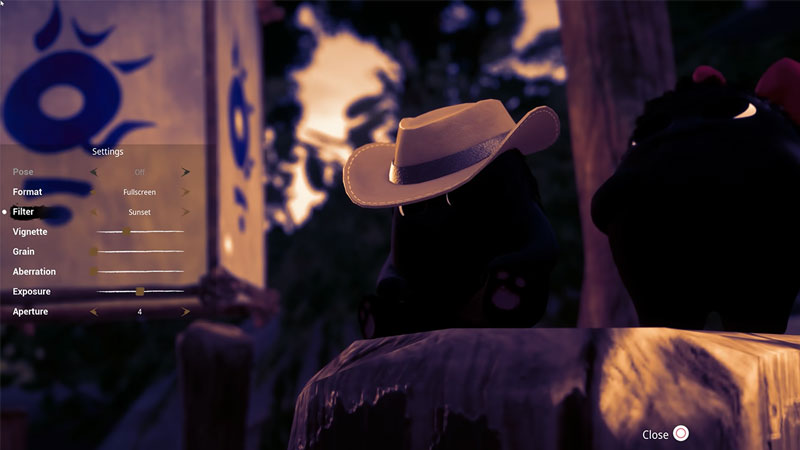
how to take pictures in kena bridge of spirits

You can easily use the Photo mode by simply pressing Up on your D-Pad. With Photo mode on you can start taking pictures. To take a picture simply press the R1 button. When you take your first image you unlock the trophy “Say Cheese!”. This game’s camera works in an interesting way as when a character is aimed by the camera they will look directly towards it. While it has the usual features like rotate it around or zoom in and zoom out it also gives you various filters.

Furthermore, you can make characters in the frame smile and strike different poses when they are in the frame. The Photo mode also has settings that let you control filters, format, vignette, grain, exposure, aperture, and aberration. And you can also make the characters in the frame Freeze by pressing L1. You can unfreeze them by pressing L1 again which turns on Action. It allows characters in the frame to move around.

All Photo Mode camera controls:

  • L2 and R2: Change Height
  • D-Pad Up/D-Pad Down: Zoom in and Zoom Out
  • D-Pad Left/D-Pad Right: Change Focus
  • R3: Auto Focus
  • Circle Button: Close Photo Mode
  • Triangle Button: Open Settings
  • R1: Take Photo
  • L1: Freeze/Action
  • X Button: Cheese! (Make characters smile or change poses)

That sums up this Photo Mode guide. If you like playing this game be sure to check out our other guide on how to parry in Kena: Bridge of Spirits.

  • Roll to Defend Codes (July 2026)

    Roll to Defend Codes (July 2026)

    Published Date :

    Roll to Defend codes can reward you with free Units, cash, and luck boosts to summon better Units to fight against zombies. Since upgrading your Backpack and unlocking new zones can take time, codes provide much-needed boosts, which is why we have a list of all the currently available rewards. Redeem them before they expire!… Read More

  • Anime Overseer Codes (July 2026)

    Anime Overseer Codes (July 2026)

    Published Date :

    Anime Overseer codes can give you free Gems, Gold, and Trait Rerolls to help you from the start. Since you’ll be summoning units, evolving them, and taking on challenging enemy waves, every free reward can make progression much easier. So, to help your journey, here’s the complete list of all the currently available codes. Last… Read More

  • Stay For Fortune Codes (July 2026)

    Stay For Fortune Codes (July 2026)

    Published Date :

    Stay For Fortune codes can give you free Cromerium, helping you unlock upgrades and progress without having to wait as long. Since the game revolves around staying in the server to earn rewards over time, every bit of free currency can help you get ahead faster. So, here’s the complete list of all the currently… Read More

  • +1 Speed Evolve Codes (July 2026)

    +1 Speed Evolve Codes (July 2026)

    Published Date :

    Speed-based games on Roblox will always stay popular, and this particular experience is quite addictive! Here, you play as an animal and your goal is to evolve into stronger animals, unlock new worlds, and be the fastest player on the server! +1 Speed Evolve codes offer free Speed and Win Boosts that can make your… Read More