Kingdom Come: Deliverance 2, the much-anticipated sequel to their acclaimed 2018 action role-playing game, is here, and the series continues to offer players a realistic and challenging experience. For those looking to customize their experience in Bohemia or experiment beyond the standard mechanics, there are some console commands you can use. Here’s the list of known KCD 2 console commands and how to activate and use them on PC via Steam.
How to Use Kingdom Come Deliverance 2 Console Commands

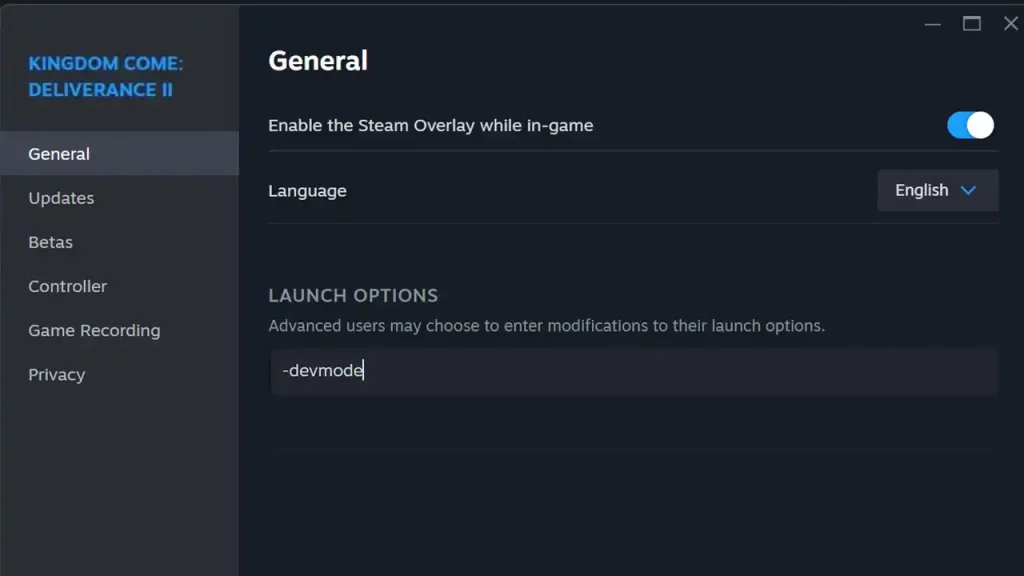
To use KCD 2 console commands, players need to access the in-game console. On PC, this can be done by pressing the tilde (~) key, located just below the Esc key on most keyboards. Once the console is open, players can input various commands to modify game settings or behaviors. But before that, you need to enable dev mode on Steam by following these steps:
- Right-click on Kingdom Come: Deliverance 2 in your Steam Library.
- Go to the General Tab.
- Look for Launch Options and type -devmode in the input field.
- Close the window and launch the game.
- Now press the ~ key when you want to type and use console commands.
KCD 2 Console Commands
Here are some notable console commands that can enhance your gameplay experience:
- wh_sys_NoSavePotion = 1
- This lets you manually save without requiring the Saviour Schnapps potion.
- wh_pl_LockPickingShakeOverride = 0
- This disables shaking during lockpicking.
- wh_pl_LockPickingDOF = 50
- This extends the durability of your lockpick while unlocking doors or chests.
- wh_ui_showHUD = 0
- This hides the HUD.
- goto x y z
- This lets you teleport.
- wh_rpg_getLocation
- This gives you the coordinates.
- wh_cheat_addItem “ItemID” “Item Quantity”
- Grants a specified item in the desired quantity.
- wh_cheat_money “Quantity”
- Provides the specified amount of money.
Using console commands does not disable achievements, which is great for players who wish to experiment. However, since the game is newly released, it’s best to be careful with commands to avoid losing any progress due to a bug. More commands may be revealed in the future so keep an eye out for them as well.