Blade & Sorcery is a built-for-VR Sandbox game that allows you to enjoy a medieval-style game with real physics. The game also supports MODS and has quite a lot of it for every major update. The best MODS are always the ones that you feel are good for your game. But how do you get Mods for your game? In today’s article, I will show you how to get MODS for Blade and Sorcery.
How to Get and Install MODS for Blade and Sorcery
Blade and Sorcery MODS can be downloaded from many websites but I highly recommend getting them from Nexus MODS. Go to their website and then follow the steps given below:
- From the website, download a MOD that you like for Blade and Sorcery.
- The File will come as a Zip file so you will need a Software App like WinRar to extract it.
- Extract the files to your desired location.
- Once that is done, go to Steam and find Blade and Sorcery in the Installed Games Panel.
- Right-click on it and then go to Properties.
- Under Properties, select the LOCAL FILES tab and then click on Browse.
- This will take you to the location of your Game Files of Blade and Sorcery.
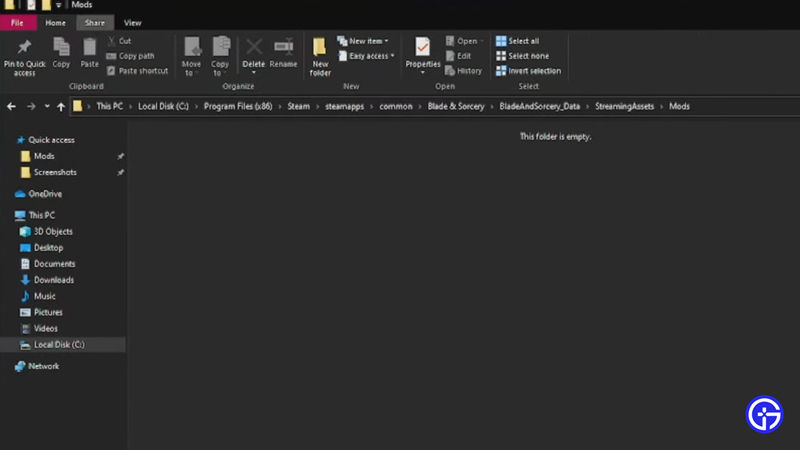
- Now in the Blade & Sorcery file, go to BladeAndSorcery_Data -> StreamingAssets -> Mods.
- This will open up this folder as an empty one if you don’t already have Mods in it.
- Now just drag the Mod Files into this folder.
- For the Oculus, the process is similar.
- From the Oculus Software, go to your Apps and click on the three dots on Blade & Sorcery.
- You will see a lot of options, of which click on Details.
- This will open a panel on the side and it will give you the Location of the Game Files.
- Then from here follow the steps for adding the Mod File into the Game files as mentioned above.
- You have successfully added Mods into the game.
This was all about getting Mods into Blade & Sorcery. Hopefully, this guide has helped you. You can also check our other guides like List Of Best Blade And Sorcery Mods.