Home > Doom Eternal > Funny Unicorn Skin Guide

How To Unlock DOOM Eternal DOOMicorn Skin – The Unicorn Skin

Published Date :

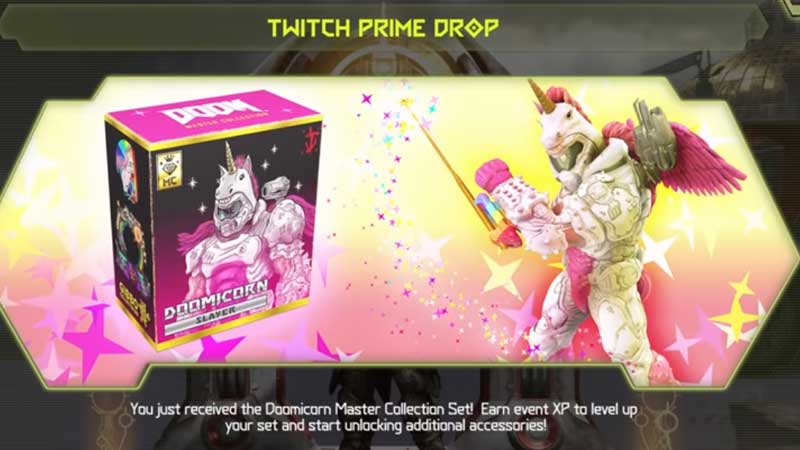
As a demon slayer, you play a serious role in killing monsters in Doom Eternal, but what if you can customize your character to give a look that no has yet expected. You can unlock a unicorn skin in Doom Eternal, called Doomicorn this skin is reserved as a special gift for some limited users only. Yes, not everyone can claim in to unlock Doomicron Skin in Doom Eternal you will need to three things. Amazon Account, Bethesda account, and Twitch Prime account. Yes, Doomicron is a special skin only for Twitch prime users, and if you have one then here is how you can claim this skin for free in Doom Eternal.

How to unlock Doomicron Skin in Doom Eternal?

Here is a step by step process to link your accounts to Bethesda.net and how you can claim the Doom Eternal free skin.
Doom Eternal Unlock Unicorn Skin

  1. Visit Bethesda.net and click on the Login button on the top right of the screen.
  2. Login using your Username and Password.
  3. Click on the profile icon on the top right corner of the screen and click on Linked Accounts.
  4. You will have a option as Add Platform, Social Media or Game Account.
  5. Click on that and click on Amazon. Use your Amazon user id and password to login in popup browser.
  6. Next, you will have to visit your Twitch Prime account which must be already linked with Amazon Account. If this step is done you are eligible for the free skin.
  7. Launch Doom Eternal on whichever platform you are playing. For example PS4.
  8. Go to Settings and click on Reconcile Entitlements.
  9. Completely log out from the game first and then logout from the console.
  10. Restart the console and then log in again.

That’s it, you will have to repeat the same process on PC or Xbox. When you login back you will see a popup about the Doomicron Skin. Go to Customize and from there you can apply the skin on your character. The Doomicorn Skin is a part of the Doomicorn Master Collection Set, you will also unlock more new fresh accessories after claiming this one.


  • Steal an Egg Codes (September 2026)

    Steal an Egg Codes (September 2026)

    Published Date :

    Steal An Egg is a Roblox game where you steal eggs from creatures, hatch them, and build a collection of pets. As you progress, you can also improve your base and race through different areas as you work toward rarer pets. Speaking of progression, many players are looking for Steal An Egg codes that can… Read More

  • Silk Road Trading Simulator Codes (September 2026)

    Silk Road Trading Simulator Codes (September 2026)

    Published Date :

    Silk Road Trading Simulator is a Roblox game where you take on the role of a merchant and travel between historic locations while trading goods. You can build your wealth, expand your trading operation, and customize your character along the way. Codes can give you free items, including cosmetics for your merchant. Here’s the complete… Read More

  • How to Play NoPixel V

    How to Play NoPixel V

    Published Date :

    NoPixel V is the newest version of the famous GTA 5 roleplay experience, and this time Rockstar Games is officially supporting the project. It comes with a complete rebuild of the server, new locations, updated visuals, and more tools for creating roleplay stories. However, the September launch is not an open release. Here’s what you… Read More

  • GTA 6 Sprint Control Change: Rockstar Ditches Button Mashing?

    GTA 6 Sprint Control Change: Rockstar Ditches Button Mashing?

    Published Date :

    Rockstar is making a small but important change to how players sprint in GTA 6. The new instalment appears to be moving away from the button-mashing controls used in earlier GTA titles and switching sprinting to the left stick. This means running around Vice City should require fewer repeated button presses when playing as Jason… Read More