Uninstalling Discord is a really simple and easy process. Discord is a great chat platform with unique features for gamers. However, if you prefer to use another application and want to uninstall Discord, we will show you the easy steps to do so.
How to Uninstall Discord on PC (Windows 10) Guide
Read the steps below to learn how to uninstall Discord on your Windows PC. Make sure to pay attention to each of the steps in the process. Doing so will ensure the uninstallation process is smooth and unproblematic.
- To delete and remove Discord completely, you first need to ensure the application is not running in the background. Discord is one of the many applications that opens up each time you switch your device on.
- Hover over the Discord app icon in the taskbar. Now, right click on it and select Quit Discord.
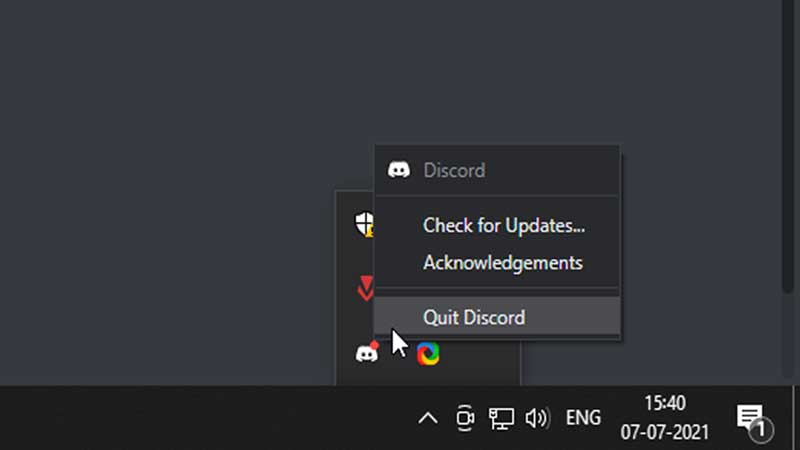
- Alternatively, you can also disable the auto-run feature for Discord by going to the Task Manager in Windows.
- Once you do this, Discord will stop running automatically in Windows.
- Now, go to the start menu in your taskbar.
- In the search text-box, type Apps and Settings. Click on the resultant suggestion.
- This will open the Apps and Settings menu.
- Here, you will find a collection of active applications that have been installed in your computer.
- Search for Discord by typing in the search box. Doing so will bring up the Discord application.
- You will now find the option to either modify the app or uninstall it.
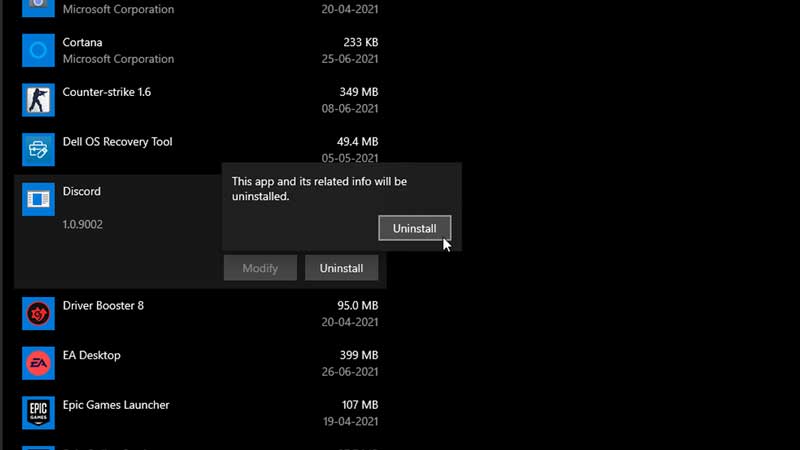
- Click on the Uninstall button. This will bring up a confirmation prompt.
- Confirm the uninstallation by pressing Yes.
And that’s it. With a few simple steps, you can delete and remove Discord from your computer fully. Remember to first disable the application from running automatically. Failing to do so can cause errors in the uninstallation process.
Now that you know how to uninstall the application, learn how to fix the fatal javascript error in Discord.