Home > Overwatch 2 > How To Use Spectator Mode In Overwatch 2

Overwatch 2: How To Spectate

Published Date :

If you are a strategist who likes to understand every aspect of the game, then the spectator option is just for you. Spectating can help you understand characters, learn some new moves, or just enjoy the gameplay. Watching players get an insane clutch is always entertaining. With the launch of Overwatch 2, it is understandable to have an urge to just observe the gameplay. In this article, we will tell you how to spectate in Overwatch 2.

How to Spectate in Overwatch 2
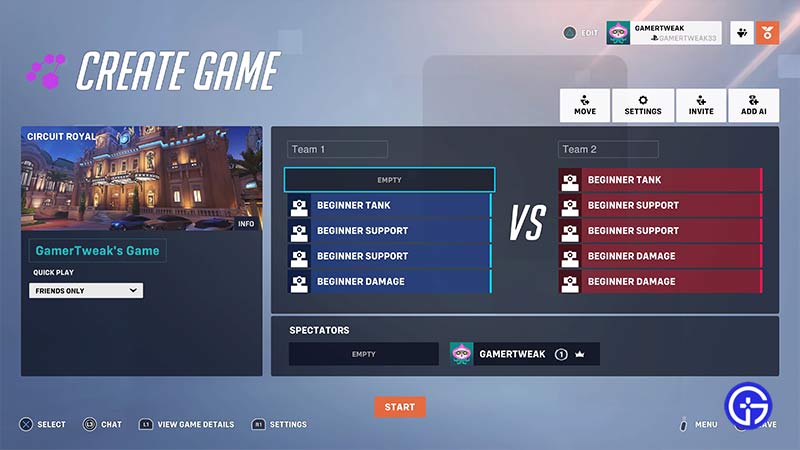
Spectate in custom game in Overwatch 2

The Spectator option in Overwatch 2 allows you to watch your friends play. Now if you are already in a game then you can spectate your teammates for a short duration when you die in a round. Although if you just want to observe the game then there are two ways you can do it: Custom Game and Spectate Friends

Custom Game

To spectate in a custom OW2 game:

  • Simply click on Play
  • Go to Custom Games
  • Create a New game or Join a game that is in progress
  • You will see two slots for Spectator at the bottom
  • If you’ve created the game then move the players around and enter the Spectator slot

When you join as a spectator, you can view the whole map and the stats of all the players. This option is useful if you want to study the maps and work on strategies. You also have an option to track a single player. To do so, focus on that player and press the right mouse button.

Spectate Friends

To spectate your friends who are already in a match in Overwatch 2 :

  • Open your Friends List
  • Right Click on your friend’s name
  • Click on Spectate

You can watch the POV of everyone on your friend’s team. Note that you cannot spectate your friend if they are in Competitive Mode. This is done to ensure fair play.
Spectating players can give you a lot of insight into how the game works. We hope this article helped you to understand how to spectate in Overwatch 2. Since this is a fairly new iteration of the original game, you might come across several issues. We have a whole bunch of guides on OW 2 so do check them out.

  • Roblox Lowball Codes (August 2026)

    Roblox Lowball Codes (August 2026)

    Published Date :

    Buying items below their market value and flipping them for a profit is the fastest way to get rich in Lowball. Every successful negotiation grows your cash, letting you take on bigger trades and expand your inventory even further. If you want an extra boost without waiting for your next big deal, redeeming the latest… Read More

  • Junk Mechanics Codes (August 2026)

    Junk Mechanics Codes (August 2026)

    Published Date :

    Turning piles of scrap into powerful cars is the key to progressing in Junk Mechanics. As you keep playing, you’ll start needing plenty of cash for purchases and upgrades, which is why free rewards are always worth claiming. Be sure to redeem the latest Junk Mechanics codes whenever they’re available and check out this complete… Read More

  • GTA 6’s Extended Look Will Debut on Netflix Before YouTube

    GTA 6’s Extended Look Will Debut on Netflix Before YouTube

    Published Date :

    Rockstar Games has revealed an unexpected way for fans to watch the next major Grand Theft Auto 6 showcase. Instead of heading straight to YouTube, the studio’s upcoming Extended Look presentation will premiere first on Netflix, which means subscribers get an early preview before it becomes available to everyone else. It is set to air… Read More

  • Stream a Mukbang Codes (August 2026)

    Stream a Mukbang Codes (August 2026)

    Published Date :

    Mukbang games are gaining more popularity on Roblox these days, and Stream a Mukbang is where you eat food live, gain views, likes, followers, and earn cash for upgrades. As your live videos become more popular, you’ll need more resources to keep attracting new viewers, and that’s where free rewards can make a difference. Redeeming… Read More