Home > Gaming Guides > How to Save Highlights in Marvel Rivals

How to Save Highlights in Marvel Rivals

Published Date :

If you’ve just had a thrilling victory, become the MVP, or used a strategy that worked out in your favor, you might want to know how to save your highlights in Marvel Rivals for future viewing. You can watch them later to analyze your gameplay or share them with your friends — here’s how you can do it easily on PC and consoles.

Also Read | How to Turn Voice Chat On or Off in Marvel Rivals

How to Save your Highlight in Marvel Rivals

Your latest 5 in-game highlights are automatically captured and they will be uploaded to your Career > Favorites. You can access this from your main menu and then clicking on your profile icon at the top right corner of the screen. If you want to save one or more of them, click on the Save button under it and give it a name that will help you identify the clip. This will save the video to the ‘Highlights Saved’ section and you can watch them from your device’s Media Library. Make sure to let the clip download and save properly in your storage.
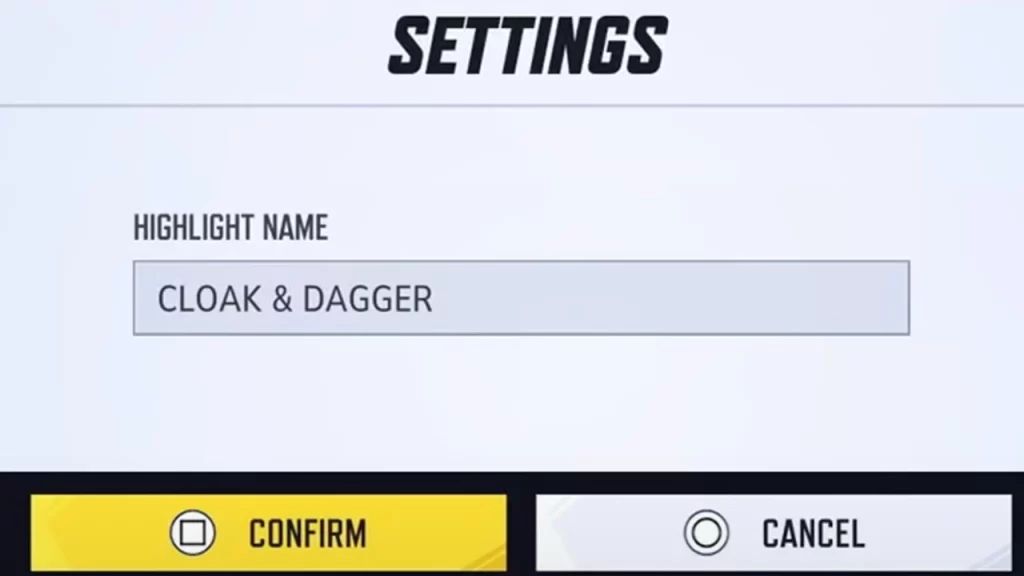
save highlight marvel rivals

Note that if you’re on PC, you can find the location of your downloaded videos right under the ‘Highlights Saved’ tab. It should look something like C:\Users\Your PC\Videos\Marvel Rivals\Highlights. You can also change the folder location from here.

How to Watch Game/Match Replays in Marvel Rivals
watch match replay marvel rivals

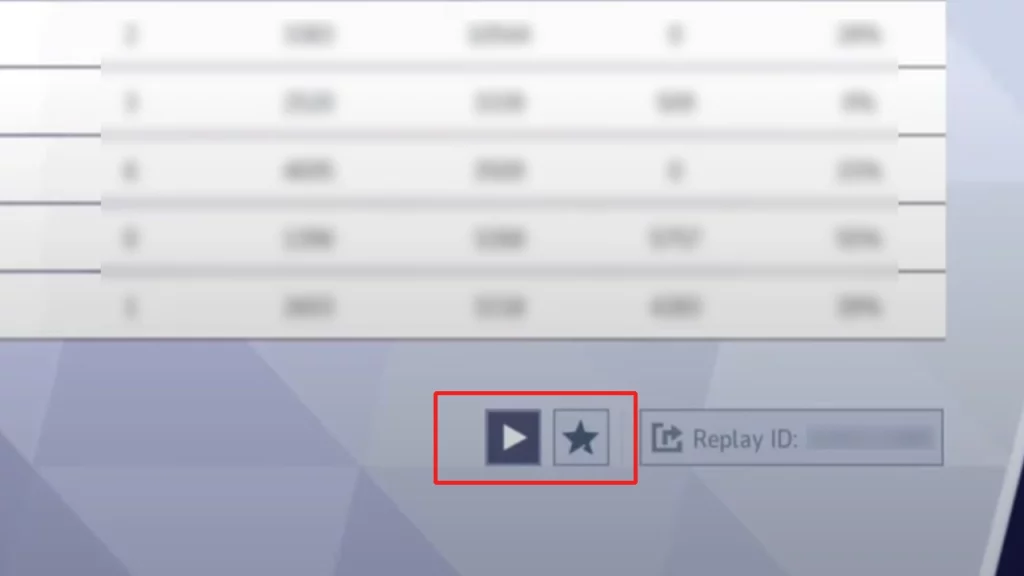
You can also watch match replays to understand what worked or didn’t work well in the game….or to find out which player lacked the most. Click on the profile icon at the top right corner and then select the History tab next to Career. Find the match you want to see a replay of and click on it. Then click on the Play button to watch the video, or the star button to favorite it. If you’d like to share the match ID, click on the third button and you should be able to share it with a friend.

  • Spin a Car Codes (July 2026)

    Spin a Car Codes (July 2026)

    Published Date :

    Spinning games are pretty popular on Roblox and rightly so, because they’re very addictive! Spin a Car is where you roll dice to unlock various cars and upgrades – the rarer your vehicle, the more money it makes! Since free rewards are always welcome, the developers share codes that provide Gasoline, Coin Potion, cash and… Read More

  • Build Your Butterfly Garden Codes (July 2026)

    Build Your Butterfly Garden Codes (July 2026)

    Published Date :

    Build Your Butterfly Garden codes let you grow your butterfly sanctuary even faster by rewarding you with useful items like Eggs, Flowerbeds, and Luck Boosts. As you hatch new butterflies, expand your collection, and decorate your peaceful garden, these freebies can give your progress quite a boost! Here are the latest rewards you don’t want… Read More

  • Paint or Die Codes (July 2026)

    Paint or Die Codes (July 2026)

    Published Date :

    Paint or Die Codes can help you build up your Cash balance before you jump back into another round of hiding in plain sight. In this Roblox game, your goal is to blend perfectly with the environment by painting yourself while avoiding the Seeker (similar to the viral Meccha Chameleon). And if unlocking certain character… Read More

  • Monkey Soccer Codes (June 2026)

    Monkey Soccer Codes (June 2026)

    Published Date :

    Monkey Soccer codes can give you plenty of free Bananas and Lucky Spins, making it easier to get a much better experience on the pitch. Since new codes are usually released alongside major updates and milestones, here’s a complete list of rewards to ensure you don’t miss out. Last checked for new codes on June… Read More