
Home > Cyberpunk 2077 > How to Holster your Gun?

How To Holster Weapons In Cyberpunk 2077

Published Date :

CP2077 is an RPG and everything you do has its consequences and yes, even drawing your weapon in the middle of the road. Doing this will make the people around you scared of you and you will look unnecessarily aggressive when the situation doesn’t need it. In such scenarios, you will get curse words thrown at you or your bounty targets can run away or start fighting with you. Other than this, nothing major will happen unless you actually use your weapon. So, that is why you should know how to holster your weapon in Cyberpunk 2077. It is pretty to put away your gun, so here’s a quick guide on that.

How do I holster weapon in Cyberpunk 2077?

Holster weapons in Cyberpunk 2077 and put your gun away on PC by holding the ALT key with which the Quick Select menu will come up. Choose the red gun and instantly, you will holster the weapon that is in your hand. To holster weapons faster, simply double tap ALT.
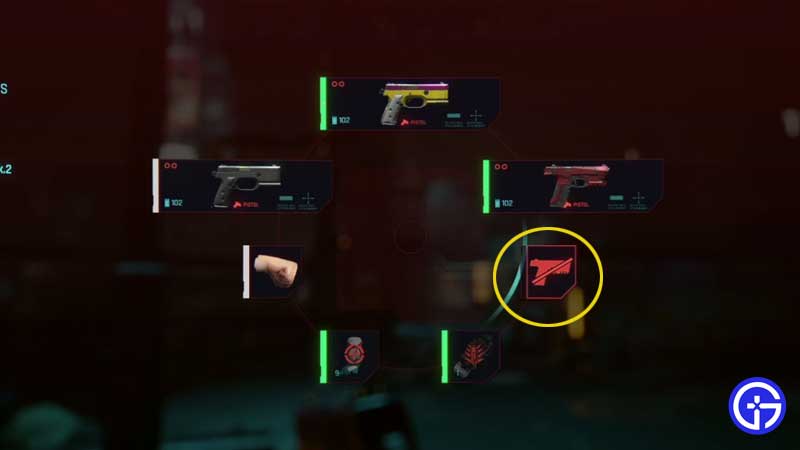
how-to-put-away-gun-weapons-cyberpunk-2077

Don’t Miss | How To Collect Your Gun From Wilson (The Gun Quest)

How to put your gun away on Xbox and PlayStation consoles

You can holster weapons in Cyberpunk 2077 on Xbox by pressing and holding Y and then pressing A . For PlayStation players, that’s Triangle and pressing X. The first button will bring up the Quick Select menu after which you can press the second button to choose the red gun icon. Similar to PC, you can also holster your gun faster in CP2077 by double tapping A or X.

This is basically everything about how to holster weapons in Cyberpunk 2077. Go ahead and explore the town without making people nervous. Now that you know how to put away your gun, get some more information about weapons in this game through our guides on how to get Legendary Weapons quickly, how to find and equip weapon mods and attachments, our complete Cybernetics guide and more hidden secrets in our Cyberpunk 2077 wiki.


  • ZZZ Version 3.0 Is the Biggest Patch Yet: Here’s What Changed and Why It Matters More Than You Think

    ZZZ Version 3.0 Is the Biggest Patch Yet: Here’s What Changed and Why It Matters More Than You Think

    Published Date :

    Zenless Zone Zero 3.0 patch is the biggest patch since the launch of this game. With the introduction of a new element, a rarity tier, a free anniversary character, and an explorable region, you will find this patch launch exciting. It is necessary to learn what you should prioritize from all of these because of… Read More

  • Anime Duelists Codes (July 2026)

    Anime Duelists Codes (July 2026)

    Published Date :

    Anime Duelists follows the tried and tested formula of spinning stars to unlock fighters, sending them into battle and collecting rewards. If you want to get unique fighters, abilities, and progress through various realms, you need these code rewards! You can get anything from free Gems, Trait Rerolls, Stats Reroll, Super Luck, Star Speed potion,… Read More

  • Mini Cup Codes (July 2026)

    Mini Cup Codes (July 2026)

    Published Date :

    In Mini Cup, you open up packs to unlock footballers, build houses, and win matches against rival teams. This makes it a perfect mix of some of the most popular gameplay loops for soccer fans on Roblox. To grow your club, you’ll need cash, as well as special packs, which is where Mini Cup codes… Read More

  • Be The Final Boss Codes (July 2026)

    Be The Final Boss Codes (July 2026)

    Published Date :

    Now you can be the final boss! In this experience, you summon minions to fight for you and take down waves of heroes. To level up, you’ll need plenty of coins and various resources, which is where Be The Final Boss codes come in handy. If you wish to boost your character and stay one… Read More






