
While Among Us became viral in 2020, it still has a dedicated player base with thousands of players on Steam daily. And since the game popularized quite a few things like the words “sus”, “emergency meeting”, as well as the unique look of the characters, if you’re wondering how to get the Among Us emoji on your keyboard to use in Twitch chat, Twitter, Instagram, or any other social media platform, here’s how to get it easily.
How to Get Among Us Emoji
While there is no official emoji that is based on the colorful game characters, you can use an Among Us copy-and-paste website to get this emoticon or stickers to use in chats. To make things easier for you, here’s the Among Us text symbol that you can copy: ඞ
Plus, there are some more that look similar: ඩධවැ
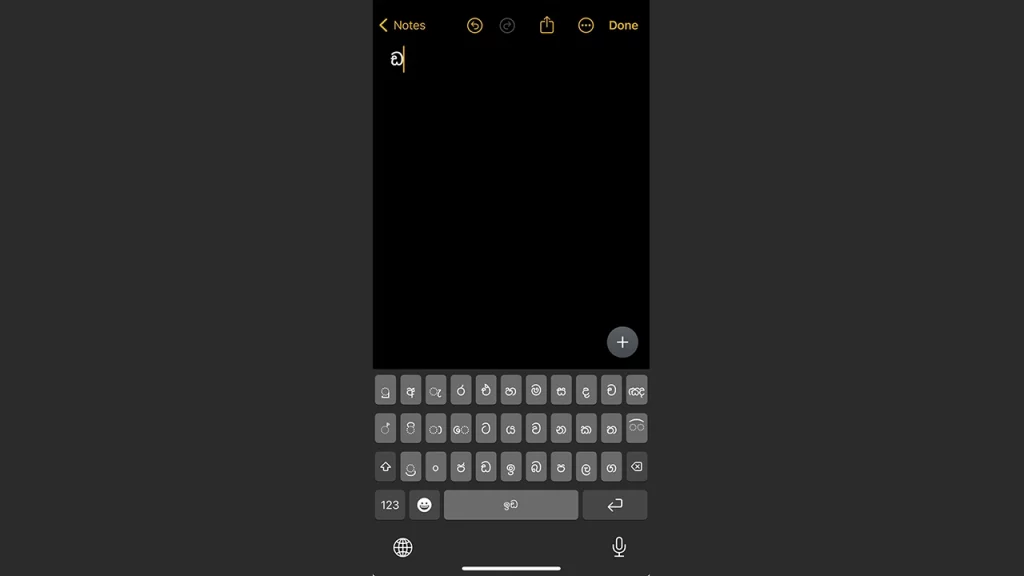
Type Among Us Emoji from your Keyboard
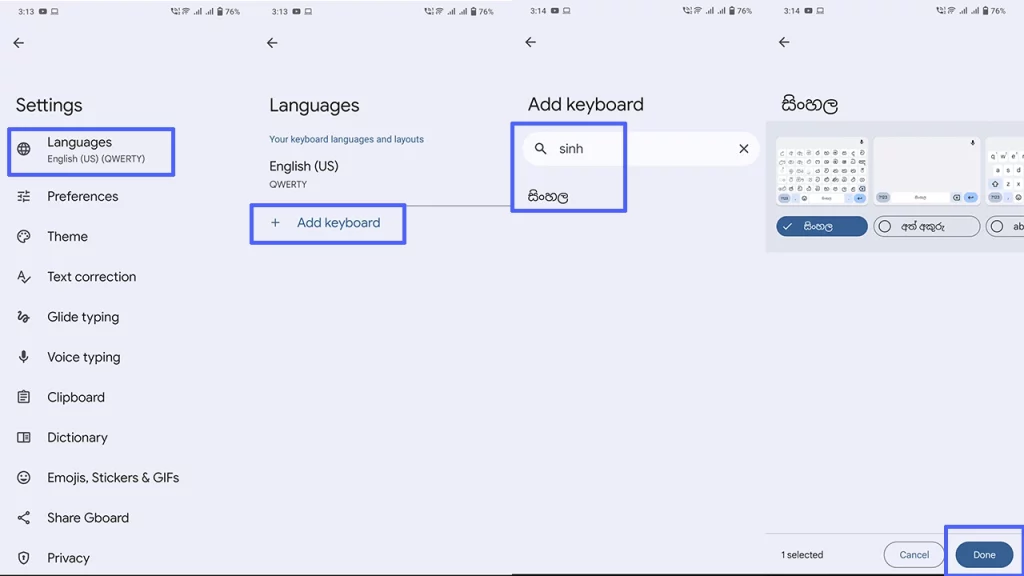
An interesting thing to note is that some letters of the Sinhala language look like the Among Us characters, and you can get them via your Keyboard Settings. Once you’ve tapped on the Gear icon, under Languages, tap on the option to Add Keyboard, search the Sinhala language, select the keyboard, and hit Done.
You can then switch to the Sinhala keyboard whenever you want to get the Among Us emoji in chat and select the letter you want to use.
For a complete ‘drawing’ of Among Us that you might want to paste as a comment, here’s one that’s made of quite a lot of dots:
⠀⠀⠀⠀⠀⠀⠀⠀⠀⠀⠀⣠⣤⣤⣤⣤⣤⣶⣦⣤⣄⡀⠀⠀⠀⠀⠀⠀⠀⠀
⠀⠀⠀⠀⠀⠀⠀⠀⢀⣴⣿⡿⠛⠉⠙⠛⠛⠛⠛⠻⢿⣿⣷⣤⡀⠀⠀⠀⠀⠀
⠀⠀⠀⠀⠀⠀⠀⠀⣼⣿⠋⠀⠀⠀⠀⠀⠀⠀⢀⣀⣀⠈⢻⣿⣿⡄⠀⠀⠀⠀
⠀⠀⠀⠀⠀⠀⠀⣸⣿⡏⠀⠀⠀⣠⣶⣾⣿⣿⣿⠿⠿⠿⢿⣿⣿⣿⣄⠀⠀⠀
⠀⠀⠀⠀⠀⠀⠀⣿⣿⠁⠀⠀⢰⣿⣿⣯⠁⠀⠀⠀⠀⠀⠀⠀⠈⠙⢿⣷⡄⠀
⠀⠀⣀⣤⣴⣶⣶⣿⡟⠀⠀⠀⢸⣿⣿⣿⣆⠀⠀⠀⠀⠀⠀⠀⠀⠀⠀⣿⣷⠀
⠀⢰⣿⡟⠋⠉⣹⣿⡇⠀⠀⠀⠘⣿⣿⣿⣿⣷⣦⣤⣤⣤⣶⣶⣶⣶⣿⣿⣿⠀
⠀⢸⣿⡇⠀⠀⣿⣿⡇⠀⠀⠀⠀⠹⣿⣿⣿⣿⣿⣿⣿⣿⣿⣿⣿⣿⣿⡿⠃⠀
⠀⣸⣿⡇⠀⠀⣿⣿⡇⠀⠀⠀⠀⠀⠉⠻⠿⣿⣿⣿⣿⡿⠿⠿⠛⢻⣿⡇⠀⠀
⠀⣿⣿⠁⠀⠀⣿⣿⡇⠀⠀⠀⠀⠀⠀⠀⠀⠀⠀⠀⠀⠀⠀⠀⠀⢸⣿⣧⠀⠀
⠀⣿⣿⠀⠀⠀⣿⣿⡇⠀⠀⠀⠀⠀⠀⠀⠀⠀⠀⠀⠀⠀⠀⠀⠀⢸⣿⣿⠀⠀
⠀⣿⣿⠀⠀⠀⣿⣿⡇⠀⠀⠀⠀⠀⠀⠀⠀⠀⠀⠀⠀⠀⠀⠀⠀⢸⣿⣿⠀⠀
⠀⢿⣿⡆⠀⠀⣿⣿⡇⠀⠀⠀⠀⠀⠀⠀⠀⠀⠀⠀⠀⠀⠀⠀⠀⢸⣿⡇⠀⠀
⠀⠸⣿⣧⡀⠀⣿⣿⡇⠀⠀⠀⠀⠀⠀⠀⠀⠀⠀⠀⠀⠀⠀⠀⠀⣿⣿⠃⠀⠀
⠀⠀⠛⢿⣿⣿⣿⣿⣇⠀⠀⠀⠀⠀⣰⣿⣿⣷⣶⣶⣶⣶⠶⠀⢠⣿⣿⠀⠀⠀
⠀⠀⠀⠀⠀⠀⠀⣿⣿⠀⠀⠀⠀⠀⣿⣿⡇⠀⣽⣿⡏⠁⠀⠀⢸⣿⡇⠀⠀⠀
⠀⠀⠀⠀⠀⠀⠀⣿⣿⠀⠀⠀⠀⠀⣿⣿⡇⠀⢹⣿⡆⠀⠀⠀⣸⣿⠇⠀⠀⠀
⠀⠀⠀⠀⠀⠀⠀⢿⣿⣦⣄⣀⣠⣴⣿⣿⠁⠀⠈⠻⣿⣿⣿⣿⡿⠏⠀⠀⠀⠀
⠀⠀⠀⠀⠀⠀⠀⠈⠛⠻⠿⠿⠿⠿⠋⠁⠀⠀⠀⠀⠀⠀⠀⠀⠀⠀⠀⠀⠀⠀
Use Sticker Packs
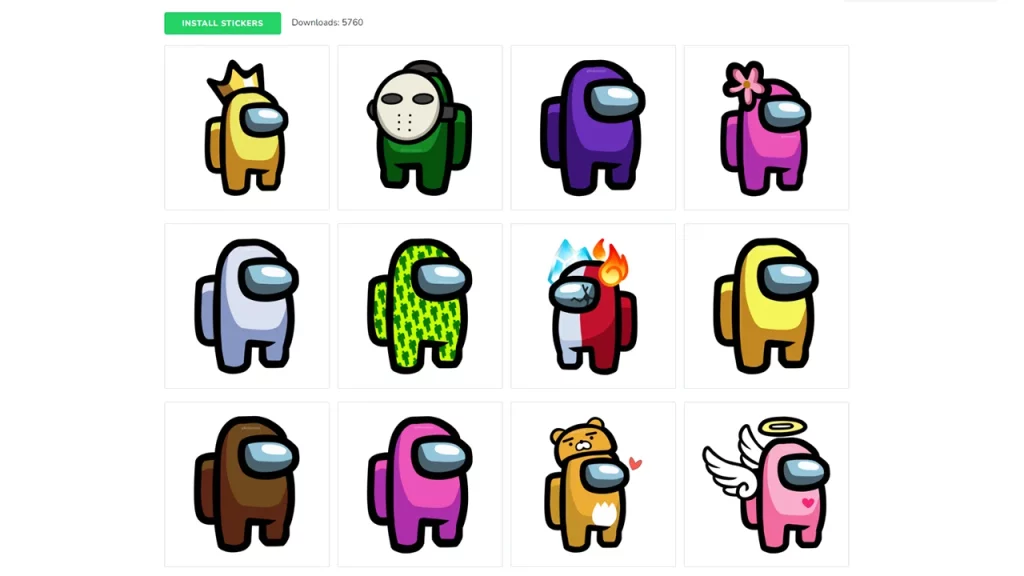
If you’d like to use some Among Us stickers for WhatsApp, you can do so via this Sticker Pack page which has some cool designs and this pack which has some lines like “you were ejected”, “IDK bro, you seem sus”, “Defeat”, and more fun stuff.
And there you have it! That was how to get Among Us emoji in chat via text symbols. If you need any help with the game, as well as some tips and tricks to win, be sure to check out our Among Us guides on Gamer Tweak.











