Home > Steam Guides > How Much Is My Steam Account Worth?

How Much Is My Steam Account Worth?

Published Date :

Let’s be honest, every gamer has wondered at least once about the worth of their Steam Account. May it be for selling the account or just to know how much money they have spent throughout the years. Luckily, it is possible to know the worth of your account by using a third-party website. Not only it will show your total purchases but also how much time you have spent playing. So if you are curious about your Steam Account’s Worth, here’s how you can put an end to it.

How to Check Your Steam Account Worth
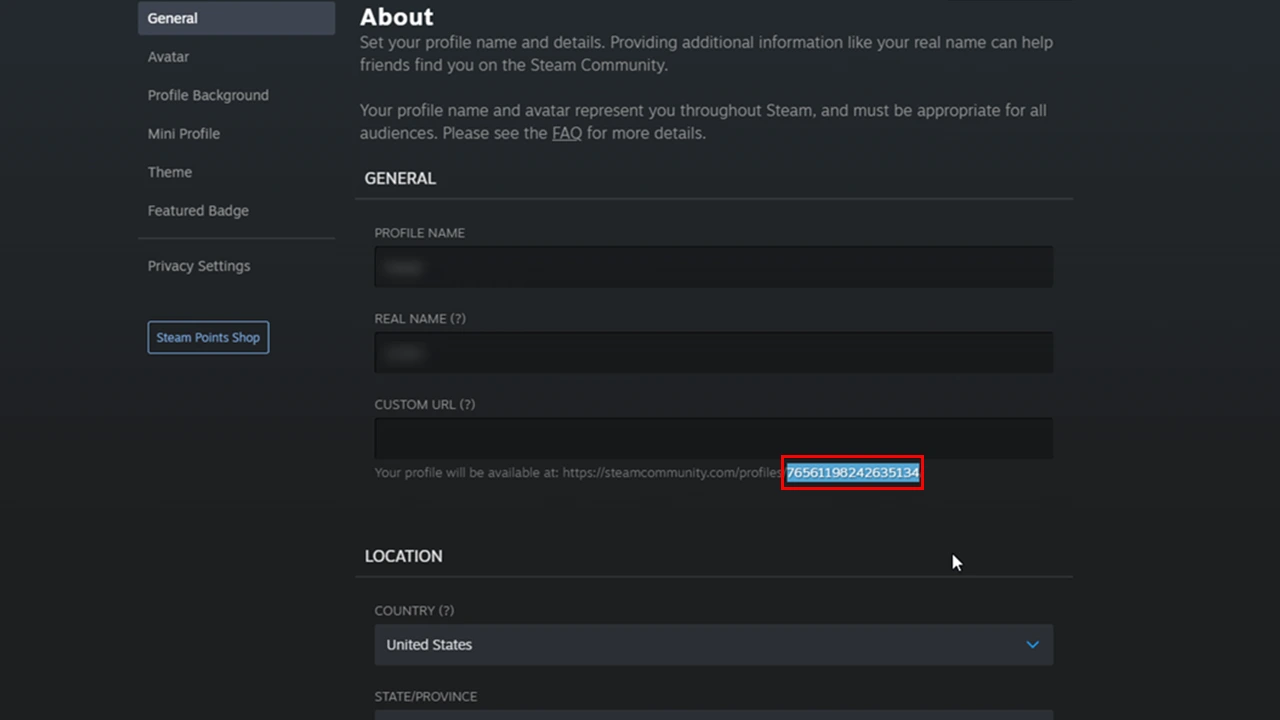
using steam id to know steam account worth
You can see the Steam ID in the marked area. Screenshot by Gamer Tweak

Before checking the worth of your Steam Library, you need to do the following things:

  1. First, you must ensure that your Steam Account is set to Public. To do this, go to Steam > Profile > Edit Profile > Privacy Settings. Then, set the “My Profile” option to public.
  2. Next, you will need your Steam ID to check your Steam Account Worth. You can find it by going to Steam > Profile > Edit Profile > General. Copy the long Steam ID from the URL mentioned beneath the “Custom URL” bar (refer to the above image).
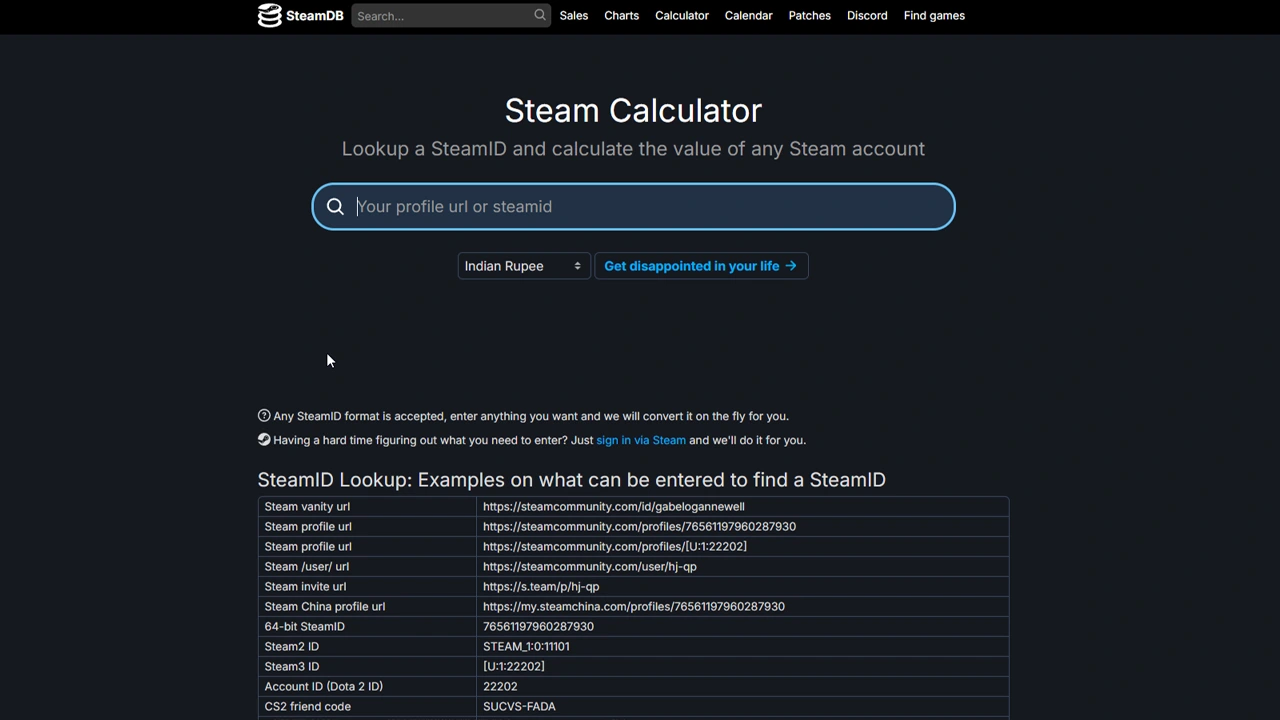
checking steam account value

Once you are done with the above, you can check your Steam Account Worth using these steps.

  1. Use your Web Browser to access the SteamDB website.
  2. On this website, go to the Calculator tab.
  3. Here, copy-paste your Steam ID in the text bar.
  4. Hit the “Get disappointed in your life” button to see your Steam Account Worth.

You can now see a plethora of details regarding your Steam Account, including your Account’s Value, Total Hours Spent, and Average Price. You can also see the value of games that you purchased earlier in terms of today’s value. If you scroll down below, you can also see the record of your Bans and Restrictions along with several other information.

For a video demonstration of the above steps, you can check out our video as well:

That’s how you check the value of your Steam Account. If you are a regular Steam user, then we have a dedicated section for you on Gamer Tweak. Feel free to browse through it.


  • CookieRun: Crumble Codes (August 2026)

    CookieRun: Crumble Codes (August 2026)

    Published Date :

    The Devsisters Corporation is back with another Cookie adventure, and like other games, there is a code redemption system in CookieRun: Crumble too! This means we can expect to get regular rewards as drops to help you assemble a team of adorable yet powerful Cookies. Here’s a list of everything currently available. Last checked for… Read More

  • Smiles Codes (August 2026)

    Smiles Codes (August 2026)

    Published Date :

    Smiles is a multiplayer survival mascot horror game where you join other players, complete objectives and survive the dangers lurking in the dark. To make the game more interesting, you can unlock emojis, animations, and more that require in-game currency (Fluff), but it can be quite a grind to earn. Don’t worry, you can redeem… Read More

  • Decaying Winter Codes (August 2026)

    Decaying Winter Codes (August 2026)

    Published Date :

    In Decaying Winter, you’re stranded on EDEN-277 where you need to survive not just scavengers, raiders and supernatural enemies but also the hostile environment. Since it’s a roguelike co-op survival experience, every little boost helps, and that’s where Decaying Winter codes will come in handy. Luckily, there is a code redemption mechanic in the game,… Read More

  • Fishing Tower Defense Codes (August 2026)

    Fishing Tower Defense Codes (August 2026)

    Published Date :

    Fishing Tower Defense codes can help you build a stronger defense by rewarding you with free Diamonds, Dice, and other useful items. Unlike the usual tower defense games, this Roblox experience has you catching unique fish and deploying them as living towers to stop waves of invading humans. As you unlock rarer fish and upgrade… Read More