Close Menu
    Facebook X (Twitter) Instagram
    Gamer TweakGamer Tweak
    • GT Originals
    • Guides
      • AC Mirage
      • Starfield
      • Wordle
      • Mobile
      • GTA 6
      • AC Valhalla
      • Genshin Impact
      • Honkai Star Rail
      • Minecraft
      • Discord
      • Street Fighter 6
      • Project Slayers
      • The Sims 4
      • Lies of P
      • Zelda TOTK
    • Roblox
      • Roblox Codes
      • Blox Fruits
      • Type Soul
      • Grow a Garden
      • 99 Nights in the Forest
    • Review
    • Roblox Codes
    • BG3
    • CS2
    Gamer TweakGamer Tweak
    Home > Lost Ark > How To Get Pheons In Lost Ark
    Lost Ark

    Lost Ark Pheon: How To Get & Use It

    Karan PahujaBy Karan PahujaAugust 10, 20223 Mins Read

    Pheon is one of the many currencies that you can get in Lost Ark. This is a type of currency that you can’t directly buy but can get by converting other currencies. Its main use is to purchase stuff from the Auction House. So in this guide let us check all the ways that let you get Pheons in Lost Ark and how to use it.

    How to Get Pheon in Lost Ark
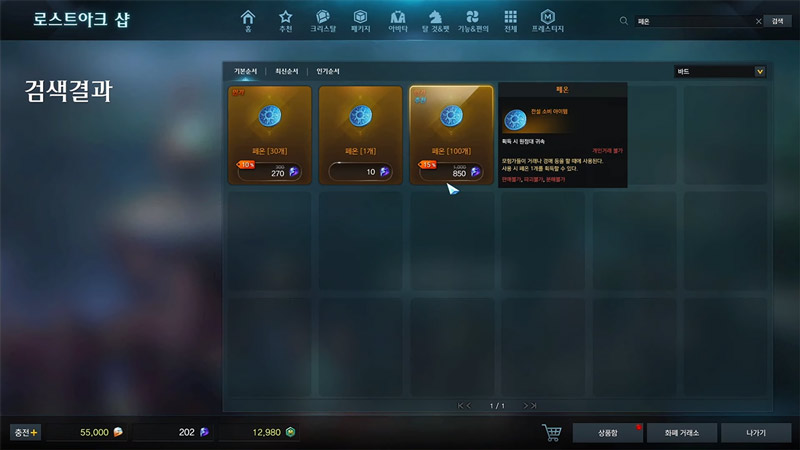
    lost ark how to get pheon
    Image Credit: Aiyulol on YouTube

    There are 2 ways to get Pheons in Lost Ark.

    • From Daily Login: Simply launch the game and daily login rewards. One of the rewards among them will be Pheons. Keep logging in daily to make sure you don’t miss out on them.
    • Using Blue Crystals: You can buy Pheons in exchange for Blue Crystals. It typically costs 850 Blue Crystals to get 100 Pheons.

    There are two ways to get Blue Crystals, one is by exchanging them for gold and the other by using Royal Crystals. You have to spend real money to get Royal Crystals. As for Gold, it is easy to get, you can get it by progressing the game’s campaign, or by completing quests. Lastly, you can also spend Royal Crystals to get Gold. This is how to get Blue Crystals:

    1. Go to the Lost Ark shop.
    2. Next click on the Currency Exchange button in the bottom right corner of the screen.
    3. Here, click on the Buy Crystals button.
    4. Now, set the Sale Price as the Recommended Sale Price. You can also change the quantity below it, it will increase or reduce the Blue Crystals you get.
    5. Press Add button, and it will bring up a popup about the information of your transaction. Click on the Add button again.
    6. It will now bring up a popup that says Transaction Complete. Here click on the green check mark to go to Transaction History.
    7. Click on the Claim button to get your Crystals.

    The above method uses gold to get Blue Crystals. If you have Royal Crystals then you can first convert them into gold and then follow the above steps.

    How to Use Pheons in Lost Ark

    You can use it to buy items from the Auction house. You can find the following things in the Auction House:

    • Equipment Chests
    • Avatar
    • Seal Books
    • Enchant Materials
    • Combat Goods
    • Food
    • Life
    • Adventure Book
    • Voyage
    • Pets
    • Mounts
    • Misc
    • Gem Chests

    That covers this guide on how to get Pheons in Lost Ark and how to use them. Since you are interested in this game you should also learn about the different currencies it has. Also, check out our Lost Ark guides if you need help on other topics of this game.

    Lost Ark Guides PC Tips and Tricks
    Share. Facebook Twitter Pinterest LinkedIn Tumblr Email Reddit
    Karan Pahuja

    Karan is a Soulsborne enjoyer who grew up playing NES classics like Contra, Mario, Zelda, Kirby, Megaman, and a list of other games that go on. He also enjoys FPS games like Overwatch 2 and Valorant. Currently, he is maining Cammy in Street Fighter 6, while experimenting some Sorcerer builds in Diablo 4. And if you need help with some boss fights in a game, he is your guy!

    Related Posts

    Players Are Spending More Time in Virtual Worlds Than Ever Before, Showcasing the Largest Surge on Record

    December 3, 2025

    Unwritten Helldivers 2 Rules – Don’t Make These Mistakes!

    November 20, 2025

    Where Winds Meet Codes (December 2025)

    November 19, 2025

    User Experience in Quick Online Games – How to Retain Players

    November 11, 2025
    Latest Codes

    Last Letter Codes (December 2025)

    December 3, 2025

    The Forge Codes Roblox (December 2025)

    December 1, 2025

    Inazuma Strikers Codes (December 2025)

    November 26, 2025

    Deadly Delivery Codes (December 2025)

    November 26, 2025

    Roblox Hypershot Codes (December 2025)

    November 26, 2025

    SLAP Codes Roblox (December 2025)

    November 25, 2025
    Trending
    • Players Are Spending More Time in Virtual Worlds Than Ever Before, Showcasing the Largest Surge on Record
    • Last Letter Codes (December 2025)
    • Where to Find Tomo’s Cat in The Forge
    • Discover the Best Casino Games at Greatwin Casino for UK Players
    © 2025 Gamertweak.
    • Advertise With Us
    • About Us
    • Team
    • Contact Us
    • Privacy Policy
    • Terms
    • Open Critic

    Type above and press Enter to search. Press Esc to cancel.