
Home > Mobile > Import Character Design in Gacha Club - Complete Guide

Gacha Club: How To Import Characters

Updated Date :

In Gacha Club, players can import characters into their game and there are two ways through which it can be done. If you are someone who wants to import a character’s design you just got from someone, or maybe you found this amazing character design you want in your game, no need to search anymore. This guide will help you import characters designs using online code as well as offline import.

How to Import Characters in Gacha Club

Now, before we start, it is worth noting that you have to be level 5 to use this feature in your game. Furthermore, you require the 6-digit Code of the character you wish to import, or you can have the long offline code. Any of these codes have to be pasted on a space in the profile to get the desired character imported.

Now that you have the code with you, let’s begin to import.

  1. Firstly, open the game and head to Home.
  2. Next, choose a character that can be replaced, and go for the default character.
  3. Now, click on Profile located in the bottom right of the game.
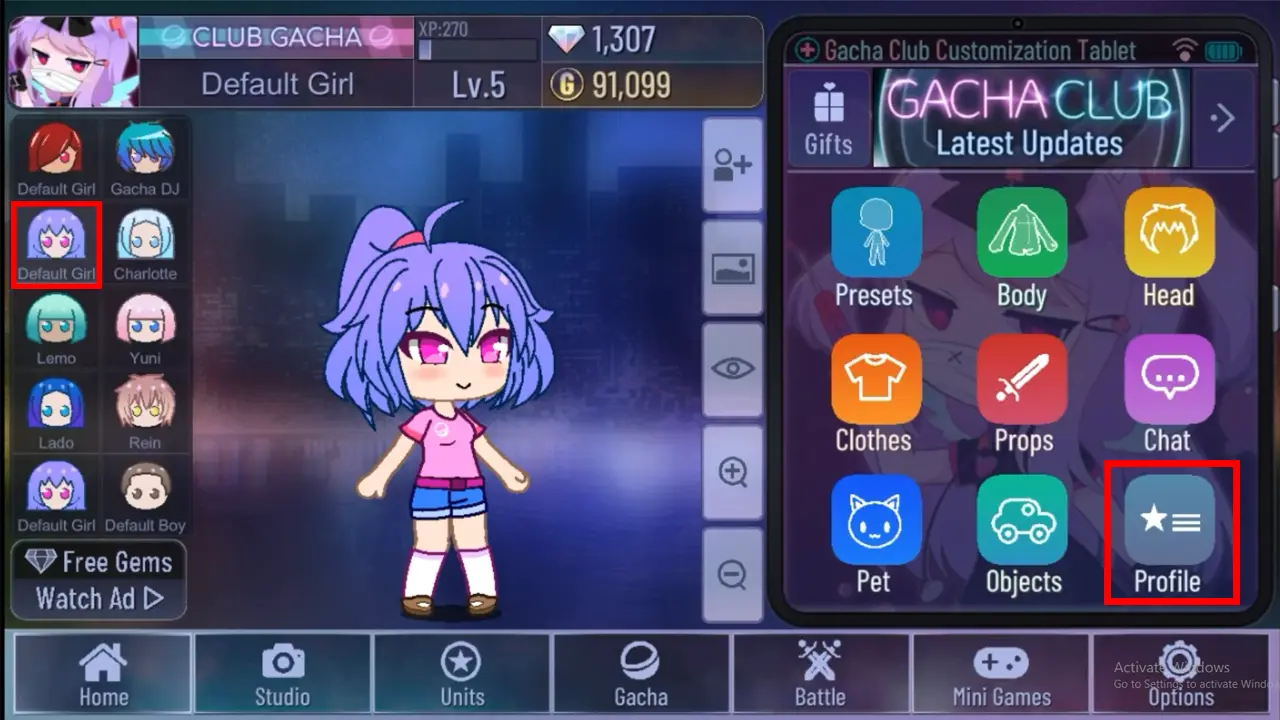
    Step to open profile in Gacha Club to import character
    Img Credit- Kappren
  4. Next, click on Import in the bottom right of the profile settings.
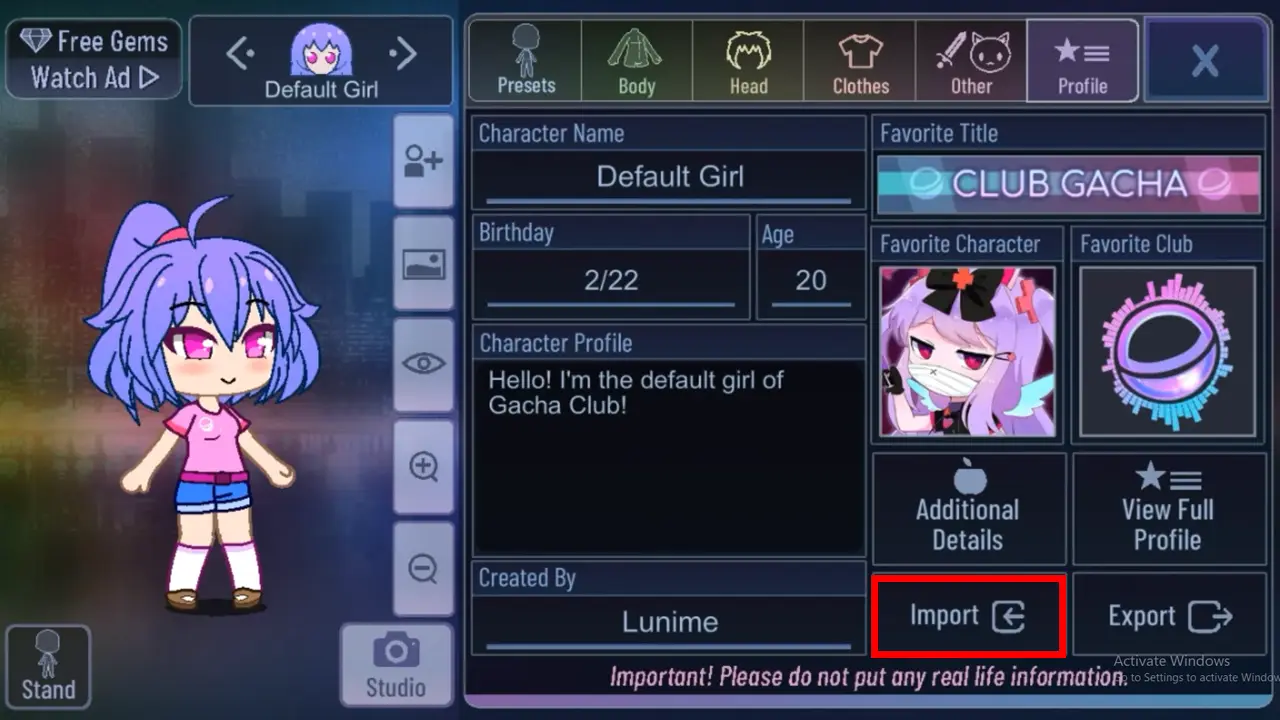
    step to import character in Gacha Club
    Img Credit- Kappren
  5. Further, paste the code into the box at the top space and then click on Import.
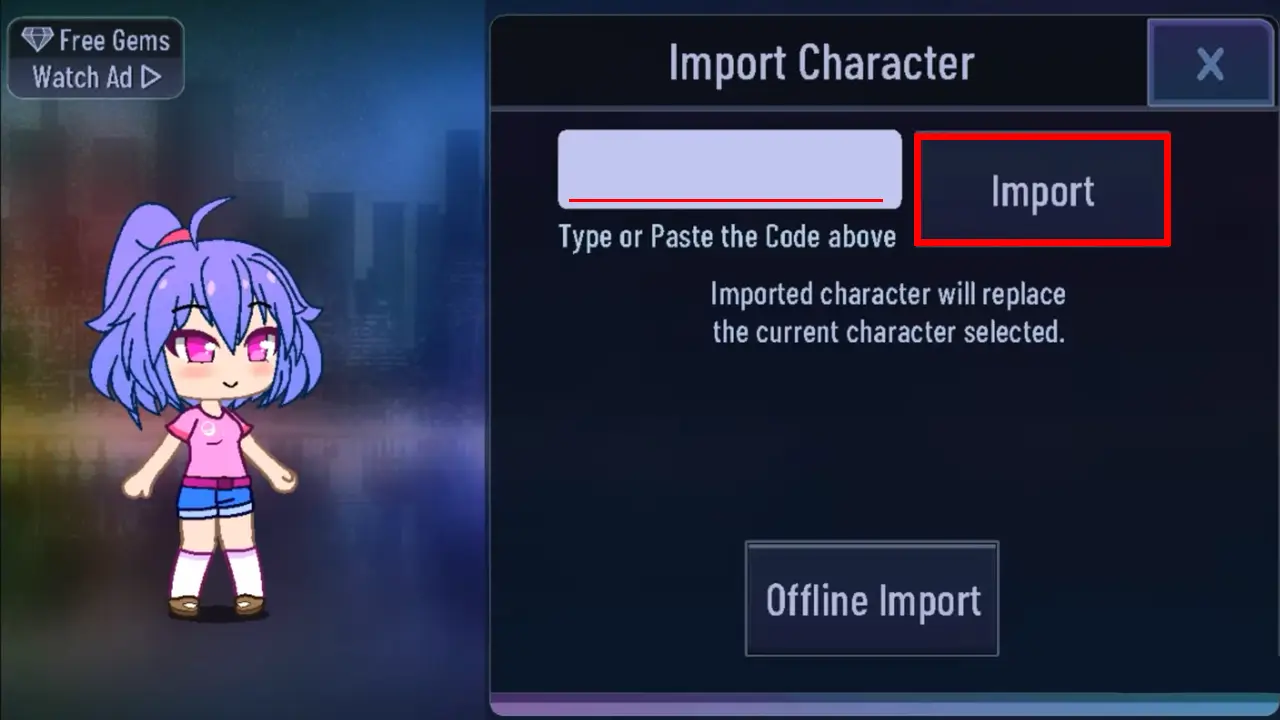
    Import character in Gacha Club
    Img Credit- Kappren
  6. Additionally, you can use Offline Import to import it, for this, you have to paste the long digit codes to the given space after clicking Offline import.

As mentioned earlier, be cautious about import because the new character will replace the one you currently have selected

There are a lot of character designs available on the Reddit page for Gacha Club for these long-digit code. you can use this offline feature to import the design if you are having issues with the normal online import method.

That’s everything you need to know on how to import character design in Gacha Club. While you are here, check out our articles on the best Gacha games to play on iOS and Android.


  • Mafia Codes Roblox (July 2026)

    Mafia Codes Roblox (July 2026)

    Published Date :

    Mafia is a social deduction game based on the classic concept; however, to make things more interesting, you might want to unlock new disguises or animations. You’ll need Credits for that, and thankfully, Mafia codes are one of the easiest ways to earn free Credits. Check out the list of all working rewards below. Last… Read More

  • Split or Steal Brainrot Codes (July 2026)

    Split or Steal Brainrot Codes (July 2026)

    Published Date :

    Winning a rare Brainrot (by stealing or splitting) is fun, but you’ll also need Grade Tokens to improve its rarity and make your collection even stronger over time. Thankfully, Split or Steal Brainrot codes give you free Grade Tokens, making it easier to upgrade your favorite Brainrots to make a lot of money. If you… Read More

  • Just Yeet Bro Codes (July 2026)

    Just Yeet Bro Codes (July 2026)

    Published Date :

    As the name of the game suggests, just yeet, bro! All you have to do is grab a player and throw them off the stage. However, you will need Bananas to unlock skins, abilities and more, which is where these Just Yeet Bro codes come in real handy! Here’s the complete list of all the… Read More

  • Roll to Defend Codes (July 2026)

    Roll to Defend Codes (July 2026)

    Published Date :

    Roll to Defend codes can reward you with free Units, cash, and luck boosts to summon better Units to fight against zombies. Since upgrading your Backpack and unlocking new zones can take time, codes provide much-needed boosts, which is why we have a list of all the currently available rewards. Redeem them before they expire!… Read More








