EA Sports has launched its latest and last edition of FIFA and fans are enjoying it. The game has managed to bridge the gap between real-world football and in-game mechanisms. The use of HyperMotion 2 Gaming Technology has brought upgrades not just in the graphics but also in the AI motion and movement, the upgrades in attacking, skills, dribbling, and defending. However, with such upgrades, low end PCs will need to boost FPS and use the best settings in FIFA 23. While the upgrades are certainly good, they do put a load on your CPU and that can be frustrating for low end PCs. This might lead to lag, stuttering, and frame drop. To avoid this, we made this guide with the best settings.
Best Settings for Low End PC to Boost FPS in FIFA 23
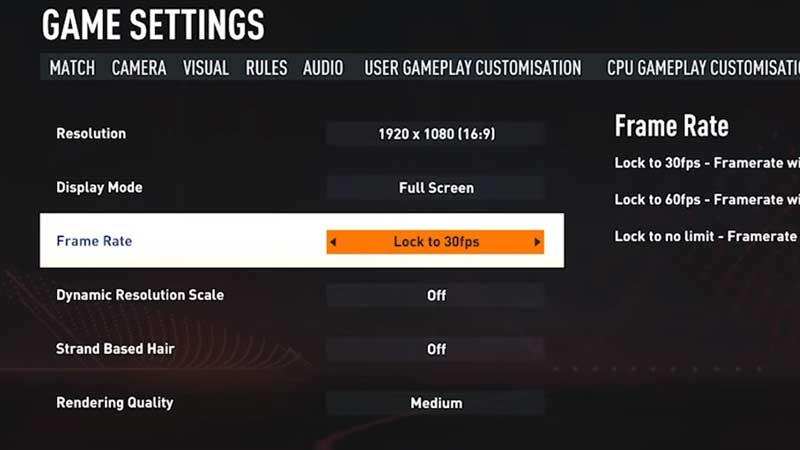
Veterans of FIFA are aware of the pop-up box that appeared when they launched the application. While you had to start the game from the pop-up box, you could also change the Game Settings from it. EA Sports have discarded the pop-up box completely and Game Settings come within the Customization option in FIFA 23.
While you head over to the Game Settings, you will need to open the Display Configuration to alter the Graphic settings. Here are the best settings for Low End PC to Boost FPS in FIFA 23:
- Resolution – 1920 x 1080 (16:9)
- Display Mode – Full Screen
- Frame Rate – Lock to 60 FPS / Lock to 30 FPS (Depending on FPS drops)
- Dynamic Resolution Scale – Off
- Strand Based Hair – Off
- Rendering Quality – Medium / Low (Depending on performance, you can also go for Auto)
These are the best settings for low end PC and will Boost your FPS in FIFA 23. However, since this is a game that puts a high load on your CPU, playing on low end PCs might still give you stuttering and FPS drop troubles even with these settings. But do give these settings a try as they may lower your troubles and allow you to enjoy the game.
That’s all there is on the Best Settings for Low End PC to Boost FPS in FIFA 23. While you are here, make sure you do not miss out on our FIFA 23 guides at Gamer Tweak.