Discord is a popular communication platform used by many gamers to create private chatrooms. Although the major function is communication, it turned into a full-fledged app where you can play games, video chat, stream games, and more. However, many users are looking to fix an error where Discord had a yellow border while sharing the screen. If you too are one of them then you are at the right place. This guide will walk you through fixing this annoying issue.
How to Fix Yellow Border Around the Screen While Sharing on Discord
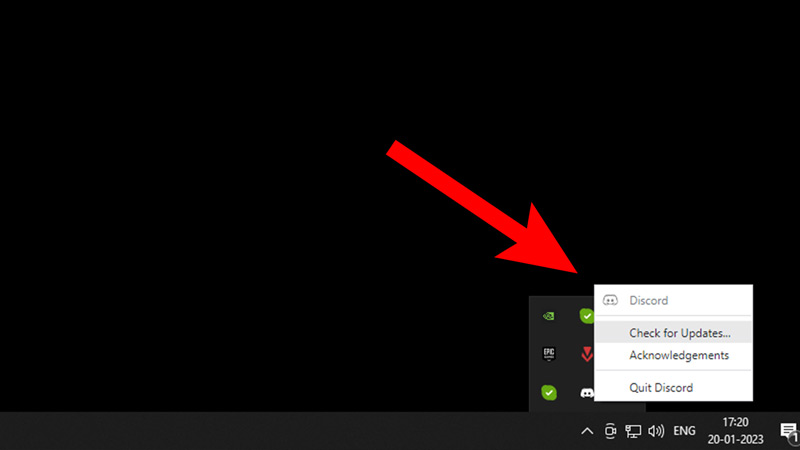
Since this issue came up after updating Discord, there can be two reasons for it. Discord faced an error while updating to the latest version. Or the update isn’t compatible with your Windows version. We’ll explain how we reached this conclusion but first let’s focus on fixing it.
To fix the Yellow Border Around Screen on Discord:
- Update and Restart Discord
- Restart the PC
- Update Windows to the Latest Version
- Switch to Windows 11
If you have an updated version of Discord and the problem still persists, then try reinstalling and restarting the PC. This will remove the damaged or corrupted files. That should fix the issue but if not, then it must be due to your Windows version.
Why Does it Happen?
After an update, users faced an issue where they noticed a Yellow Border around the screen while using Discord’s Streaming or Screen-sharing feature. As the number of users facing this error increased, a senior staff engineer addressed the issue with the following words:
“We are using a new form of graphics capture. However, on older versions of windows (windows 10) specifically, this graphics capture interface would make the window being captured having a yellow border. On Windows 11, it does not have the yellow border. We had a bug in the code that was not detecting this appropriately. For now, we are rolling back this new capture interface, so that we can fix this issue, so in around ~30 minutes we should have this fix deployed to the stable client – and the yellow borders will be gone following a reload of your client. Sorry for the inconvenience!”
We hope our methods helped you fix the Yellow Border While Screen Sharing issue on Discord. For more helpful guides regarding this app like How to Use Netflix Bot, check out our Discord section.