Do you want to know how to fix the Xbox 360 network failed, internet blocked error? Well, sometimes when players try to play online they are not able to connect to the online service, and every time it gives some kind of DNS error. The problem is that even after connecting the network cable to play and doing the connection test, the Xbox 360 console recognizes the network but then it fails when it connects to the internet. So, in this guide, we will tell you how to fix such common Xbox 360 wireless networking problems in detail below.
Xbox 360 Network Failed, Internet Blocked Error Fix
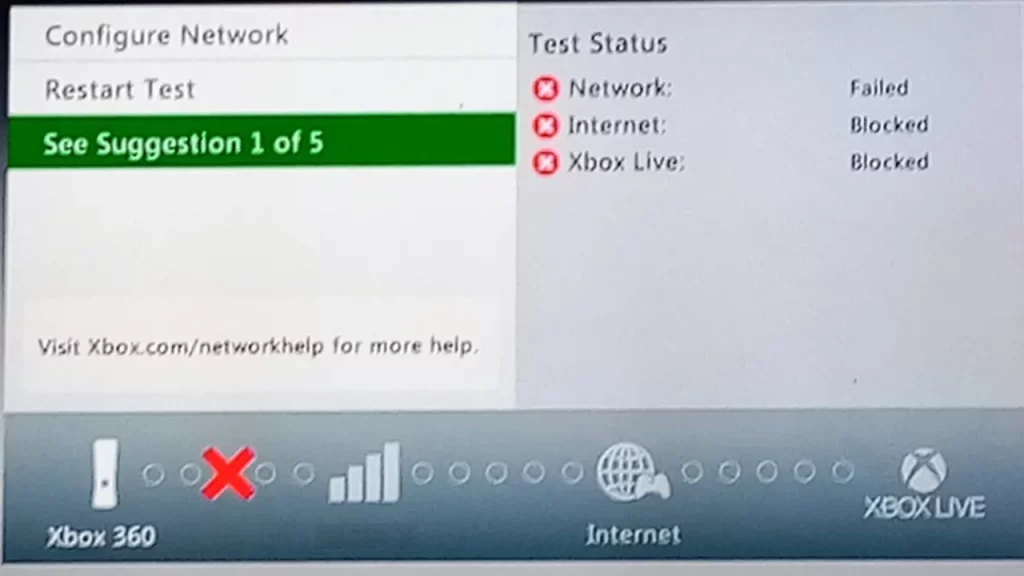
Follow the steps below to fix Xbox 360 network failed, internet blocked error:
- Configure your modem as a bridge (if applicable).
- Connect the router to the modem (connect the modem to the router’s Wan port) and make the necessary settings (provider username and password, network password if it is wireless, etc.).
- Connect a network cable to the PC and another to the Xbox 360.
- If there is a Firewall on the router, try disabling it so that the Xbox can try to connect.
- In your current configuration, there could also be an error in the network settings on the Xbox. The IP it uses must be different from the one on the card, for example:
Second network card (PC):
IP: 192.168.1.1
Mask: 255.255.255.0
Gateway: 192.168.1.1
DNS: 192.168.1.1
XBOX (connected to the second network card):
IP: 192.168.1. 2
Mask: 255.255.255.0
Gateway: 192.168.1.1
DNS: 192.168.1.1 (This way you will use the computer’s DNS settings).
Connect Xbox 360 to Internet with Ethernet cable
It is very easy to connect the Xbox 360 to the Internet with an Ethernet cable that only takes a few minutes to put into practice.
- First of all, get a LAN network cable and connect one of its ends to one of the ports on the back of the modem.
- Next, carry out the same operation with the other end of the cable, but insert it into the LAN port of the Xbox 360.
- After that turn on the console and open the Network Settings section by pressing the right back button on the controller and selecting the Settings > System > Network Settings menu items.
- You will find the Wired Network icon with a check mark in the corner, indicating a successful connection.
- By selecting the latter, you will be able to access the panel for testing the connection to Xbox Live services, in order to verify that everything is going well.
Connect Xbox 360 to Internet via WiFi
If you want to know how to connect Xbox 360 to the Internet with WiFi, follow the steps below:
- The first thing you need to do is turn on the Xbox 360 console and use the right button on the controller to go to the Settings menu.
- After doing this, select the System item and choose the Network Settings tab.
- Now, wait a few moments and locate the Wi-Fi network to which you want to connect your Xbox 360: after highlighting it, press the A button on the controller to connect to it.
- In the next screen that appears, type the password associated with the Wi-Fi network and press the Start button to confirm the entry.
- In the warning that appears on the screen, choose the “Yes” option to start the connection test to make sure everything is working correctly.
- At the end of this procedure, press the Continue button to complete the operation.
That is all you need to know about how to fix Xbox 360 network failed, internet blocked error. In the meantime, do not forget to check out our other Xbox 360 Troubleshooting Guides, only on our website Gamer Tweak.