
Nothing is worse than finding out that voice chat is not working in Diablo 4 while trying to take down a tough boss with party members. As you know, communication is key, especially in a co-op game like this one, because you can time your ultimates and plan your next move pretty easily. Typing in the chat is not an option during situations where every second matters. So, here’s what to do if VC is not working in D4 on PC, PS and Xbox.
How to Fix Voice Chat Not Working in Diablo 4
If VC is not working in D4 and you’re not able to hear other party/group members, here are some of the solutions you can try to fix it.
Check Sound Output Device
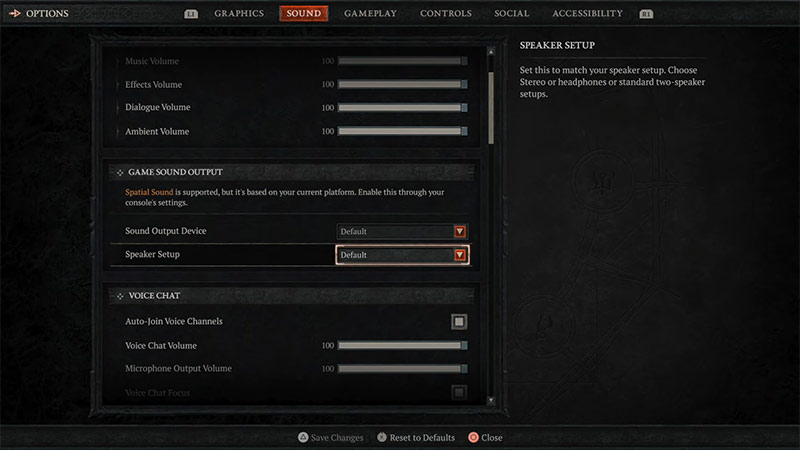
Having the right playback device is important to listen to other players while playing. You won’t be able to use the voice chat properly if your in-game sound output device is different than the headphones or speakers you are using. To check if you have the right sound output device selected, here are the steps you can follow
- Open the Main Menu of the game.
- Select Options and head toward the Sound Tab.
- Here, scroll down until you find Game Sound Output.
- After which, select your audio device from the option.
This will help you change the playback to the device you are using and you will be able to listen to other players while in-game. You check the output device on your device as well by going into respective sound settings on PC & Consoles.
Change Voice Chat Mode
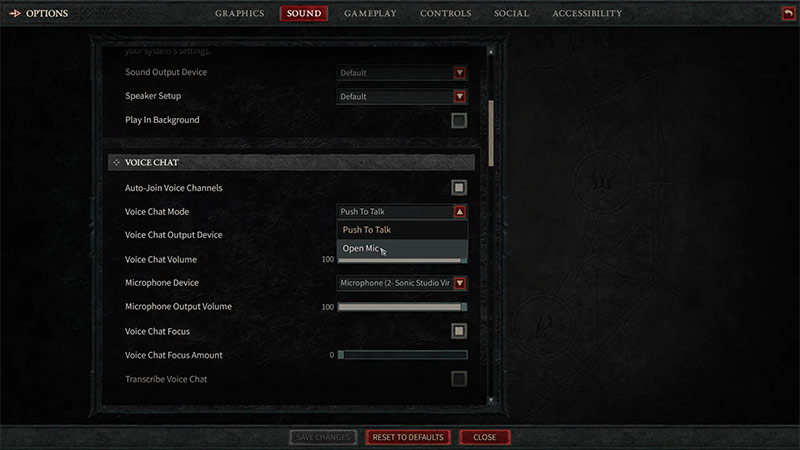
You can change the voice chat mode in the game from push-to-talk to an Open Mic on PC. If you have push-to-talk enabled make sure you are using the right key bind and pressing it before using voice chat. You can turn on the Open Mic if don’t want to keep pressing the button before you talk. Here are the steps you can follow
- Open the Main Menu of the game
- Select Options and head toward the Sound Tab
- Here, under the Voice Chat option select the Open Mic instead of push-to-talk
This will enable the Open Mic options and you would join the voice channels without pressing any buttons.
That is everything covered on how you can fix voice chat not working in Diablo 4. Check out our guide on how you can fix the login issue in Diablo 4, right here on Gamer Tweak.











