
Fornite features one of the best battle royale gameplay experiences. But to survive its unforgiving matches, you need to master its movements and controls. Due to some issues, players are unable to sprint during the matches. This issue can be extremely troublesome during the mid-game. If you don’t sprint, you might be eliminated by an enemy player. Not to worry, we do have some solutions or workarounds to resolve this issue. So, check out our guide on how to fix the Fortnite sprint not working issue.
How to Fix Fortnite Sprint Not Working Issue
You can resolve the sprint not working issue by simply checking your Controls settings. You can encounter this issue mainly due to not assigning a keybind or control for Sprint. So, here’s how to fix the sprint not working in Fortnite:
- From the Main Menu, head over to Settings.
- If you are using a Mouse and keyboard, head over to the Keyboard Controls.
- Over there, check if you have assigned a keybind for the Sprint.
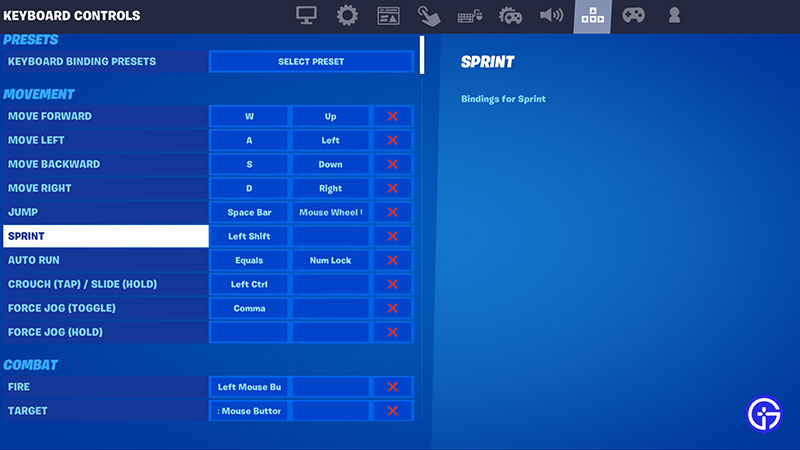
- You can assign the control movement by hitting the Sprint option and the keybind to set it.
- Once you have chosen the keybind, hit the Apply button to save the setting.
- If you are using a Controller, head over to the Controller settings and navigate to the Edit Controls option.
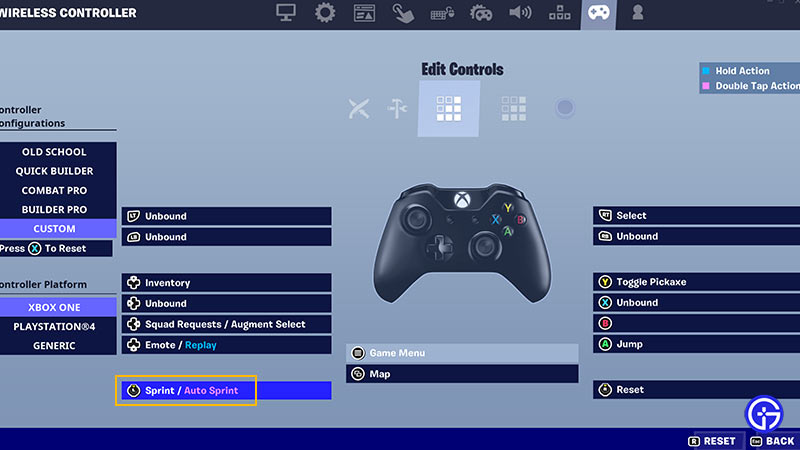
- Then, check if you have assigned a control for sprinting. If not hit the Sprint/Auto Sprint option and assign the Action for it.
- After you assign the action, don’t forget to hit the Apply setting to save the setting.
This should hopefully resolve the issue and allow you to sprint in Fortnite. You can also check out our guide on the best Controller settings for combat and building for more insight.
That’s everything covered on how to fix the Fortnite sprint not working issue. If this guide helped you, check out our more guides on how to bounce with Shockwave hammer, all mending machine locations, how to get Deku and other MHA characters, and more helpful Fortnite guides on our dedicated section right here on Gamer Tweak.











