Despite being one of the most popular games on Steam right now, the Finals has some bugs and glitches. But since it is a new game, we can expect such problems to show up during the initial stages. One such problem has arrived in the form of an error code – TFLA0002. For those wondering what’s up with this error code, it is basically a common connection issue.
The error code TFLA0002 in the Finals might have occurred due to load on the server as tons of players are trying to log into the game simultaneously. If you are troubled with this error, then we are here to help you out with that. Here are the solutions to get the error code TFLA0002 resolved.
Here’s how to Fix the Error Code TFLA0002 in the Finals
Before we move ahead and start with our fixes, make sure that your Internet Connection is stable. That’s because an unstable network connection is the root cause of all such major server issues. In case your Internet is working fine, then you can proceed with the following solutions:
Disable VPN
If you are using any third-party VPN service, then I recommend you disable it as soon as possible. We know that a VPN secures your data but in exchange it slows down your Internet speed.
Verify & Repair Game Files
This is one of the most common solutions for fixing most problems on all the games available on Steam. All you need to do is head over to your Steam Library > right-click on the Finals > Properties > Installed Files > Verify integrity of game files.
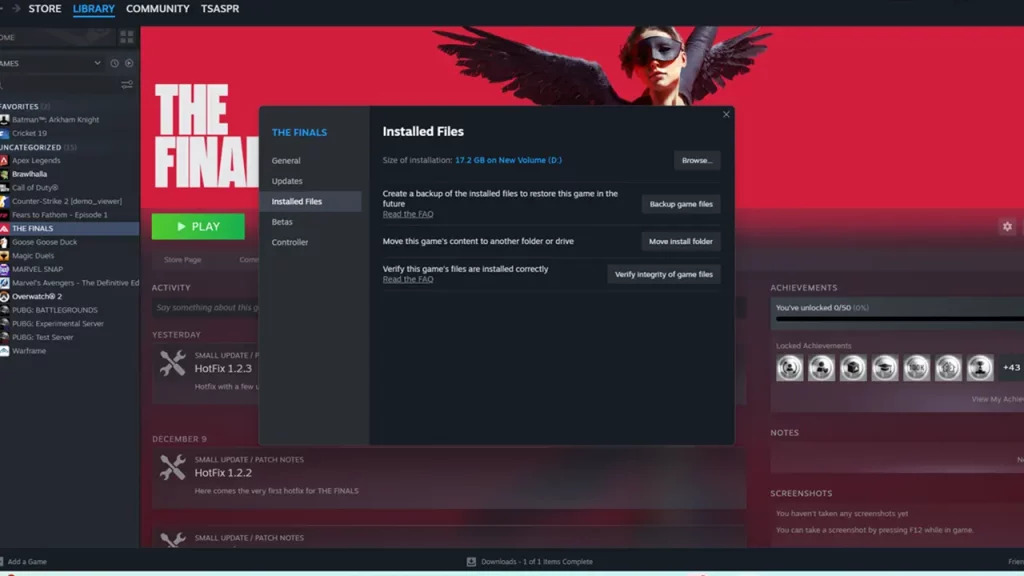
This will find and replace the corrupted files if there are any. So if the error code TFLA0002 was caused due to a technical error, it should be fixed using this method.
Check for Updates
There are chances that this issue is already fixed in any latest patch update rolled out by the developers. Just check out if you have any pending updates remaining. If so, then please download and try launching the game. It should work without any errors this time.
Reinstall Game
If nothing works for you, then try to uninstall and reinstall the game. Since this is a lengthy method, it should be your last resort.
Or else, you can directly contact the Finals Support Website. The developers team is pretty active so they should reach out to you soon.
That covers everything on this topic. Hopefully, your error code TFLA0002 will now be fixed. For any other information related to The Finals, feel free to navigate through our guides on Gamer Tweak.