Home > Call of Duty: Modern Warfare II > How To Fix Error Code 0xc0000005(0) N In Modern Warfare 2

Modern Warfare 2: Error Code 0xc0000005(0) N [Fix]

Updated Date :

Modern Warfare 2 has a plethora of in-game elements that can keep you entertained for hours. Developers have put their level best while giving the players a lifetime best COD experience. Although, we should not deny the fact that the game has been hit by multiple bugs and glitches. This is not something new, as there are multiple issues reported by players since Modern Warfare 2 was released in Beta. Recently, some players encountered an Error code “0xc0000005(0) N” that caused the game to stop working. If you are one of those players who encountered this issue, then this article is all you need. Check out this guide that features the steps to fix the Error Code 0xc0000005(0) N in COD MW2.

Error Code 0xc0000005(0) N in Modern Warfare 2 [Fix]
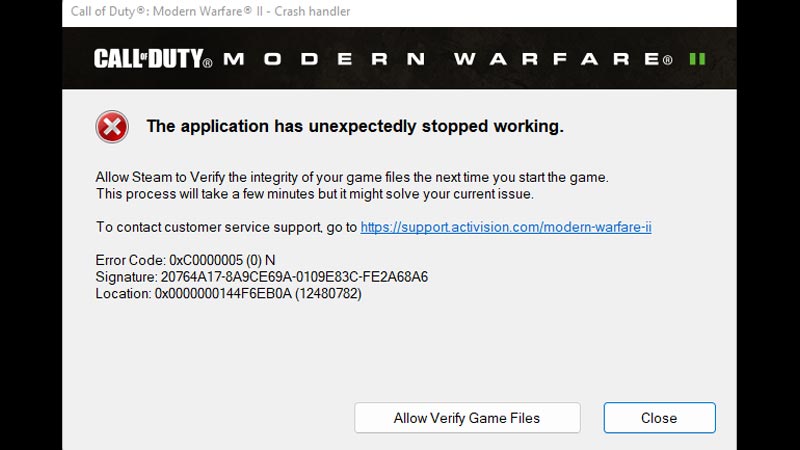
How To Fix Error Code 0xc0000005(0) N in Modern Warfare 2

For some players, this issue was fixed by turning off the NVIDIA Reflec and On-Demand Texture Streaming. Both of these settings can be disabled by heading into the in-game Graphic settings. Both of these settings make the game run on the best possible potential of your hardware. This can be a possible reason for the Error Code 0xc0000005(0) N to appear in MW2.

If this doesn’t fix the error, then try to set the Shader Quality on low settings. If Shader Quality is set to high, then it may cause the game to stop working. This setting is also found in the Graphic settings of MW2.

Also, try running the game in Administrator mode as this will let the game access all the files. This will rule out the possibility of the game missing any file by chance. Further, make sure that you have lowered your frame rate so the PC doesn’t get overclocked.

At last, try updating your Graphic drivers from Device Manager to check if it fixes Error Code 0xc0000005(0) N in MW2.

Also Read | Fix Modern Warfare (MW) 2 “Application Has Unexpectedly Stopped Working” Error

That’s all you can do to fix the Error Code 0xc0000005(0) N in Modern Warfare 2. If you found this article helpful, then make sure to check out our other COD MW2 guides.

  • Clean the Squishies Codes (July 2026)

    Clean the Squishies Codes (July 2026)

    Published Date :

    There’s something surprisingly satisfying about picking up the cute Squishies and putting them back on their designated shelves. If you’re interested in getting some unique rewards including free Squishies, this guide is for you. Here’s the complete list of all the working rewards. Last checked for new codes on July 13, 2026 All Clean the… Read More

  • Scratchy Loot Codes (July 2026)

    Scratchy Loot Codes (July 2026)

    Published Date :

    If you want a little luck boost while playing Scratch Loot, codes come to the rescue! In this experience, you scratch cards, reveal symbols, earn coins, and keep upgrading to get better rewards. To make this journey easier, the developers regularly release codes, and if you don’t want to miss out, redeem the freebies mentioned… Read More

  • My Squishy Box Store Codes (July 2026)

    My Squishy Box Store Codes (July 2026)

    Published Date :

    Every new customer brings another opportunity to grow your business and expand your collection of adorable squishies. To help you even more, the devs release My Squishy Box Store codes that provide free cash and in-game items. These freebies that can help you upgrade your shop faster and earn more while handling a steady flow… Read More

  • GTA 6 Players in Australia May Need Age Verification Due to New Online Safety Rules

    GTA 6 Players in Australia May Need Age Verification Due to New Online Safety Rules

    Published Date :

    Australian players could have an extra requirement to meet before accessing Grand Theft Auto VI’s online features. Under the country’s updated online safety regulations, games classified as R18+ may need to verify that players are adults instead of relying on a simple age confirmation (as per news.com.au). If GTA 6 falls under those requirements, Rockstar… Read More