Home > Modern Warfare 3 > COD Modern Warfare 3 Dev Error 5433 – How To Fix

COD Modern Warfare 3 Dev Error 5433 – How To Fix

Published Date :

Ever since Call of Duty Modern Warfare 3 was released, players have encountered multiple issues during their playthroughs. The “Dev Error 5433” is just one of those issues that most probably occurs due to corrupted cache data. You can sigh in relief because there’s nothing wrong with your hardware. Dev Error 5433 is certainly a mistake from the developer’s end.

Being a true gamer, you can’t just wait around for this issue to get resolved on its own. Instead, you should put effort and try some workaround to get the game running again. With that said, you can find the solution to fix the Dev Error 5433 in COD MW3 below.

Note: For now, this issue has only taken place on PS4 and PS5. In case you have encountered it on Xbox or PC, you can use the following steps as the solution remains the same.

How to Fix Dev Error 5433 in COD MW3

According to a tweet posted on Call of Duty Updates’ X (Twitter) Account, the developers are trying to fix this issue. You will know the issue is fixed if a new patch update is rolled out. Until then, you can use the following steps to fix the Dev Error 5433 in COD MW3:

  • Launch the game and go to Settings.
  • From there, enter the Graphics section and navigate to the “On-Demand Texture Streaming” option.
  • Select Show More and adjust the Allocated Texture Size to Small.
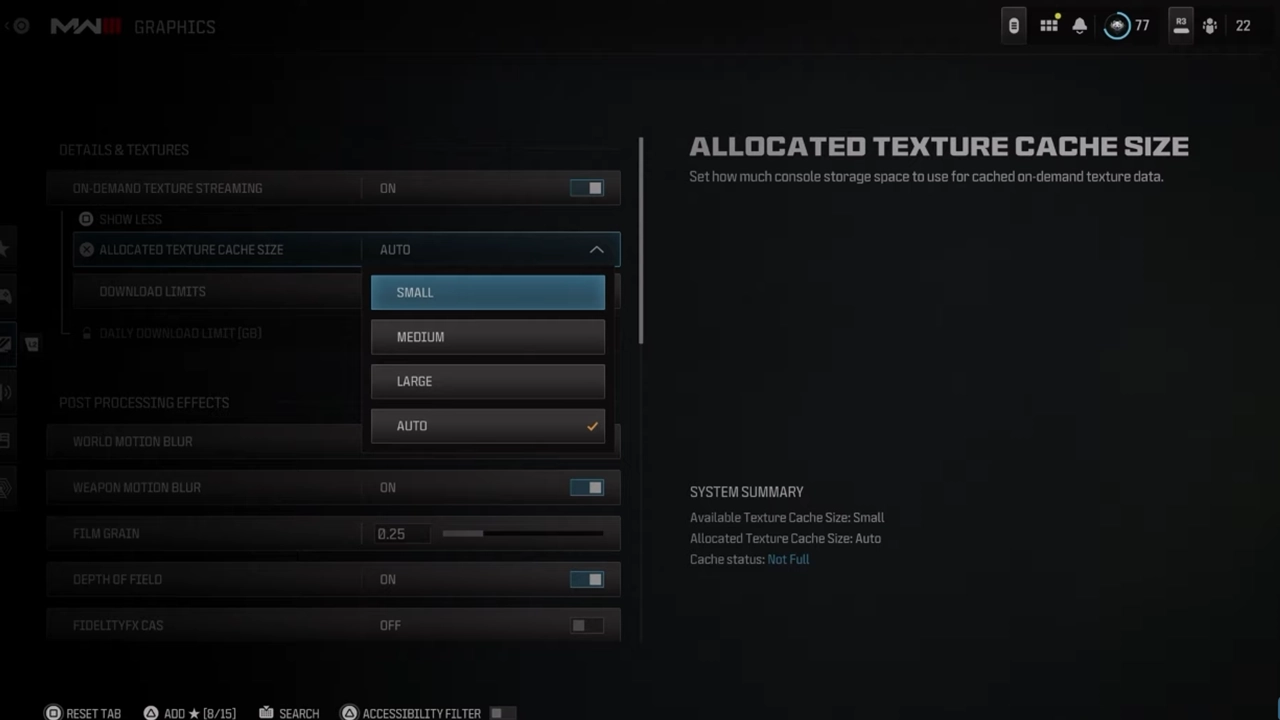
fixing the dev error 5433 in Modern Warfare 3

Once you are done with the above steps, you can get past the Dev Error 5433 in COD MW3. As I mentioned earlier, players facing this error on PC and console can also use this fix. If it is not working for some reason, you can try reinstalling the game. Since this method consumes a lot of time, I would suggest you consider it as a last resort.

That’s all you can do to fix the Dev Error 5433 in COD MW3. By the way, did you know that you are also vulnerable to a Black Screen Error and TYR Conversion Kit Bug? You can check out our guides to get those errors fixed in case they appear.
  • ZZZ Version 3.0 Is the Biggest Patch Yet: Here’s What Changed and Why It Matters More Than You Think

    ZZZ Version 3.0 Is the Biggest Patch Yet: Here’s What Changed and Why It Matters More Than You Think

    Published Date :

    Zenless Zone Zero 3.0 patch is the biggest patch since the launch of this game. With the introduction of a new element, a rarity tier, a free anniversary character, and an explorable region, you will find this patch launch exciting. It is necessary to learn what you should prioritize from all of these because of… Read More

  • Anime Duelists Codes (July 2026)

    Anime Duelists Codes (July 2026)

    Published Date :

    Anime Duelists follows the tried and tested formula of spinning stars to unlock fighters, sending them into battle and collecting rewards. If you want to get unique fighters, abilities, and progress through various realms, you need these code rewards! You can get anything from free Gems, Trait Rerolls, Stats Reroll, Super Luck, Star Speed potion,… Read More

  • Mini Cup Codes (July 2026)

    Mini Cup Codes (July 2026)

    Published Date :

    In Mini Cup, you open up packs to unlock footballers, build houses, and win matches against rival teams. This makes it a perfect mix of some of the most popular gameplay loops for soccer fans on Roblox. To grow your club, you’ll need cash, as well as special packs, which is where Mini Cup codes… Read More

  • Be The Final Boss Codes (July 2026)

    Be The Final Boss Codes (July 2026)

    Published Date :

    Now you can be the final boss! In this experience, you summon minions to fight for you and take down waves of heroes. To level up, you’ll need plenty of coins and various resources, which is where Be The Final Boss codes come in handy. If you wish to boost your character and stay one… Read More