
In Farming Simulator 22, become a modern age Farmer and build your farm, grow crops, raise animals, and do a lot more. Fertilizers are an important resource in growing crops and this is especially true for Farming Simulator 22. But once we have bought the Fertilizer, how do we fill it up in our Fertilizer Spreader? To answer that question, I have made this guide that will show you how to Fill the Fertilizer in Farming Simulator 22.
How to Fill Fertilizer in Farming Simulator 22
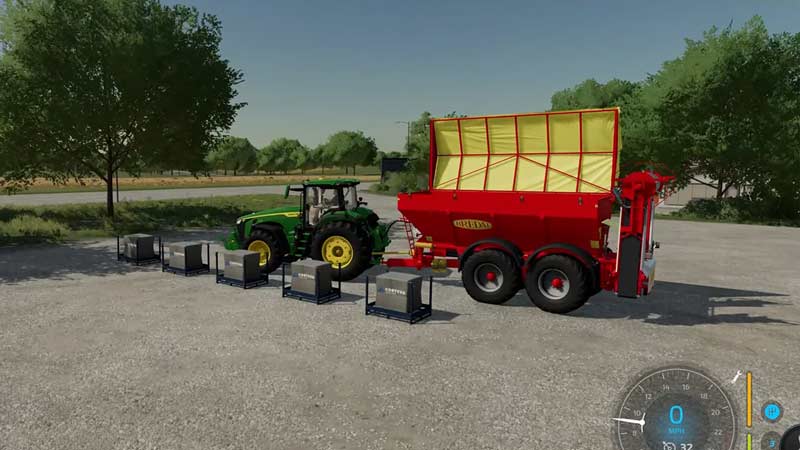
Before filling up your Fertilizer Spreader, you will need to buy Fertilizer for it. To do this, you will need to first go to your Garage in Farming Simulator 22. In the Garage, a menu will pop up. In this Menu, scroll and select the fourth option that will say Objects. On the Objects page, Select the Big Bag Pallets and purchase a few of them. Also, each Big Bag Pallet will give you 1000L of Solid Fertilizers. Once you are done buying the Fertilizer, the Big Bag Pallets will spawn near your Fertilizer Spreader in Farming Simulator 22.
Now all you have to do is to Drive and Align yourself along the line of Big Bag Pallets. As you get near them, the Top of the Fertilizer Spreader should open up. Then click on the Use Object Button for your respective gaming system in Farming Simulator 22. For PC it’s R, for Xbox, it’s Left Stick Down, and for PS it’s also Left Stick Down. Once you do that, the Fertilizer Spreader will start to fill up. It can be indicated by the white color Fertilizer filling up the Fertilizer Spreader. As you keep filling up, the Pallets will start to disappear as they have been filled into the Fertilizer Spreader.
Once you get all of them filled into the Spreader, you will be able to close the Spreader and use the Fertilizer for growing crops. This was all about filling Fertilizer in Farming Simulator 22. Hopefully, this guide has helped you. You can also check our guides on Install & Use GPS Guidance Steering Mod and Server Status Check in Farming Simulator 22.











