Home > Dreamlight Valley > Tame And Feed Ravens In Disney Dreamlight Valley

Disney Dreamlight Valley: How To Feed Ravens

Published Date :

Disney Dreamlight Valley is a real-life sim and an adventure game based on the Disney Universe. There are tons of things to do like Cooking, Fishing, Mining, etc. You will also interact with animals and birds that you can befriend and feed. One of the birds added in the new Scar update is the Raven. Feeding the Ravens isn’t easy as they will only eat their favorite food. Want to know what that is and how to tame them? In this article, we will tell you how to feed Ravens in Disney Dreamlight Valley.

How to Feed Ravens in Disney Dreamlight Valley
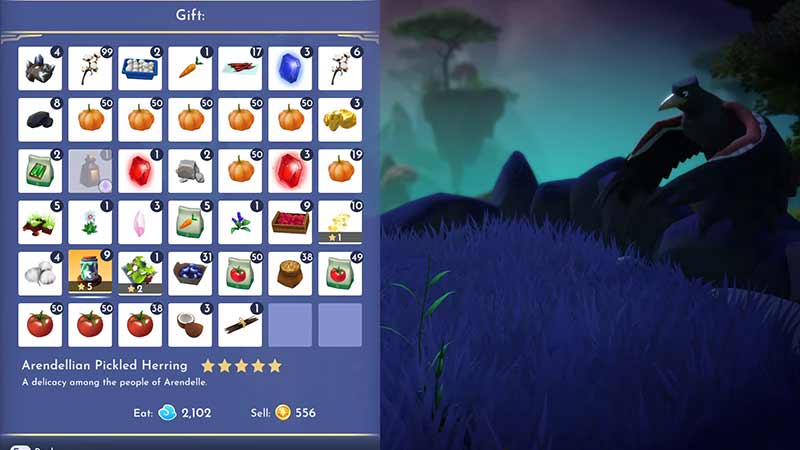
Dreamlight Valley Feed and Tame Ravens

Ravens are found roaming in the Forgotten Lands. You can unlock this biome for 15,000 Dreamlight. To feed them:

  • Approach a Raven
  • Don’t move as they come towards you and start circling around your head
  • When they stop in front of you, interact with them (X on Playstation, E on PC)
  • Select any five-star dish from your inventory and the raven will eat it
  • You can feed the same raven a five-star meal twice to befriend it
  • Then, you can select it from the companion tab
  • When you feed Ravens in Disney Dreamlight Valley, they will drop a random Motif bag that you can use to stylize your clothes

There are currently five different colored ravens in the game i.e. Blue, Brown, Classic, Red, and White. Their preference is only five-star dishes. We recommend you stock up on Arendiallian Pickled Herring as it is simpler among all the other five-star dishes. You will require Herring, lemon, garlic, onion, and any spice (Basil or Oregano). You can easily find these ingredients throughout the map.

That’s all from us on how to feed ravens in Disney Dreamlight Valley. We have more helpful guides like Where to find Lion’s Claws and How to remove Wildebeest Bones in our Dreamlight Valley section.

  • Will GTA 6 Have First-Person Mode? Latest Footage Leaves Fans Wondering

    Will GTA 6 Have First-Person Mode? Latest Footage Leaves Fans Wondering

    Published Date :

    GTA 6’s latest extended look has given players a closer look at the game’s action, story, driving, exploration, and open world. However, the gameplay steers away from one familiar feature: first-person mode. The new footage shared by Rockstar has brought back questions about whether GTA 6 will let players switch between third-person and first-person perspectives… Read More

  • Who is Jason’s Voice Actor in GTA 6? His Voice Is Already Dividing Fans

    Who is Jason’s Voice Actor in GTA 6? His Voice Is Already Dividing Fans

    Published Date :

    Jason Duval is one of GTA 6’s two main protagonists, but Rockstar Games has yet to reveal the actor behind his voice. That hasn’t stopped fans from trying to figure it out, especially after the latest GTA 6 footage gave players more of Jason’s dialogue to analyze. The discussion has also moved beyond his identity,… Read More

  • Fly Your Wings Codes (August 2026)

    Fly Your Wings Codes (August 2026)

    Published Date :

    Fly Your Wings lets you glide across the map and earn Coins as you improve your equipment. You can upgrade your wings and fireworks to travel farther and free Coins from codes can help you get those upgrades without waiting as long. Here are all the codes you can redeem right now. Last checked for… Read More

  • Power a City Codes (August 2026)

    Power a City Codes (August 2026)

    Published Date :

    Power a City is all about keeping a growing city supplied with electricity. You can build generators, connect your power network, upgrade your equipment, and expand your operation as the city’s energy needs increase. Managing everything well can take time, so free Cash and other rewards can give your progress quite a boost. So, here… Read More