You can sell your grains and crops in Farming Simulator 22 in different markets or stations. This is a neat feature as the prices fluctuate in the markets, so if you keep an eye out you can make a ton of profit. Alternatively, you could also suffer from a loss when not selling to a proper market or station. Goldcrest Valley is one such station that will occasionally give you the best price for certain goods. So in this guide let us take a look at how to sell to Goldcrest Valley and how to load and use trains in Farming Simulator (FS) 22.
How to Sell to Goldcrest Valley in Farming Simulator 22
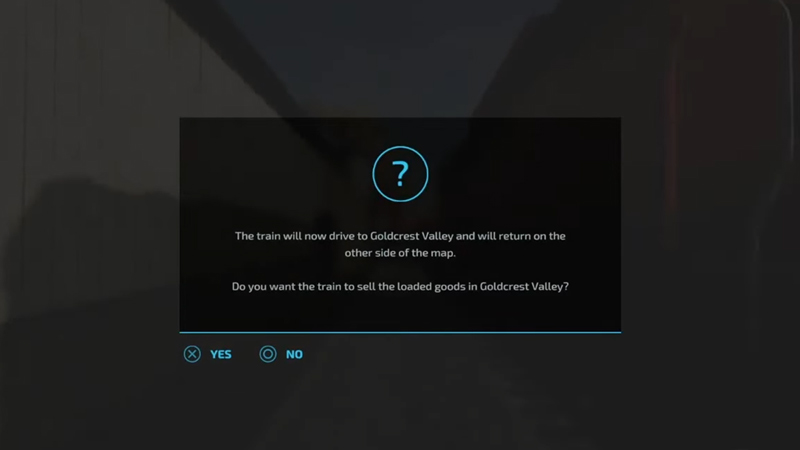
In order to sell to Goldcrest Valley, you need to use trains. Load up your crops or grains on the train. Keep driving the train forward and you should get a popup message. The message will ask “Do you want to sell the loaded goods in goldcrest valley“. Select Yes and it will automatically sell the goods to Goldcrest Valley. If you are wondering how to use or load up a train then check the below steps.
How to Load & Use a Train
- Go to Elm Creek and walk along the rail tracks and find a control switch box.
- Walk over to the Control Switch box and you will get a message on the top left-hand side of the screen. This message asks you if you wish to rent a train for 1000$ per hour.
- Rent the train. It should arrive in a few minutes.
- Enter the train and ride it just like you would ride any other vehicle.
- Ride it over the tracks where you can see two icons that allow you to load or unload the train.
- Press the left analog stick to start filling the cars. The 1st car can store 90000 liters, the 2nd can store 120000 liters and the 3rd can store 90000 liters of crops.
- This allows you to load a total of 3 types of crops or grains in the trains. And a total of 300000 liters capacity of crops.
- You can use the trains to sell goods or transport them between farms.
If you follow the above steps you should be able to use and load trains in no time.
That sums up everything you need to know about how to sell to Goldcrest Valley and how to load and use trains in Farming Simulator (FS) 22. If you like playing this game then be sure to check our other guides on how to make money in Farming Simulator 22.