The same issue that haunted CSGO players, is back for CS2 being the Failed to locate game servers with acceptable ping error and they need a fix. As the name suggests, when this problem occurs you are unable to matchmake and thus can’t play the game. You will most likely get this error when trying to play with distant friends as the game won’t put you in the same servers. But here is an easy solution for this error.
How to Fix Failed to Locate Official Game Servers with Acceptable Ping Error in CS2
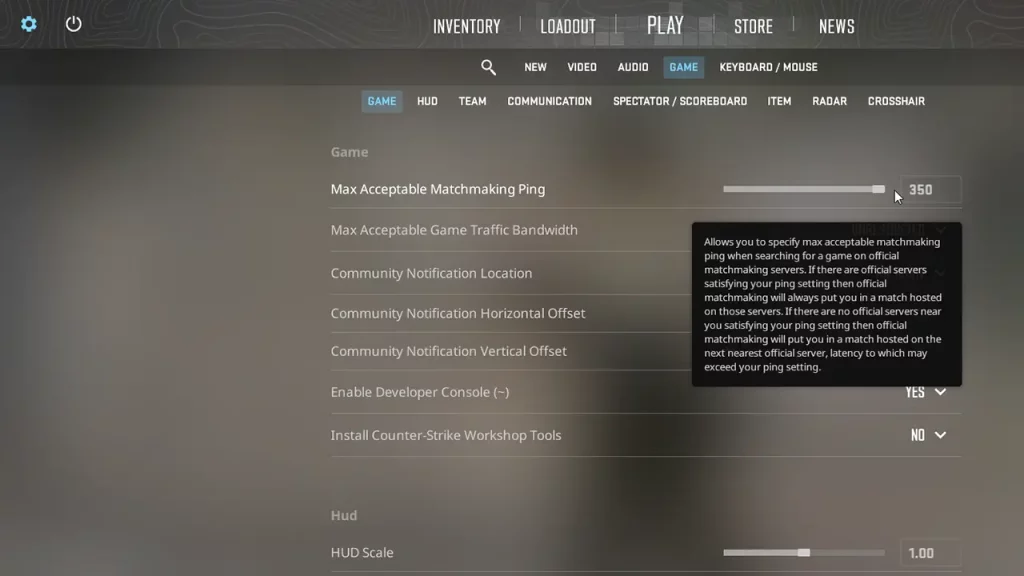
The best way to solve this error is by going to your Game Settings and increasing the Max Acceptable Matchmaking Ping option.
Basically how it works is, that the lower the ping the better your gameplay experience will be. So by default, the game will match you with only your nearby servers. But the problem arises when you are trying to play with friends from different regions. Since you all aren’t on the same server. The game won’t be able to find a match and will give you the above error. But to solve it you and your friends have to just change the following option:
- Go to Settings.
- Next, click on the Game sub-tab.
- The first option below is Max Acceptable Matchmaking Ping.
- Increase it to full that is 350.
- Now, restart the game.
Once each player has done this they should have no issues matchmaking or playing the game together. In case the above fix doesn’t work for you here are some basic things you can try:
- Check CS2 server status: Visit sites like Downdetector and check if the game’s servers are working. If the servers are down then no amount of setting changes can help you play the game until they are back online.
- Check your connection: Another reason you may be getting this error is that your connection might not be stable. Do a speed test and if your internet is slow then refresh it to see if it works any better.
- Verify File Integrity: Verify the Integrity of your CS2 game files from Steam. Once it fixes any corrupt or residual files from previous updates the game shouldn’t give you this error.
With that, you should no longer get the Failed to locate game servers with acceptable ping error in Counter Strike 2. For more help on other topics of this game check out our CS2 section.