Home > Minecraft > Fabric 1.18: How To Download & Install Loader & API

Fabric 1.18 Minecraft Mod Loader & API Install Guide

Published Date :

Minecraft 1.18 has been released and naturally, players are now searching for more updates related to Fabric 1.18. How to install the Fabric mod loader and API file? Let’s look at the steps below.

How to Download & Install Fabric for Minecraft 1.18

Follow this process to get Fabric mod loader for Minecraft 1.18.

  • Head to fabricmc.net.
  • Download the Fabric loader from the site from here.
  • Click on the Download Installer button as per your requirement. The Windows/.EXE one is recommended.
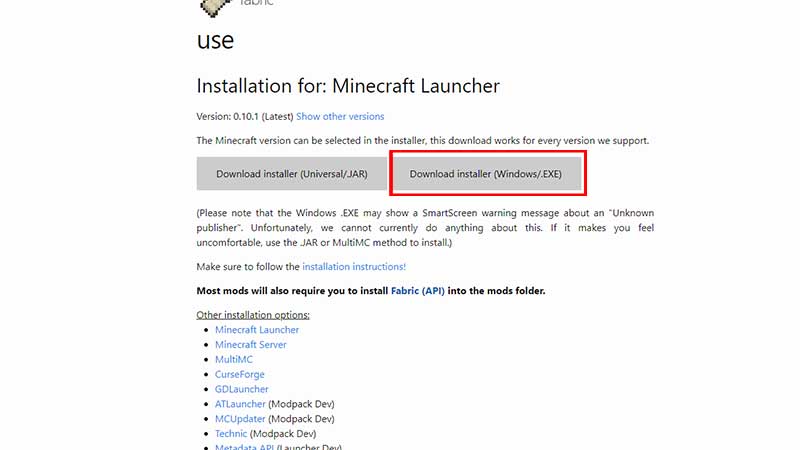
    minecraft 1.18 fabric mod loader installation guide
  • In the Fabric installer window that appears, select Minecraft version 1.18.
  • Click on Install.
  • Ensure that your Minecraft launcher is closed before the installation. Once done, continue by clicking YES.
  • You will now see the Successfully Installed window – click on OK.
  • Next, launch Minecraft via your launcher and check the area to the left of the green PLAY button. It should say Fabric Loader 1.18.

How to Download & Install Fabric API

You may also have to install Fabric API into the mods folder. To do that, follow these simple steps:

  • Head to Curseforge.com and find Fabric API.
  • Scroll down and find the Recent files on the right side of the screen. You should see the 1.18 Fabric API file – download it.
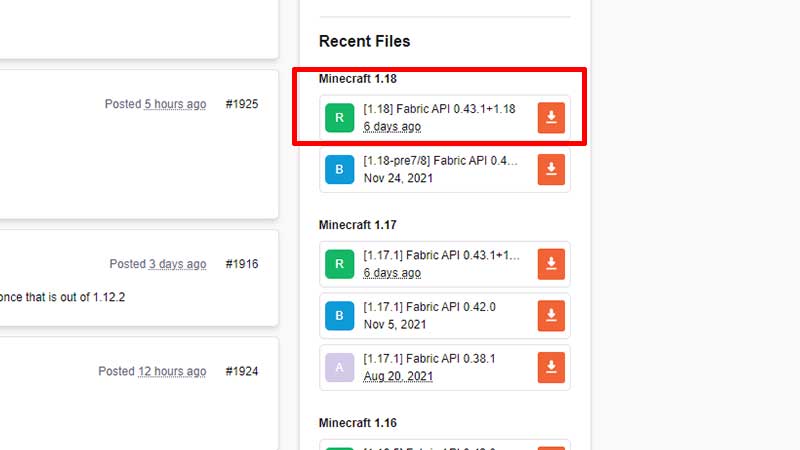
    how to download install fabric api minecraft
  • Wait a bit and you will get your download file. Make sure to “Keep” the jar file.
  • Then, find the Minecraft mod you are using and has a recent file compatible for Minecraft 1.18. Download it.
  • Next, in your PC’s search bar, type %appdata% and find the .minecraft folder.
  • Find the mods folder or create one if needed. Name it “mods” without the double quotes.
  • Now, drag and drop your downloaded files into this folder.
  • That’s all you need to do.
  • Head back to your launcher and select Fabric loader 1.18 and hit play.
  • At the bottom left section of the Minecraft screen, you should be able to see Minecraft 1.18/Fabric (Modded) which means things have worked out properly.

And there you have it! That’s all for Minecraft Fabric mod loader and API. While you are here, don’t forget to check out the list of the best Minecraft 1.18 shaders.
  • Build Your Butterfly Garden Codes (July 2026)

    Build Your Butterfly Garden Codes (July 2026)

    Published Date :

    Build Your Butterfly Garden codes let you grow your butterfly sanctuary even faster by rewarding you with useful items like Eggs, Flowerbeds, and Luck Boosts. As you hatch new butterflies, expand your collection, and decorate your peaceful garden, these freebies can give your progress quite a boost! Here are the latest rewards you don’t want… Read More

  • Paint or Die Codes (July 2026)

    Paint or Die Codes (July 2026)

    Published Date :

    Paint or Die Codes can help you build up your Cash balance before you jump back into another round of hiding in plain sight. In this Roblox game, your goal is to blend perfectly with the environment by painting yourself while avoiding the Seeker (similar to the viral Meccha Chameleon). And if unlocking certain character… Read More

  • Monkey Soccer Codes (June 2026)

    Monkey Soccer Codes (June 2026)

    Published Date :

    Monkey Soccer codes can give you plenty of free Bananas and Lucky Spins, making it easier to get a much better experience on the pitch. Since new codes are usually released alongside major updates and milestones, here’s a complete list of rewards to ensure you don’t miss out. Last checked for new codes on June… Read More

  • GTA 6 Console Players May Have to Settle for 30 FPS

    GTA 6 Console Players May Have to Settle for 30 FPS

    Updated Date :

    Ever since Rockstar Games dropped GTA 6 trailers, fans have been thinking about one thing: will the game support 60 FPS on consoles? While plenty of players are hoping for a Performance Mode on the PS5 and Xbox Series X|S, recent technical analysis suggests Rockstar may instead provide a locked 30 FPS experience. We don’t… Read More