Home > Gaming Guides > AFK Journey: How To Leave Guild

AFK Journey: How To Leave Guild

Updated Date :

Joining the Guild in AFK Journey is one of the first things players do after clearing AFK Stage 30. Since the maximum limit of members is thirty at the time of writing, finding open slots in active ones becomes quite bothersome. While scrolling through the list, you might have joined the one with most slots filled but later realized that most aren’t active in the game or completing activities.

When that happens it is better to find another and leave the current one, the items you get from Challenges, Battle Drill, Glory Expedition, and Chest are worth switching the Guild. With that said, let’s be hasty like the Starshard Artifact and leave the team.

How to Leave Guild in AFK Journey
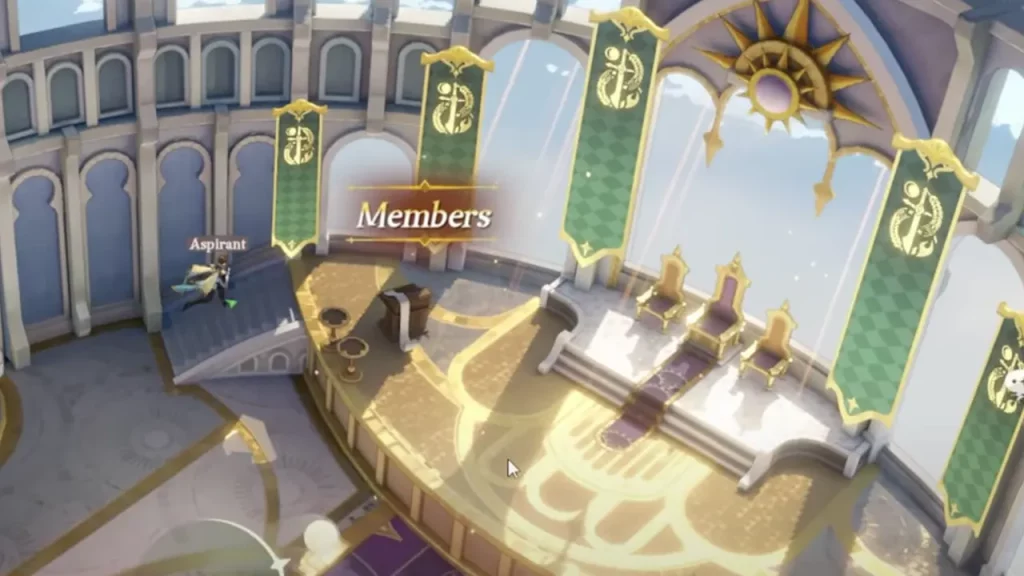
Leave Guild in AFK Journey
Image Credit: Barry Gaming AFK Journey on YouTube

After leaving the Guild, you must wait 30 minutes before joining the new one. So, if you plan to become part of another, it is better to talk with the members and ensure the seat doesn’t get filled during the cooldown. Now, since that is clear, let’s get to the steps:

  1. Tap on the Guild button from the bottom of the main screen.
  2. Head towards the Members section and interact with it. To reach the podium, climb the stairs on the left of the throne.
  3. This will take you to the members list. On the bottom right, you will see a More button; press that.
  4. Here, you will see the Exit option. Use it and confirm your choice to leave the Guild.

How to Switch and Join Guild in AFK Journey

Once the cooldown ends, go to the Guild option from the bottom of the main screen. This time, you will see the list of all the Guilds with open seats. Before pressing the Join button, check the Activeness given beside their name. If the Activeness is low, you would probably get stuck with the inactive one, so avoid joining such.

That is all you have to do to leave and switch Guild in AFK Journey. If you found this useful, you should check how to change the server and add friends.

  • Pop for Free Codes (August 2026)

    Pop for Free Codes (August 2026)

    Published Date :

    Pop for Free puts a simple twist on the obby formula. You complete obstacle courses based on their difficulty, earn Pops for finishing them, and then use those Pops to spin different colored wheels. Eventually you can claim free Robux so you have a good reason to keep pushing through more challenging courses. If you… Read More

  • Mine Rocks Codes (August 2026)

    Mine Rocks Codes (August 2026)

    Published Date :

    Mining in Mine Rocks is pretty straightforward: break rocks, collect Coins, turn them into Geodes, and use those Geodes to progress further. While you’re at it, a few boosts can make that process much quicker, especially when you’re just getting started. Here are all the Mine Rocks codes that are currently available. Last checked for… Read More

  • Anime Stars Codes (August 2026)

    Anime Stars Codes (August 2026)

    Updated Date :

    Anime Stars is all about collecting powerful anime Heroes and defeating enemies that prove to be increasingly difficult. You’ll need Coins, Gems, Summons, and other resources to keep upgrading, and codes can give you a nice head start with some of these resources. If you’re curious to know which rewards are working, here’s the full… Read More

  • Ghost Driver Codes (August 2026)

    Ghost Driver Codes (August 2026)

    Published Date :

    Ghost Driver puts you behind the wheel on busy highways where you’ll need to weave through traffic, build up your cash, improve your ride, and more to become one of the best drivers. A better car can make those early runs much easier, and the latest codes can give you a good amount of Cash… Read More