
In the mystical world of Esperia, players can recruit different heroes, fight formidable opponents in battles, and encounter various challenges on this journey. However, players have been wondering how they can check and change their server in AFK Journey.
The process of identifying and changing your server can be quite complicated, as there is no in-game tutorial that explains how you can access this option. Therefore, to help you simplify this, we will explain how you carry out this process easily within a few steps.
How to Check and Change Server in AFK Journey
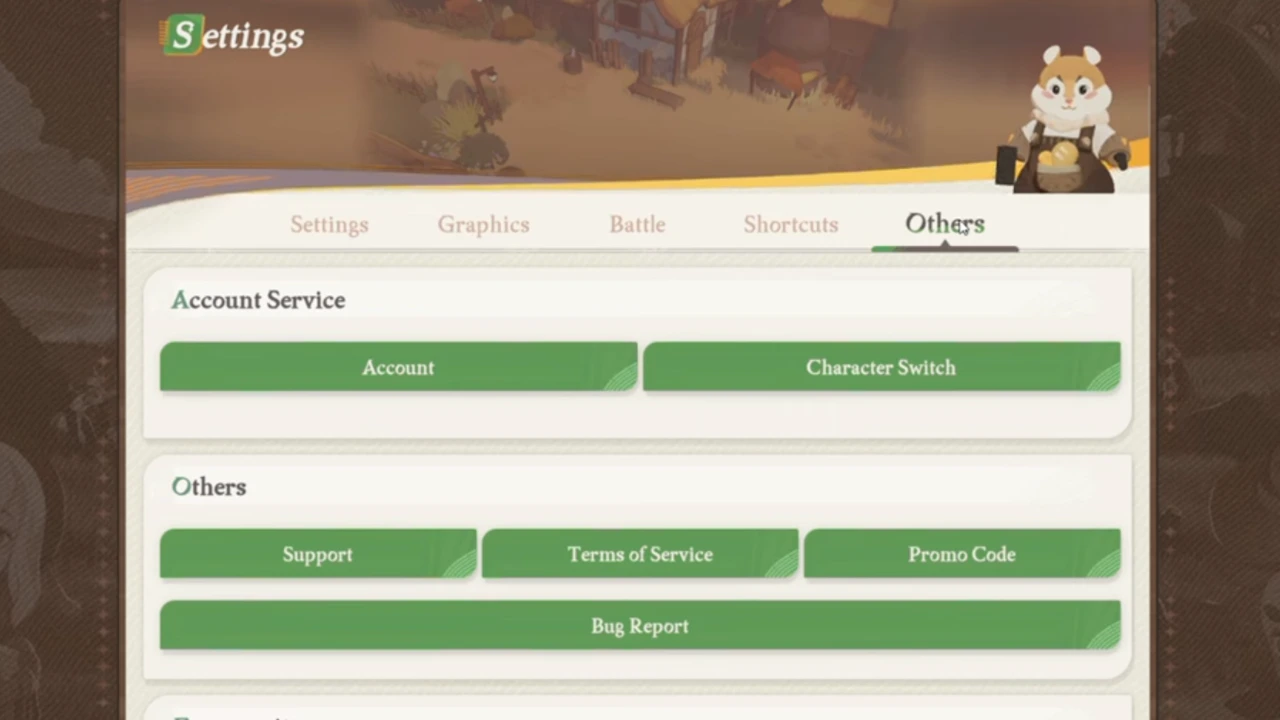
Here are all the steps you will have to follow in order to check and change your server in this game –
- Firstly, you will have to click on the three horizontal lines that appear towards the bottom of the main screen.
- From here, look for the Setting (Cog icon) that will be located towards the right side.
- There will be a list of different settings. Select the ‘Options‘ tab.
- Now, click on the ‘Character Switch‘ option which is present under ‘Account Service.’
- Here, you will be able to check the server you are using. Additionally, you will also be able to verify the Resonance Level of your current character.
- If you want to change your server, click on ‘Create New Character‘ and the list of all the Global Servers will appear, along with the ‘Recommended Server‘ as well.
- Select the one you want to continue with this process. It is important to note that this action will trigger the main screen and you will begin with the initial stages of the game, starting with character creation.
Additionally, the characters you have created and leveled up in the previous servers will remain as it is, however, you won’t be able to transfer any characters, materials, items, or rewards to a different server.
You can switch back to your previous server whenever you want to use the character you had created and get back to your game from where you had left off.
This is everything you need to know about checking and changing servers in AFK Journey. Browse through our list of all the working AFK Journey Codes we have mentioned in our guide and check out our Video Game section to know more about this compelling RPG.










