Close Menu
    Facebook X (Twitter) Instagram
    Gamer TweakGamer Tweak
    • GT Originals
    • Guides
      • AC Mirage
      • Starfield
      • Wordle
      • Mobile
      • GTA 6
      • AC Valhalla
      • Genshin Impact
      • Honkai Star Rail
      • Minecraft
      • Discord
      • Street Fighter 6
      • Project Slayers
      • The Sims 4
      • Lies of P
      • Zelda TOTK
    • Roblox
      • Roblox Codes
      • Blox Fruits
      • Type Soul
      • Grow a Garden
      • 99 Nights in the Forest
    • Review
    • Roblox Codes
    • BG3
    • CS2
    Gamer TweakGamer Tweak
    Home > Gaming Guides > How To Fix The Error Code SU-30746-0 On The Playstation 4 (PS4)
    Hardware

    PlayStation 4 – How To Fix The Error Code SU-30746-0 On The PS4

    DarwinBy DarwinMarch 24, 20223 Mins Read

    In March of 2022, PlayStation just released the 9.50 Update. Sometimes when new updates are released, bugs and errors can arise. One such Error is the Error Code SU-30746-0. Error Codes are never fun, especially the ones that stop you from updating your PS4. In this guide, I will show you how to fix the Error Code SU-30746-0 on the Playstation 4 (PS4).

    How to Fix the Error Code SU-30746-0 on the PlayStation 4 (PS4)
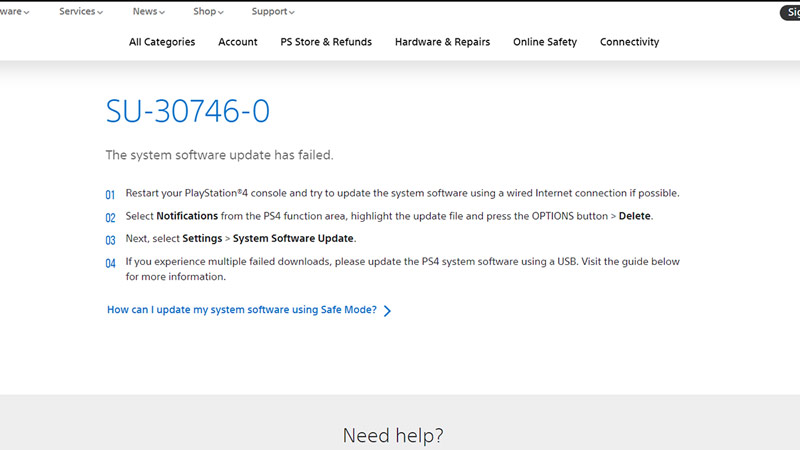
     error code su-30746-0 e playstation 4 ps4

    The Error Code SU-30746-0 on the PS4 (PlayStation 4) occurs when the system is unable to find the correct update file. One way to solve the Error Code is by restarting the PS4 in Safe Mode. To do this, you will have to completely shut down your Console. Once that is done, connect your PS4 DualShock Controller via a USB cable & press the PS Button to pair. Now boot up your PS4 by holding the Power Button till you hear 2 Beeps, the beeps will be spaced between 5 to 8 seconds. This will open up Safe Mode.

    Now select the option of Restart PS4. Once your PS4 reboots, the Error Code SU-30746-0 on the PlayStation 4 should no longer be there. If that doesn’t work, then try updating the Console in Safe Mode. Follow the above steps to get to Safe Mode and then select the option of Update Software System. This will open up a menu and from there select Update Using Internet. If that doesn’t work then install the latest firmware version and store it in an external USB. Connect the USB and then from the Menu select the Update from USB Storage Device option.

    If the above steps didn’t fix the Error Code SU-30746-0 on the PlayStation 4 then try to restore default settings. In Safe Mode, select the Restore Default Settings option. A confirmation window will pop up, you will have to click on Yes. After that, just reboot your Console, preferably in Safe Mode. If that also didn’t work then you will have to reinitialize your Console. In Safe Mode, scroll to the bottom and select the Initialize PS4 option. This will Reinstall your System Software. After selecting it a confirmation window will pop up, you will have to click on Yes.

    One of the above 4 Steps will work and fix the Error Code SU-30746-0 on the PlayStation 4. You will have to try each one of them if the prior ones don’t work. Hopefully, this guide has helped you. You can also check our guides like PS4 Error Code WS-37505-0 – What Does It Mean & How To Fix It.
    PS4 Tips and Tricks
    Share. Facebook Twitter Pinterest LinkedIn Tumblr Email Reddit
    Darwin
    • X (Twitter)

    Before you ask, yes my name is Darwin and no I am not Charles Darwin's cousin. But I do love everything Science, Games, and Anime. Think of me as your Baymax. Oh, I also like the Rubik's Cube.

    Related Posts

    Unwritten Helldivers 2 Rules – Don’t Make These Mistakes!

    November 20, 2025

    Where Winds Meet Codes (December 2025)

    November 19, 2025

    User Experience in Quick Online Games – How to Retain Players

    November 11, 2025

    How to Fix if Helldivers 2 Update is Taking Forever

    November 5, 2025
    Latest Codes

    Last Letter Codes (December 2025)

    December 3, 2025

    The Forge Codes Roblox (December 2025)

    December 1, 2025

    Inazuma Strikers Codes (December 2025)

    November 26, 2025

    Deadly Delivery Codes (December 2025)

    November 26, 2025

    Roblox Hypershot Codes (December 2025)

    November 26, 2025

    SLAP Codes Roblox (December 2025)

    November 25, 2025
    Trending
    • Last Letter Codes (December 2025)
    • Where to Find Tomo’s Cat in The Forge
    • Discover the Best Casino Games at Greatwin Casino for UK Players
    • Ultimate Guide to Player Safety at MegaWin Casino for UK Players: Expert Tips and Advice
    © 2025 Gamertweak.
    • Advertise With Us
    • About Us
    • Team
    • Contact Us
    • Privacy Policy
    • Terms
    • Open Critic

    Type above and press Enter to search. Press Esc to cancel.