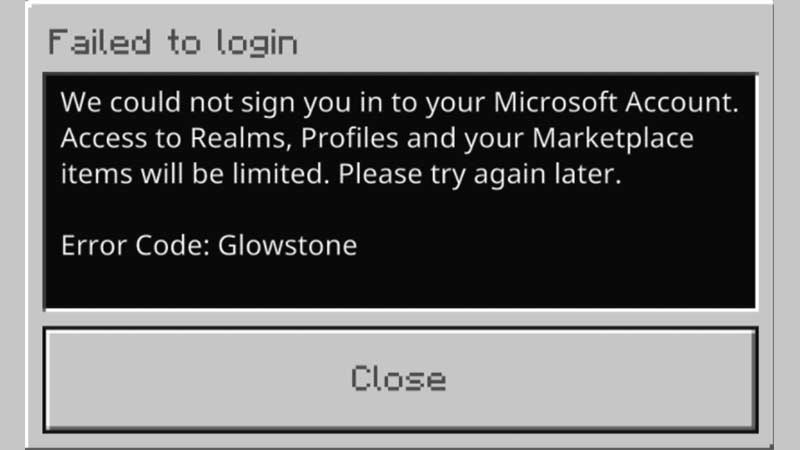
While trying to play Minecraft, you may come across the Minecraft Error Code Glowstone which doesn’t let you sign in. What is this code and how to fix it? We’ll take a look at all the potential solutions in this guide.
How to Fix Minecraft Glowstone Error?
To fix this error, you need to close the game and restart it. Hopefully, it will solve the login issues and you will be able to play the game. You can also download the Xbox Companion app on your PC and sign in to your relevant and accurate Microsoft account. After that, start the game again to see if the error persists.
If this does not work for you, there are other workarounds that players are suggesting online. As per Xbox user, James Clow on a Mojang bug report thread, you can reset your Xbox console companion and other Xbox related apps. Then, launch the Xbox companion and choose the old Xbox Console Companion option where you see ‘Launch’. Then open Minecraft and sign in. Some players are commenting that this workaround has worked for them.
For PlayStation and Nintendo switch users, there seems to be no workaround that has got the stamp of approval from fellow gamers. The official error code troubleshooting page does mention that you need to wait for services to resolve the issues and try again after some time.
If all else fails, try contacting Mojang Customer Services for support regarding this.
Minecraft Error Code Glowstone Explained
The Minecraft Glowstone error comes up because the sign-in process was interrupted. Basically, you will see the ‘failed to login error’ with this message: Sign in could not authenticate with all services.
As you know that Minecraft errors are named after in-game content such as Drowned, Piglin and more. Glowstone, in particular, is a light-emitting block that you will find in the Nether. So, they are a light source equal to lanterns, sea lanterns, beacons, shroomlights, jack o’lanterns, conduits and redstone lamps. The light level you will get is 15 which is the brightest you can get as of now.
With that cleared up, we hope the workarounds help you solve the Minecraft Glowstone error code. For more Minecraft tips and tricks, head over to our guides on Gamer Tweak!