Epic Games launcher is infamous for frequent crashes and login issues. One of the major issues that have been troubling the players is the “Preparing the Epic Games Launcher”. This issue is a nightmare and usually blocks you from entering the game services. So today let us look at some fixes for stuck on the “Preparing the Epic Games Launcher” issue.
How to Fix Epic Games Launcher Stuck on Preparing Issue?
If you are stuck on Preparing the Epic Games Launcher screen, there are two main things you can do to fix it. They are:
- Check the Epic Games server status
- Check the official Epic Games Twitter account
To understand the solutions we need to look into each of them in a bit of detail.
Check the Epic Games server status
First, you need to check that all Epic services are up and running by going to the Epic Games Server Status website here. If there is an outage or a system-wide problem with the Epic Games Launcher, it will be announced on this website. Notably, such server-side issues can only be repaired only after Epic’s outage has been addressed. There is nothing much you can do from your PC.
Check the official Epic Games Twitter account
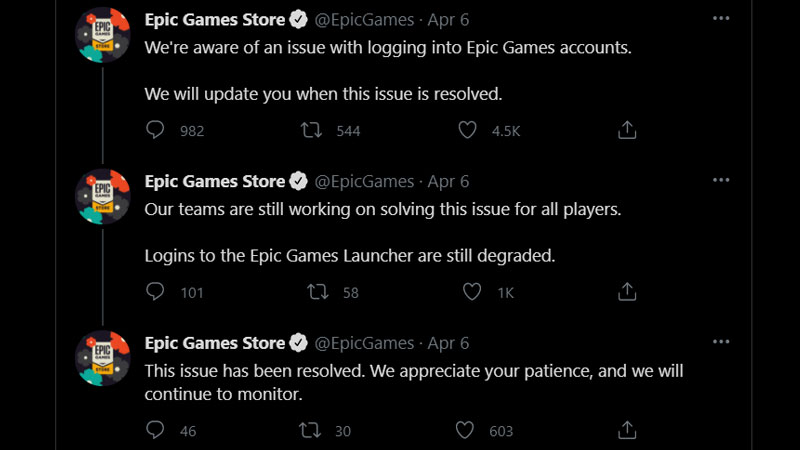
Users should keep an eye on the official Epic Games Twitter account for feedback on existing technical problems since the team is outspoken about the issues and can let the public know what is being worked on and when a fix can be expected.
If you don’t get any updates on Twitter right away, search downtime reporting websites like DownDetector and see if other people are reporting issues. Most likely, there’s a widespread problem if you see a significant increase in user-reported errors in the last short period of time. You can even try to get in touch with Epic via Twitter if they missed this issue.
According to Epic’s official help page for troubleshooting launcher issues, you can try restarting or reinstalling your Epic Games Launcher to try fixing it. Aside from that, there isn’t anything you can do on your end to fix the issue in such circumstances. For more help from Epic Games, you can refer to this page – Troubleshooting Epic Games Launcher issues
That’s everything you need to know about possible fixes for Epic Games Launcher Stuck on Preparing issue. While you are here, check out how to unlink Epic Games account as well.