Emotes & Gestures are common things in games. Like the Soul games, Gestures are present in Elden Ring. They are the best way to communicate with one another in Coop or come in handy while taunting your Enemies. There are many Gestures in this game and some are easier to get than others. In this guide, I will show you how to Emote & Gesture in Elden Ring.
How to Emote & Gesture in Elden Ring
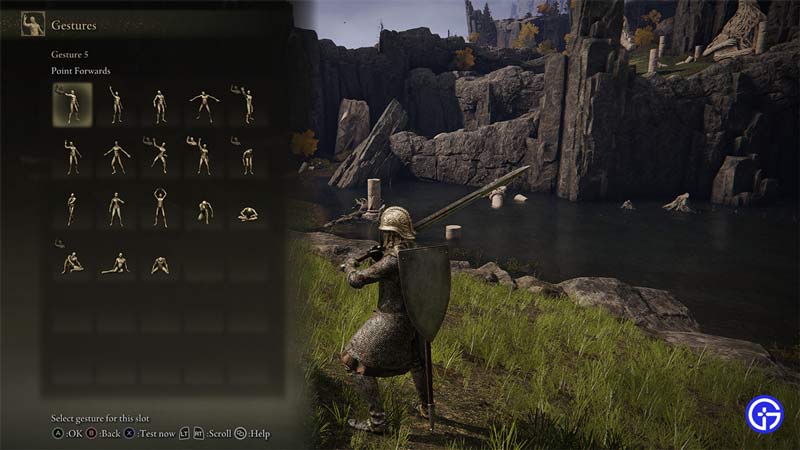
In Elden Ring, you will get your first Gesture pretty early on. Once you do get one you will be able to show it off instantly. All you have to do is go to your Menus Page. You can bring it up by pressing the ESC key for PC, Options for PS, & Menu for Xbox. Once that opens up, you will be able to see a Gestures Menu on the right side of the screen. Select the Gesture you want by hovering over it and emote the Gesture in Elden Ring. If you, you can put the Gesture on a Shortcut key to emote it on command.
You can get Emotes & Gestures by just playing Elden Ring. It is a collectible from Corpses, drops from Bosses, & Rewards from NPCs. You will have to explore the Lands Between to get all of them. The Ring Gesture was an exclusive emote that was given to those who preordered the game. Gestures & Emotes are used in communication, that is a fact but that is not its only use. Some games like Elden Ring, use Gestures as a way to progress the game. If you ever find Statues with a Pose similar to a Gesture, then you should try out the Gesture over there. This may or may not open up a new Area or Quest in the game. Similarly, an NPC might ask you to do the same. Follow through and you will receive some amazing rewards.
How to do a PS5 Motion-Controlled Emote & Gesture
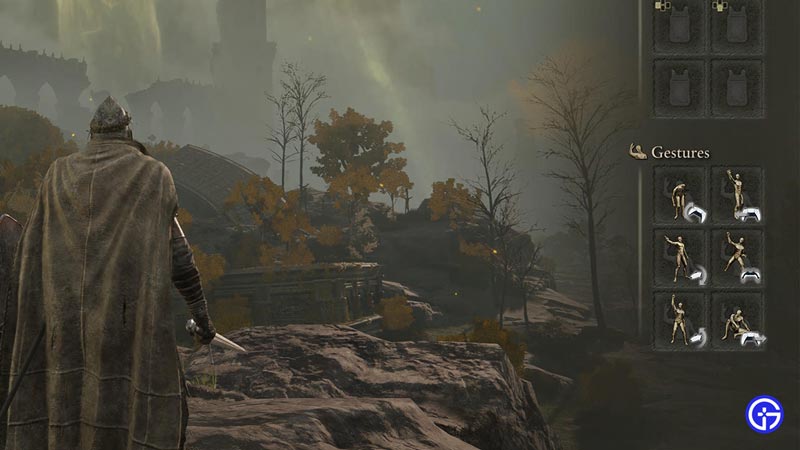
As I have mentioned above, you can access the Emotes & Gestures in Elden Ring through the Access Menu. But on the PS5 you can use an Emote or Gesture through the Motion Control. On the PS5 Dualshock Controller, all you have to do is hold down Triangle and then perform one of the Motion Control for the Emote & Gestures that you have bound in the Quick Access Menu. You can see which motion uses which slot. Just hold Triangle and you will be able to perform it on the PS5.
This was all about Emotes & Gestures in Elden Ring. Hopefully, this guide has helped you. You can also check out our guides on Elden Ring Crystal Tears.