If you can’t connect to a game or facing login issues, it’s most likely a server issue. But how to check if there’s an outage and the servers are down? Simply follow the steps given below to know the EA server status related to network problems or maintenance period.
Are EA Servers Down Right Now?
If EA sports servers are down, you won’t be able to connect to or even log into EA games. First, ensure if your internet connection is working smoothly. Use a wired connection if there’s some instability. If that’s normal then check social media or forums to see what other players are talking about. Usually, if the servers are down, something will come up in the trends on Twitter.
How to Check EA Server Status
To know the EA sports server status, these are the websites you need to head to:
- Check out Xbox Live, PlayStation Network and Nintendo to see if they’re having any issues.
- If there’s an outage, then the latest tweets from @EAHelp will give you updated info about any problems or maintenance.
- Visit Downdetector to know more about reported connection issues.
- You can also check the EA player community at Answers HQ for more answers.
- Make sure to check the game’s page to check its server status. Not sure how to do that? Here’s how.
- Click on the Games menu on top of the page.
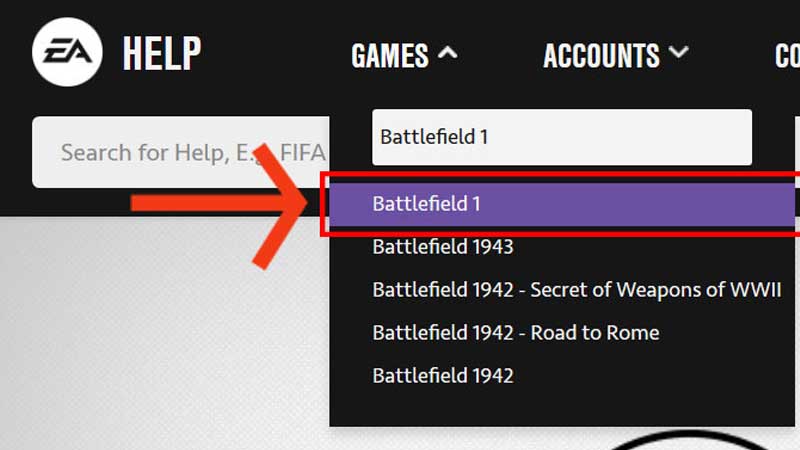
image credit: help.ea.com - Type the name of the game you are experiencing connection issues in.
- From the drop-down suggestions, click on the game name.
- Find the server status icon at the top right section of the page. If it’s green, then the servers are functioning normally. If it’s yellow or red, there are some issues that may be worked on.
- Don’t forget to click on the icon to know more updates.
- Click on the Games menu on top of the page.
In case the game you’re playing has a server status icon, you will get the information there. If not, you can visit Microsoft’s and Sony’s sites for info.
That’s everything you need to know about EA server status and how to check if EA is down. Simply wait until the server issues are fixed. If you’d like to read more about the latest game releases, stay with Gamer Tweak!