
Home > Roblox Guides > How To Turn Off Roblox UI Navigation

Roblox: How To Disable UI Navigation (Blue Box Glitch)

Updated Date :

If your character got stuck while playing a Roblox Experience and see a blue box appearing on your screen, here is how you can get rid of it by disabling the UI Navigation. The online gaming platform offers a wide range of features for the players to customize. With the UI Navigation option, you can control the game’s interface using your keyboard and select different options with the blue box, however, this can turn out to be annoying when you are immersed and have the least to do with other options in the game. Since you probably just accidentally pressed some key bind and you aren’t aware which one turns it off, here is a guide that will help you get unstuck and roam freely in Roblox.

How to Turn Off UI Navigation in Roblox
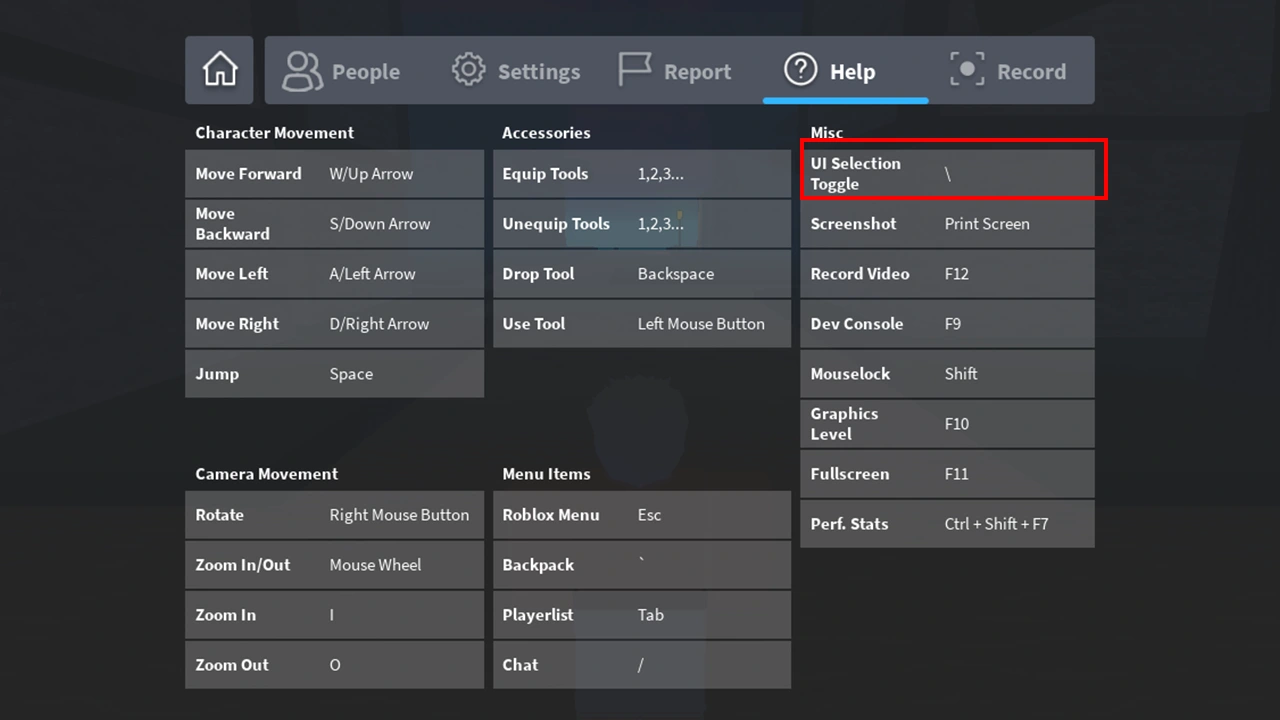
turn off ui navigation in roblox

Players can disable the UI Navigation in Roblox using the Backslash (\) key on their keyboard to get. This will help you get rid of the blue box from your interface. It will unstuck your character and you can enjoy your gameplay. If this doesn’t work, it might be because you have some other key bind to enable and disable UI Navigation. Follow the steps given below to check which key is allotted for the option:

  1. While playing, press ESC to open the Menu.
  2. Here, head toward the Help tab.
  3. Select the tab and you will see all the controls and key binds.
  4. Look under the Misc section and find UI Selection Toggle.
  5. Once done, use the key given to disable the option.

That’s everything covered on how you can disable the UI Navigation in Roblox. Check out our guide on Roblox Needs To Quit Error to fix the constant crashing issues while playing games and for more guides like these, we recommend you check out our dedicated Roblox section, right here on Gamer Tweak.


  • Anime Duelists Codes (July 2026)

    Anime Duelists Codes (July 2026)

    Published Date :

    Anime Duelists follows the tried and tested formula of spinning stars to unlock fighters, sending them into battle and collecting rewards. If you want to get unique fighters, abilities, and progress through various realms, you need these code rewards! You can get anything from free Gems, Trait Rerolls, Stats Reroll, Super Luck, Star Speed potion,… Read More

  • Mini Cup Codes (July 2026)

    Mini Cup Codes (July 2026)

    Published Date :

    In Mini Cup, you open up packs to unlock footballers, build houses, and win matches against rival teams. This makes it a perfect mix of some of the most popular gameplay loops for soccer fans on Roblox. To grow your club, you’ll need cash, as well as special packs, which is where Mini Cup codes… Read More

  • Be The Final Boss Codes (July 2026)

    Be The Final Boss Codes (July 2026)

    Published Date :

    Now you can be the final boss! In this experience, you summon minions to fight for you and take down waves of heroes. To level up, you’ll need plenty of coins and various resources, which is where Be The Final Boss codes come in handy. If you wish to boost your character and stay one… Read More

  • Clean the Squishies Codes (July 2026)

    Clean the Squishies Codes (July 2026)

    Published Date :

    There’s something surprisingly satisfying about picking up the cute Squishies and putting them back on their designated shelves. If you’re interested in getting some unique rewards including free Squishies, this guide is for you. Here’s the complete list of all the working rewards. Last checked for new codes on July 13, 2026 All Clean the… Read More







