
Home > Gaming Guides > How To Get Dark Mode For Infinite Craft

How To Get Dark Mode For Infinite Craft

Updated Date :

After Cookie Clicker, Infinite Craft is one of the best browser games that I have ever played. Starting with base ingredients like Earth, Water, Wind, and Fire, you can create complex stuff like Batman and even God Units. You can literally go on to play this game for hours without getting bored. However, one customization that most players would want in this game is the Dark Mode. While playing the game, the completely white screen causes strain to the eyes.

Luckily, there’s an extension that you can use to enable Dark Mode in Infinite Craft. This will solve the issue of staring at that dull white screen.

How to Enable Dark Mode in Infinite Craft
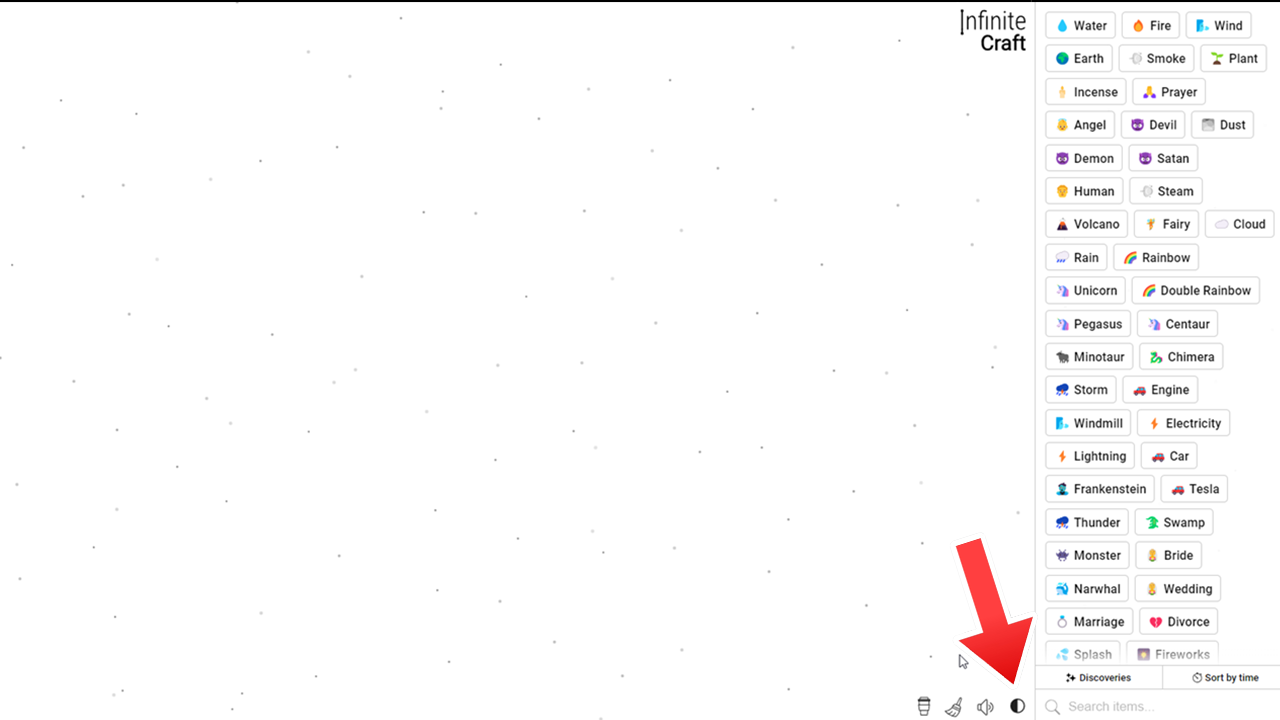
Using Better Infinite Craft Extension to get Dark Mode in Infinite Craft
Dark Mode Available in Infinite Craft through Better Infinite Craft Extension. Screenshot by Gamer Tweak

You can download an Extension known as “Better Infinite Craft” to enable Dark Mode in Infinite Craft. This extension is available on Chrome and Mozilla Firefox and you can get it from the respective Extension or Add-On shop. Once you have added the Better Infinite Craft extension to your browser, you will get a Dark Mode toggle button in Infinite Craft. You can find it in the bottom. Simply press it and enjoy the new Dark theme.

I forgot to tell you that with Dark Mode, you also get some other cool features through this extension. Here are the advantages that you’ll get:

  • You can directly type to find ingredients in your inventory. There’s no need to click on the Search Bar first.
  • Pressing the Enter key will insert the first ingredient on the screen
  • Pressing the ESC button will clear the Search Bar
  • Hold Shift and drag using the cursor to duplicate the items on the screen.

Now that you have the Dark Mode for Infinite Craft, you can easily play this game for hours without many issues. Before you begin your next session, I suggest you check out our Recipes and Combinations list. Referring to it will give you an idea of what else you can create.


  • ZZZ Version 3.0 Is the Biggest Patch Yet: Here’s What Changed and Why It Matters More Than You Think

    ZZZ Version 3.0 Is the Biggest Patch Yet: Here’s What Changed and Why It Matters More Than You Think

    Published Date :

    Zenless Zone Zero 3.0 patch is the biggest patch since the launch of this game. With the introduction of a new element, a rarity tier, a free anniversary character, and an explorable region, you will find this patch launch exciting. It is necessary to learn what you should prioritize from all of these because of… Read More

  • Anime Duelists Codes (July 2026)

    Anime Duelists Codes (July 2026)

    Published Date :

    Anime Duelists follows the tried and tested formula of spinning stars to unlock fighters, sending them into battle and collecting rewards. If you want to get unique fighters, abilities, and progress through various realms, you need these code rewards! You can get anything from free Gems, Trait Rerolls, Stats Reroll, Super Luck, Star Speed potion,… Read More

  • Mini Cup Codes (July 2026)

    Mini Cup Codes (July 2026)

    Published Date :

    In Mini Cup, you open up packs to unlock footballers, build houses, and win matches against rival teams. This makes it a perfect mix of some of the most popular gameplay loops for soccer fans on Roblox. To grow your club, you’ll need cash, as well as special packs, which is where Mini Cup codes… Read More

  • Be The Final Boss Codes (July 2026)

    Be The Final Boss Codes (July 2026)

    Published Date :

    Now you can be the final boss! In this experience, you summon minions to fight for you and take down waves of heroes. To level up, you’ll need plenty of coins and various resources, which is where Be The Final Boss codes come in handy. If you wish to boost your character and stay one… Read More







