While progressing in the The Pickup, you will come across the optional task of freeing Brick who is the former Maelstrom leader. Brick is locked behind a door having a code and once you open it, you have to disarm the trap which is preventing his escape. You can even talk to him if you want. Now, how you set him free depends on how you have built your character in terms of attributes. Here’s how to free Brick in Cyberpunk 2077’s The Pickup job easily.
How to Save Brick in Cyberpunk 2077 (The Pickup Quest)?
There are two main steps for rescuing Brick in Cyberpunk 2077 – first you have to unlock the door which has a keypad outside. Then, you must disarm the lock that is stopping you from rescuing Brick. Here’s how to do both of these tasks and set him free.
How to Unlock the Door to Rescue Brick
- You can hack the door with RAM.
- First, activate the scanner and use the Door terminal.
- Choose to do the Remote Deactivation hack.
- This will open the door and you can access the room where he’s locked.
Cyberpunk 2077 Free Brick Door Code
If you want to find the Free Brick door code that you can put in the keypad to open the door, here’s what you should do.
- Go to the room to the right.
- Find a laptop there.
- Go to the Messages folder.
- Choose the message with the heading ‘only you guys know’.
- You will get the code to free Brick in Cyberpunk 2077: 9691.
- Go ahead and input the door code on the keypad to unlock the door and head inside.
After doing this, you will see that there’s a laser pointed at Brick’s chest and if he moves from his location, the mine will detonate. Here’s how to disarm it.

How to Disarm the Trap
To disable the trap to free Brick in Cyberpunk 2077, you can look at the mine and disarm it with the help of Technical Ability points but if you cannot do it, there’s another way.
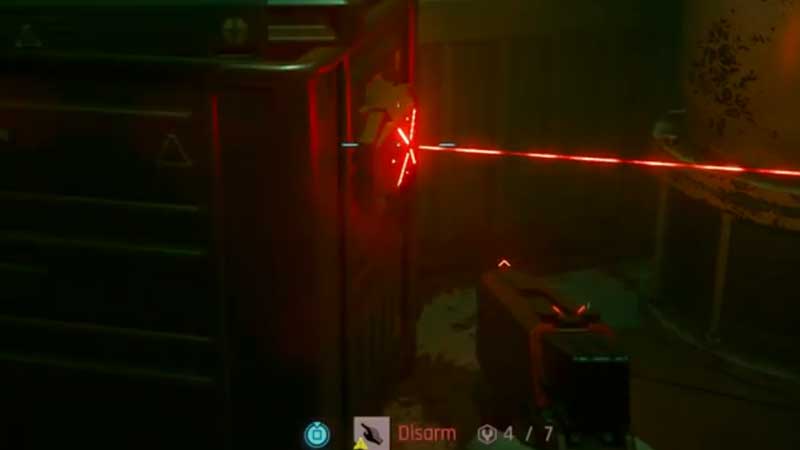
- Find the detonator placed in the room where you found the laptop.
- Pick it up.
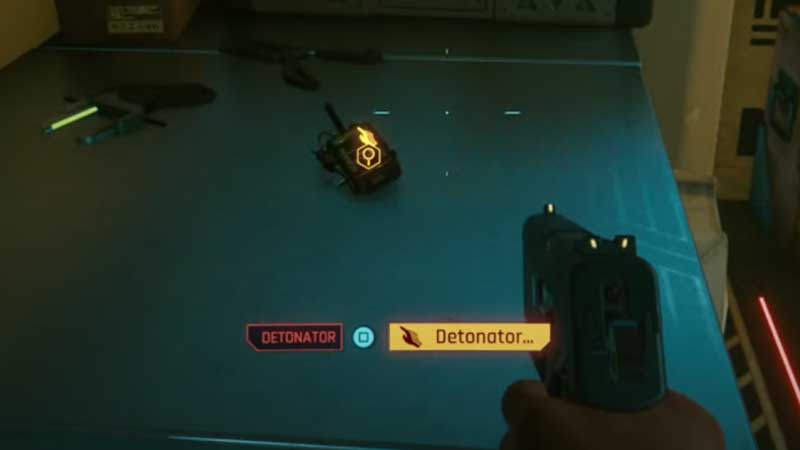
- Choose Disarm Charge. This will stop the mine from blowing up.
- After doing that, you can set him free and talk to him.
- He will promise you that he’ll be there for you if you need him ever again which is a good thing to know.
That’s all about how to free Brick in Cyberpunk 2077’s The Pickup quest. We’ve got much more quest and side job walkthroughs for you – simply head over to our Cyberpunk 2077 wiki for them or check our latest guides:
- The Information Quest: How to Scan Apartment’s Security Systems
- How To Complete The Information Braindance Mission In Cyberpunk 2077