Home > Call of Duty: Modern Warfare II > Settings To Customize & Use Vehicles In Modern Warfare II

How To Customize & Use Vehicles In MW2

Published Date :

Call of Duty Modern Warfare 2 is one of the most awaited FPS games, and it’s finally here. Now the game is out of the early access state and available for all players on various platforms. In this game, you’re going to come across various new and old features that keep you engaged for hours. One of the old features is that you can customize & use your Vehicles in MW2. Whether it be an SUV, Tank, or Heavy Chopper, you can customize them all. However, if you’re unaware of the process to do so, then simply check out the steps mentioned below.

Steps to Customize & Use Vehicles in COD MW2
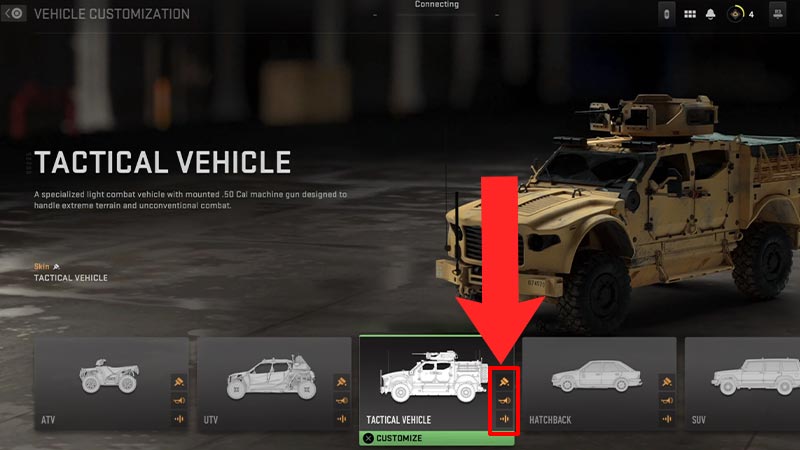
How To Customize & Use Vehicles In cod modern warfare 2

Here’s what you’ll need to do in order to customize & use vehicles in Call of Duty MW2 easily.

  • First, launch the Call of Duty Modern Warfare 2 game.
  • Next, head to the in-game Main Menu.
  • After that, click on the Vehicle Customization option.
  • Then, choose the vehicle you want to customize and change.
  • And after that, click on the Paint, Horn, or War Track option to customize the vehicle according to your preference.

This is how you can customize the vehicle in the COD Modern Warfare 2. As mentioned above, players can only customize the vehicle’s Paint, Horn & War track. However, this might be enough to make your automobile cool & unique. If you’re unaware of the number of vehicles available in the game, then scroll down for answers.

List of All COD Modern Warfare 2 Vehicles

Take a look at all the Air, Land, & Water transport automobiles you’ll come across in the game.

  • Land Vehicles
    • Utility Terrain Vehicle (UTV)
    • All Terrain Vehicle (ATV)
    • Tactical Vehicle (TAC-V)
    • SUV
    • Hatchback
    • Chop Top
    • Cargo Truck
  • Ground War Vehicles
    • Light Tank
    • Heavy Tank
    • APC
  • Air Vehicles
    • Heavy Chopper
    • Light Halo
  • Water Vehicles
    • RHIB
    • Armoured Patrol Boat

That sums up everything about how you can customize & use all the vehicles available in Call of Duty MW2. If you’re wondering how you can customize Operators in the game, then we’ve got you covered.

  • Roll to Defend Codes (July 2026)

    Roll to Defend Codes (July 2026)

    Published Date :

    Roll to Defend codes can reward you with free Units, cash, and luck boosts to summon better Units to fight against zombies. Since upgrading your Backpack and unlocking new zones can take time, codes provide much-needed boosts, which is why we have a list of all the currently available rewards. Redeem them before they expire!… Read More

  • Anime Overseer Codes (July 2026)

    Anime Overseer Codes (July 2026)

    Published Date :

    Anime Overseer codes can give you free Gems, Gold, and Trait Rerolls to help you from the start. Since you’ll be summoning units, evolving them, and taking on challenging enemy waves, every free reward can make progression much easier. So, to help your journey, here’s the complete list of all the currently available codes. Last… Read More

  • Stay For Fortune Codes (July 2026)

    Stay For Fortune Codes (July 2026)

    Published Date :

    Stay For Fortune codes can give you free Cromerium, helping you unlock upgrades and progress without having to wait as long. Since the game revolves around staying in the server to earn rewards over time, every bit of free currency can help you get ahead faster. So, here’s the complete list of all the currently… Read More

  • +1 Speed Evolve Codes (July 2026)

    +1 Speed Evolve Codes (July 2026)

    Published Date :

    Speed-based games on Roblox will always stay popular, and this particular experience is quite addictive! Here, you play as an animal and your goal is to evolve into stronger animals, unlock new worlds, and be the fastest player on the server! +1 Speed Evolve codes offer free Speed and Win Boosts that can make your… Read More