
Character Customization is important, both in terms of appearance and stats. For a game like this, there is an impressive amount of customization options available. From Backpack to Chest Armor and Helmet, there are a lot of things that you can change as per your preference. But things can get tricky for those who are still trying to get the hang of this game. That’s why, we are here to help you out in figuring out how to Customize a Character in BattleBit Remastered.
How to Customize Character in BattleBit Remastered (Change Outfit)
- You can customize your preset character just before entering the match.
- After joining a server, you will enter a Deploy screen with multiple options like creating a Squad, selecting a Class, adjusting loadout, etc.
- Right there, you will be given a ‘Character’ option at the bottom left side of the screen. Once you click on it, you will see the stats of the Helmet, Chest Armor, Backpack, and Belt you have equipped.
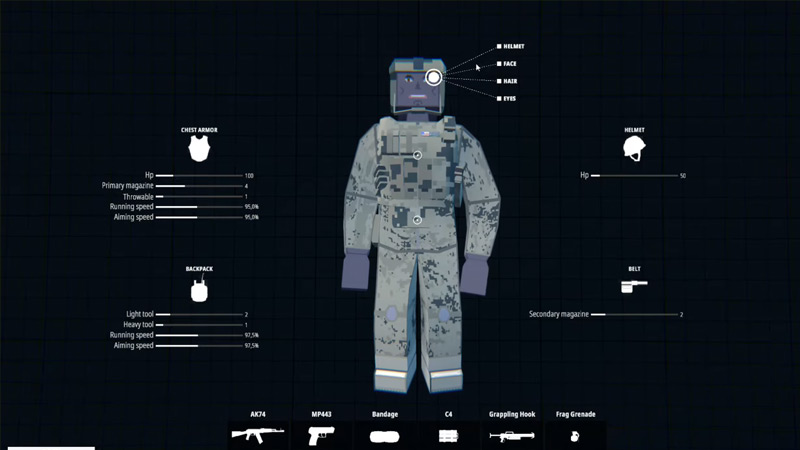
Apart from this, there will be 3 interactive points on the face, chest, and waist of your character. So, you can expand it by clicking on any of those 3 interactive points. After clicking, you will be given a rich variety of options for customizing your character in BattleBit Remastered. Take a look below to know more.
- Click on the Face to customize the Helmet, Face, Hair, and Eyes.
- Click on the Chest to customize Chest Armor and Backpack.
- Click on the Waist to customize Belt, Uniform, and Skin.
However, keep in mind that you will only be able to equip items that you have unlocked. And, you can unlock such items after progressing and leveling up. That being said, make sure to check out our guide on the Fastest Ways to Level up in BattleBit Remastered.
Now that you know how to Customize a Character in BattleBit Remastered, ensure that you stand out in the lobby. And to make this build even stronger, you must equip the strongest gun. To help you in selecting one, check out our BattleBit Remastered Best Weapons Tier List.











